2013年6月17日 月曜日
Google Tag Managerを使用してサイトタグの追加や更新を行っている場合、コンテナスニペットコードを利用することで、Webmaster Toolsでのサイト所有権の確認が迅速かつ簡単に行えるようになりました。
手順は以下の通りです:
Webmaster Toolsのホームページで、確認したいサイトのサイトを管理をクリックし、このサイトを確認を選択します。まだサイトを追加していない場合は、右上のサイトを追加ボタンをクリックしてください。
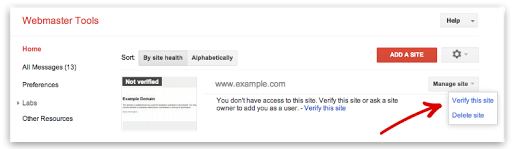
これを行うには、Google Tag Managerで「表示、編集、管理」のアカウントレベルの権限が必要です。
確認ページで、確認方法としてGoogle Tag Managerを選択し、画面の指示に従ってください。
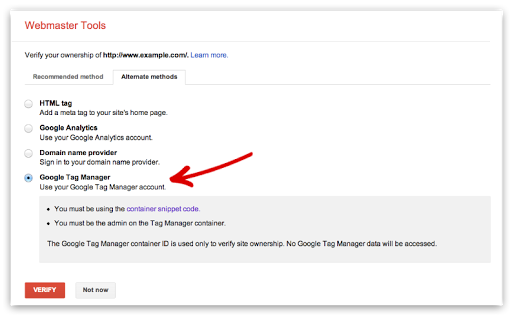
- 確認をクリックします。これで完了です!


この確認方法についてご質問がある場合は、Webmasterヘルプフォーラムまでお寄せください。
Alien Road
How we apply this
We archive Search Central announcements because client questions often trace back to a change that was announced years ago. Reading the original is faster than reconstructing it from second-hand summaries.
Related services