17 iyun 2013-cü il, bazar ertəsi
Əgər siz Google Tag Manager sayt teqlərinizi əlavə etmək və yeniləmək üçün istifadə edirsinizsə, indi siz tez və asanlıqla
verify ownership of your site
Webmaster Tools-da
container snippet code.
Budur bunun edilmə qaydası:
Webmaster Tools ana səhifəsində Manage site təsdiqləmək istədiyiniz sayt üçün seçin, sonra seçin Verify this site. Əgər hələ sayt əlavə etməmisinizsə, yuxarı sağ küncdəki Add a site düyməsini klikləyə bilərsiniz.
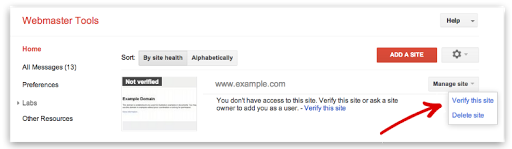
Bunu etmək üçün Google Tag Manager-də “Baxış, Redaktə və İdarəetmə”
account level permissions
malik olmalısınız.Təsdiqləmə səhifəsində seçin Google Tag Manager təsdiqləmə üsulu kimi seçin və ekranınızdakı addımları izləyin.
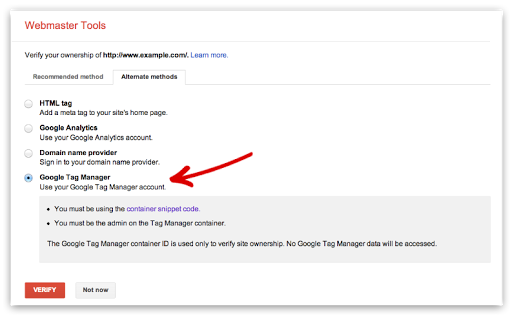
- Klikləyin Verify. Və vəziyyət hazırdır!


Bu təsdiqləmə üsulu ilə bağlı hər hansı sualınız varsa, baş çəkin
Webmaster Help Forum.
Bunu necə tətbiq edirik
We archive Search Central announcements because client questions often trace back to a change that was announced years ago. Reading the original is faster than reconstructing it from second-hand summaries.
Əlaqəli xidmətlər