Viernes, 9 de mayo de 2008
Como continuación de mis
publicaciones anteriores
sobre accesibilidad, aquí presentamos algunas recomendaciones de diseño para crear contenido web que siga siendo utilizable por la mayor audiencia posible, al tiempo que se garantiza que el contenido sea indexado y rastreado.
Evite llamadas XMLHttpRequest innecesarias
Las páginas que permiten a los usuarios buscar información a menudo utilizan llamadas XMLHttpRequest para poblar la página con información adicional después de que esta se haya cargado. Al utilizar este patrón, asegúrese de que su página inicial contenga información útil; de lo contrario, Googlebot, así como los usuarios que hayan desactivado los scripts en su navegador, pueden pensar que su sitio solo contiene el mensaje “cargando…”
Sprites CSS y enlaces de navegación
Tener un texto significativo que acompañe a los enlaces de navegación es igual de importante para Googlebot que para los usuarios que no pueden percibir el significado de una imagen. Al diseñar la apariencia de los enlaces de navegación en su sitio, es posible que haya optado por utilizar imágenes que funcionan como enlaces, por ejemplo, colocando <img /> etiquetas dentro de <a> elementos.
Ese diseño le permite colocar el texto descriptivo como un
atributo alten la etiqueta<img />
.
Pero ¿qué pasa si ha cambiado al uso de
sprites CSS
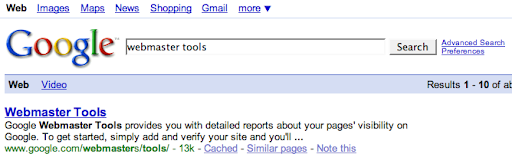
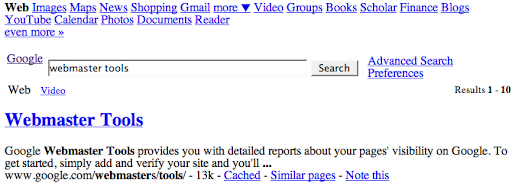
para optimizar la carga de la página? Todavía es posible incluir ese texto descriptivo tan importante al aplicar sprites CSS; para ver una posible solución, observe cómo están codificados el logotipo de Google y los distintos enlaces de navegación en la parte inferior de la página de resultados de Google. En resumen, colocamos el texto descriptivo justo debajo de la imagen con sprites CSS.
Utilice JavaScript no intrusivo
Hemos hablado del concepto de
mejora progresiva
al crear un sitio interactivo y rico en contenido. A medida que agregue funciones, utilice también técnicas de
JavaScript no intrusivo
para crear páginas web basadas en JavaScript que se degraden elegantemente. Estas técnicas garantizan que su contenido siga siendo accesible para la base de usuarios más amplia posible sin necesidad de sacrificar las funciones más interactivas de las aplicaciones de la Web 2.0.
Haga que las versiones aptas para impresora sean fácilmente accesibles Los sitios web con diseños visuales altamente interactivos a menudo proporcionan todo el contenido de una historia determinada como una versión apta para impresora
. Generadas a partir del mismo contenido que la versión interactiva, estas son una excelente fuente de contenido de alta calidad tanto para Googlebot como para usuarios con discapacidad visual que no pueden experimentar todas las funciones interactivas de un sitio web. Pero con demasiada frecuencia, estas versiones aptas para impresora permanecen ocultas detrás de enlaces basados en scripts con el formato:
Crear URL reales para estas versiones aptas para impresora y enlazar a ellas mediante simples anclajes HTML mejorará enormemente la calidad del contenido que se rastrea.
Si le preocupa especialmente el
contenido duplicado
de la versión interactiva y la apta para impresora, es posible que desee elegir una versión preferida del contenido y enviar un mapa del sitio (Sitemap) que contenga la URL preferida, además de intentar enlazar internamente a esta versión. Esto puede ayudar a Google a desambiguar si vemos partes del artículo en diferentes URL.
Cree URL para su contenido útil Como webmaster, tiene el poder de generar
- URL para todo el contenido útil que publica. Ejercer este poder es lo que hace girar la web. Crear URL para cada pepita de valor que publique y enlazar a ellas mediante hipervínculos HTML de toda la vida garantizará que:
- Googlebot conozca ese contenido,
- los usuarios puedan encontrarlo,
y los usuarios puedan guardarlo en marcadores para volver más tarde.
Cómo lo aplicamos
Google announcements age. We keep this post here for the record, and we note for clients whether the behaviour it describes still applies today or has since been superseded.
Servicios relacionados