jueves, 26 de noviembre de 2009
Esta publicación es la primera parte de la serie Cómo utilizar “Obtener como Googlebot”
¿Alguna vez su sitio ha caído repentinamente del índice o ha desaparecido misteriosamente de los resultados de búsqueda? ¿Alguna vez ha recibido un aviso de que su sitio está utilizando técnicas de encubrimiento? Desafortunadamente, a veces una parte maliciosa “hackea” un sitio web: penetran en la seguridad de un sitio e insertan contenido no deseado. Los atacantes sofisticados pueden camuflar este contenido spam o peligroso para que no aparezca para los usuarios normales y aparezca solo para Googlebot, lo que podría afectar negativamente a su sitio en los resultados de Google.
En tales casos solía ser muy difícil detectar el problema, porque el sitio parecería normal a los ojos del usuario. Es posible que solo solicitudes con un
User-agent: de Googlebot y procedente de
Googlebot’s IP
podría ver el contenido oculto. Pero eso se acabó: con
Fetch as Googlebot, la nueva función de Labs en Webmaster Tools, puedes ver exactamente lo que está viendo Googlebot y evitar cualquier tipo de problema de encubrimiento. Te mostraremos cómo:
Imagínense que el administrador de www.example.com está buscando su sitio, pero encuentran esto en su lugar:
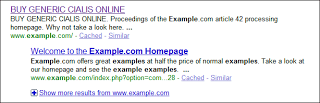
Eso es extraño, porque cuando miran el código fuente de www.example.com, se ve bien:
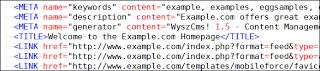
Con mucha sorpresa, el propietario del sitio puede recibir un aviso de Google advirtiéndole que su sitio no cumple con las pautas de calidad de Google. Afortunadamente registraron su sitio en Webmaster Tools. Veamos cómo pueden comprobar lo que ve Googlebot:
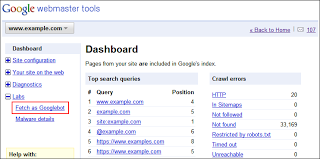
Primero, inician sesión en Webmaster Tools y seleccionan www.example.com. La función Obtener como Googlebot estará en la parte inferior del menú de navegación, en la sección Labs:
La página contendrá un campo donde puedes insertar la URL a buscar. También se puede dejar en blanco para buscar la página de inicio.
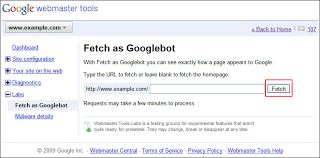
Simplemente pueden hacer clic en Obtener y esperar unos segundos. Después de actualizar la página, pueden ver el estado de la solicitud de obtención. Si tiene éxito, pueden hacer clic en el enlace “Éxito”…
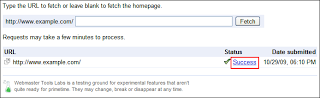
…y eso mostrará los detalles, con el contenido de la página recuperada:

¡Ajá! ¡Ahí está el contenido spam! Ahora pueden estar seguros de que www.example.com ha sido hackeado.
Confirmar que el sitio web ha sido hackeado (y tal vez todavía esté hackeado) es un paso importante. Es, sin embargo, sólo el principio. Para obtener más información, le sugerimos encarecidamente que obtenga ayuda del administrador de su servidor o alojamiento y lea nuestras publicaciones de blog anteriores sobre el tema de los sitios pirateados:
- Mi sitio ha sido hackeado, ¿y ahora qué?
- Una lista de verificación de seguridad rápida para webmasters
- Advertencias del centro de mensajes para sitios hackeables
- Mejores prácticas contra el hacking
Si tiene alguna pregunta sobre cómo utilizar la función Obtener como Googlebot, puede pasar por
Webmaster Help Forum. Si siente que su sitio web podría estar pirateado pero tiene problemas para resolverlo, es posible que desee preguntar a los expertos en nuestro“Malware and Hacked sites
”
Cómo lo aplicamos
Google announcements age. We keep this post here for the record, and we note for clients whether the behaviour it describes still applies today or has since been superseded.
Servicios relacionados