miércoles, 30 de marzo de 2011
Aquí hay un error común de detección de User-Agent que esperamos ayudarte a prevenir: si bien parece totalmente razonable basarse en la cadena “android” en el User-Agent y luego redirigir a los usuarios a tu versión móvil, hay un pequeño detalle… ¡Las tabletas Android acaban de lanzarse! De manera similar a los dispositivos móviles, el User-Agent en las tabletas Android también contiene “android”, pero los usuarios de tabletas generalmente prefieren la versión completa de escritorio sobre su equivalente móvil. Si tu sitio coincide con “android” y luego redirige automáticamente a los usuarios, puedes estar forzando a los usuarios de tabletas Android a una experiencia subóptima.

Como solución para sitios móviles, nuestros ingenieros de Android recomiendan específicamente
detectar “mobile” en la cadena del User-Agent
así como “android”. Veamos algunos ejemplos.
Con un User-Agent como este:
Como no hay una cadena “mobile”, sirve a este usuario la versión de escritorio (o una versión personalizada para dispositivos táctiles Android de pantalla grande). El User-Agent nos dice que provienen de un dispositivo de pantalla grande, la tableta XOOM.
Por otro lado, este User-Agent:
Contiene “mobile” y “android”, ¡así que sirve la experiencia móvil al internauta en este Nexus One!
Notarás que los User-Agents de Android tienen puntos en común:
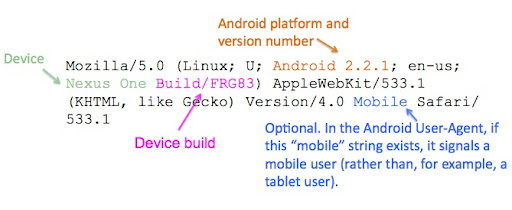
Si bien es posible que aún desees detectar “android” en el User-Agent para implementar funciones específicas de Android, como optimizaciones de pantalla táctil, nuestro mensaje principal es: si tu sitio móvil depende del rastreo de UA (UA sniffing), detecta las cadenas “mobile” y “android”, en lugar de solo “android”, en el User-Agent. Esto ayuda a servir adecuadamente tanto a tus visitantes móviles como de tabletas.
Si tienes preguntas, únete a nuestra comunidad de Android en su
foro de desarrolladores.
Cómo lo aplicamos
Google announcements age. We keep this post here for the record, and we note for clients whether the behaviour it describes still applies today or has since been superseded.
Servicios relacionados