Lunes, 31 de marzo de 2014
Herramientas para webmasters de Google
Estado de indexación
La función informa de cuántas páginas de su sitio están indexadas por Google. En el pasado, no mostramos los datos de estado de indexación de los sitios HTTPS de forma independiente, sino que incluíamos todo en el informe del sitio HTTP. En los últimos meses, nos habéis comunicado que os gustaría utilizar Herramientas para webmasters para realizar un seguimiento de vuestras URL indexadas en secciones de vuestro sitio web, incluidas las partes que utilizan HTTPS.
Hemos observado que casi el 10% de todas las URL ya utilizan una conexión segura para transferir datos a través de
HTTPSy esperamos ver a más webmasters migrar sus sitios web de HTTP a HTTPS en el futuro. Nos complace anunciar una mejora en la forma en que se muestran los datos de estado de indexación de su sitio en Herramientas para webmasters: la función Estado de indexación ahora realiza un seguimiento de las URL indexadas de su sitio para cada protocolo (HTTP y HTTPS), así como para los subdirectorios verificados.
Esto le facilita la monitorización de diferentes secciones de su sitio. Por ejemplo, las siguientes URL muestran sus propios datos en el informe de Estado de indexación de Herramientas para webmasters, siempre que se verifiquen por separado:
| HTTP | HTTPS |
| https://www.example.com/ | https://www.example.com/ |
| https://example.com | https://example.com |
| https://www.example.com/folder/ | https://www.example.com/folder/ |
| https://example.com/folder/ | https://example.com/folder/ |
Los datos refinados serán visibles para los webmasters cuyas URL de sitio estén en HTTPS o que tengan subdirectorios verificados, como https://example.com/folder/. Los datos de los subdirectorios se incluirán en los sitios verificados de nivel superior en el mismo nombre de host y protocolo.
Si tiene un sitio web en HTTPS o si parte de su contenido está indexado bajo diferentes subdominios, verá un cambio en los informes de Estado de indexación correspondientes. Las capturas de pantalla siguientes ilustran los cambios que puede ver en los gráficos de Estado de indexación de sus sitios HTTP y HTTPS, por ejemplo:
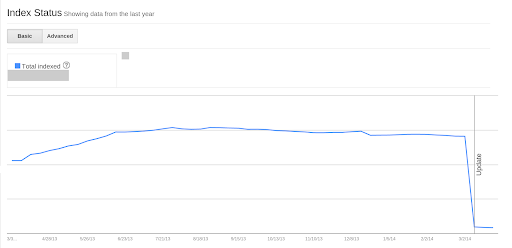
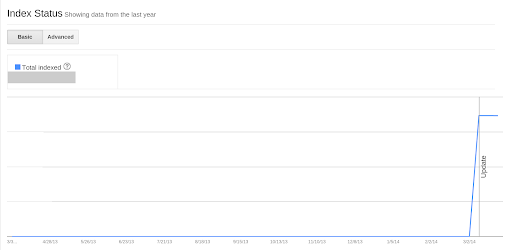
Se ha añadido una anotación de “Actualización” al gráfico de Estado de indexación para el 9 de marzo, que muestra cuándo empezamos a recopilar estos datos. Este cambio no afecta a la forma en que indexamos sus URL, ni tiene un impacto en el número total de URL indexadas en su dominio. Es un cambio que solo afecta a la presentación de informes de datos en la interfaz de usuario de Herramientas para webmasters.
Para ver sus datos correctamente, necesitará
verificar
todas las variantes existentes de su sitio (www., non-www., HTTPS, subdirectorios, subdominios) en Google Herramientas para webmasters. Recomendamos que sus dominios preferidos y
URL canónicas estén configurados en consecuencia.
Tenga en cuenta que si desea
enviar un sitemap, deberá hacerlo para la variante preferida de su sitio web, utilizando las URL correspondientes.
Robots.txt Los archivos también se leen por separado para cada protocolo y nombre de host.
Esperamos que esta actualización le resulte útil y que le ayude a supervisar, identificar y solucionar problemas de indexación en su sitio web. Puede encontrar detalles adicionales en nuestro artículo del Centro de ayuda sobre el Estado de indexación
Artículo del Centro de ayuda. Como de costumbre, si tiene alguna pregunta, no dude en preguntar en nuestro
Foro de ayuda.
Cómo lo aplicamos
We archive Search Central announcements because client questions often trace back to a change that was announced years ago. Reading the original is faster than reconstructing it from second-hand summaries.
Servicios relacionados