Jueves, 15 de septiembre de 2011
Las pruebas con usuarios nos han enseñado que quienes buscan prefieren mucho más la versión de página única “ver todo” del contenido frente a una página de componentes que contiene solo una porción de la misma información con saltos de página arbitrarios (lo que hace que el usuario haga clic en “siguiente” y cargue otra URL).
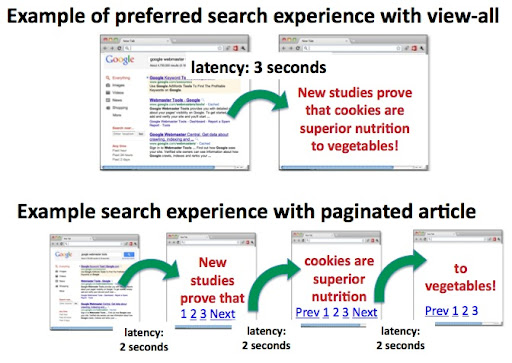
Por lo tanto, para mejorar la experiencia del usuario, cuando detectamos que una serie de contenidos (por ejemplo,
page-1.html, page-2.html, etc.) también contiene una versión de página única (por ejemplo, page-all.html), ahora nos esforzamos más en devolver la versión de página única en los resultados de búsqueda. Si su sitio tiene una opción de ver todo, no tiene que hacer nada; nosotros nos encargaremos de hacerlo por usted. Además, las propiedades de indexación, como los enlaces, se consolidarán desde las páginas de componentes de la serie hasta la página de ver todo.
Una alta latencia puede hacer que la opción de ver todo sea menos preferida
Curiosamente, los casos en los que los usuarios no preferían la página de ver todo se correlacionaban con una alta latencia (por ejemplo, cuando la página de ver todo tardaba un tiempo en cargarse, digamos, porque contenía muchas imágenes). Esto tiene sentido porque sabemos que los usuarios están
menos satisfechos con los resultados lentos. Así que, aunque una página de ver todo es comúnmente deseada, como webmaster es importante equilibrar esta preferencia con el tiempo de carga de la página y la experiencia general del usuario.
Buenas prácticas para una serie de contenidos
Si su sitio incluye páginas de ver todo: Nuestro objetivo es detectar la versión de ver todo de su contenido y, si está disponible, sus páginas de componentes asociadas. ¡No necesita hacer nada más! Sin embargo, si desea hacerlo más explícito para nosotros, puede incluir
rel="canonical"desde sus páginas de componentes hasta su página de ver todo para aumentar la probabilidad de que detectemos su serie de páginas adecuadamente.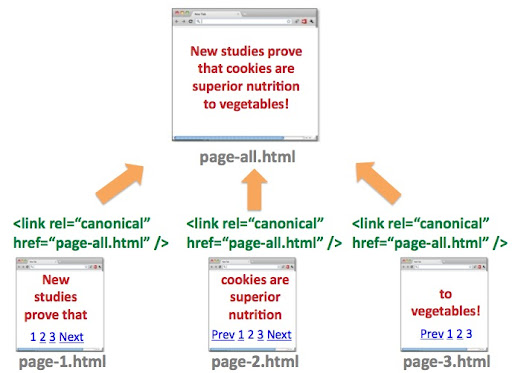
rel="canonical"puede especificar el superconjunto de contenido (es decir, la página de ver todo, en este casopage-all.html) a partir de la misma información en una serie de URLs.¿Por qué funciona esto? En el diagrama,
page-2.htmlde una serie puede especificar el destino canónico comopage-all.htmlporquepage-all.htmles un superconjunto del contenido depage-2.html. Cuando un usuario busca un término de consulta y
page-all.htmlse selecciona en los resultados de búsqueda, incluso si la consulta está más relacionada con
page-2.html, sabemos que el usuario seguirá viendo la información relevante depage-2.htmldentro depage-all.html.. Por otro lado,
page-2.htmlno debe designarpage-1.htmlcomo canónica porque el contenido depage-2.htmlno está incluido en
page-1.html. Es posible que la consulta de búsqueda de un usuario sea relevante para el contenido de
page-2.html, pero si la canónica depage-2.htmlestá configurada en
page-1.html, el usuario podría seleccionarpage-1.htmlen los resultados de búsqueda y encontrarse en una posición en la que tenga que navegar aún más a una página diferente para llegar a la información deseada. Esa es una mala experiencia para el usuario, un resultado subóptimo de nuestra parte y también podría traer tráfico mal dirigido a su sitio.Sin embargo, si desea firmemente que su página de ver todo no aparezca en los resultados de búsqueda:
- Asegúrese de que las páginas de componentes de la serie no incluyan
rel="canonical"a la página de ver todo, y - marque la página de ver todo como
noindexutilizando cualquiera de los métodos estándar.
- Asegúrese de que las páginas de componentes de la serie no incluyan
Si desea mostrar páginas de componentes individuales (o no hay ninguna opción de ver todo disponible): Es posible que una o ambas de las siguientes situaciones se apliquen a su sitio:
- La página de ver todo no es deseable como resultado de búsqueda (por ejemplo, el tiempo de carga es demasiado alto o es demasiado difícil de navegar para los usuarios).
- Sus usuarios prefieren la experiencia de múltiples páginas y ser dirigidos a una página de componentes en los resultados de búsqueda, en lugar de a la página de ver todo.
Si es así, puede utilizar los elementos estándar de HTML
rel="next"yrel="prev"para especificar una relación entre las páginas de componentes en su serie de contenido. Si se hace correctamente, Google generalmente se esforzará por:
Consolidar las propiedades de indexación, como los enlaces, entre las páginas de componentes/URLs.- Enviar a los usuarios a la página/URL más relevante de las páginas de componentes. Por lo general, la página más relevante es la primera página de su contenido, pero nuestros algoritmos pueden dirigir a los usuarios a una de las páginas de componentes de la serie.
- No es raro que los webmasters utilicen incorrectamente
fr rel="canonical" desde las páginas de componentes hasta la primera página de su serie (por ejemplo, page-2.html con
rel="canonical" a page-1.html). Recomendamos no utilizar esta implementación porque las páginas de componentes no contienen realmente contenido duplicado. El uso de
rel="next" y rel="prev" es mucho más apropiado.
Resumen
Como los usuarios generalmente prefieren la opción de ver todo en los resultados de búsqueda, nos estamos esforzando más para detectar y ofrecer correctamente esta versión a los usuarios. Si tienes una serie de contenido, no necesitas hacer nada más. Si deseas darle más pistas a Google sobre cómo mostrar mejor tu información a los usuarios:
- Para optimizar mejor tu página de ver todo, puedes usar
rel="canonical"desde las páginas de componentes hasta la versión de una sola página; de lo contrario, - Si una página de ver todo no ofrece una buena experiencia de usuario para tu sitio, puedes usar
rel="next"yrel="prev"
como una fuerte pista para que Google identifique la serie de páginas y aun así muestre una página de componentes en los resultados.
Como siempre, puedes hacer preguntas en nuestro
Webmaster Help Forum.
Cómo lo aplicamos
Google announcements age. We keep this post here for the record, and we note for clients whether the behaviour it describes still applies today or has since been superseded.
Servicios relacionados