Thursday, March 21, 2013
To help webmasters manage the
verified
owners for their websites in
Webmaster Tools,
we’ve recently introduced three new features:
Verification details view: You can now see the methods used to verify an
owner for your site. In the Manage owners page for your site, you can now find the new
Verification details link. This screenshot shows the verification details of a user who is
verified using both an HTML file uploaded to the site and ametatag: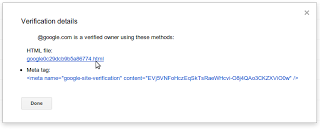
Where appropriate, the Verification details will have links to the correct URL on your site
where the verification can be found to help you find it faster.Requiring the verification method be removed from the site before unverifying an
owner: You now need to remove the verification method from your site before
unverifying an owner
from Webmaster Tools. Webmaster Tools now checks the method that the owner used to verify
ownership of the site, and will show an error message if the verification is still found. For
example, this is the error message shown when an unverification was attempted while the DNS
CNAMEverification method was still found on the DNS records of the domain:
Shorter
CNAMEverification string: We’ve slightly modified the
CNAMEverification string to make it shorter to support a larger number of DNS
providers. Some systems limit the number of characters that can be used in DNS records, which
meant that some users were not able to use the
CNAMEverification method.
We’ve now made theCNAMEverification method have a fewer number of characters.
ExistingCNAMEverifications will continue to be valid.
We hope this changes make it easier for you to use Webmaster Tools. As always, please post in our
Verification forum
if you have any questions or feedback.
How we apply this
We archive Search Central announcements because client questions often trace back to a change that was announced years ago. Reading the original is faster than reconstructing it from second-hand summaries.
Related services