Thursday, February 28, 2008
When you plan to do something, are you a minimalist, or are you prepared for every potential
scenario? For example, would you hike out into the Alaskan wilderness during inclement weather
with only a wool overcoat and a sandwich in your pocket – like the naturalist John Muir (and you
thought Steve McQueen was tough)?
Or are you more the type of person where even on a day hike, you bring a few changes of clothes,
3 dehydrated meals, a couple of kitchen appliances, a power inverter, and a foot- powered
generator, because, well, you never know when the urge will arise to make toast?
The Webmaster Tools team strives to serve all types of webmasters, from the minimalist to those
who use every tool they can find. If you’re reading this blog, you’ve probably had the opportunity
to use the current version of Webmaster Tools, which offers as many features as possible just shy
of the kitchen sink. Now there’s something for those of you who would prefer to access only the
features of Webmaster Tools that you need: we’ve just released Webmaster Tools Gadgets for
iGoogle.
Here’s the simple process to start using these Gadgets right away. (Note: this assumes you’ve
already got a Webmaster Tools account and have verified at least one site.)
- Visit Webmaster Tools and select any site that you’ve validated from the dashboard.
- Click on the Tools section.
- Click on Gadgets sub-section.
- Click on the big “Add an iGoogle Webmaster Tools home page” button.
- Click the “Add to Google” button on the following confirm page to add the new tab to iGoogle.
- Now you’re in iGoogle, where you should see your new Google Webmaster Tools tab with a number
of Gadgets. Enjoy!
You’ll notice that each Gadget has a drop down menu at the top which lets you select from all the
sites you have validated to see that Gadget’s information for the particular site you select.
A few of the Gadgets that we’re currently offering are:
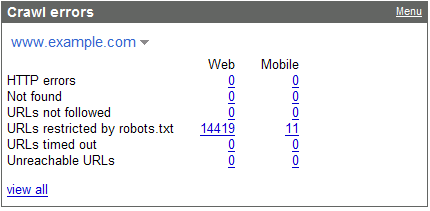
- Crawl errors – Does Googlebot encounter issues when crawling your site?
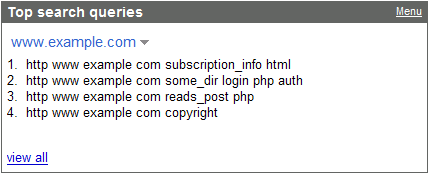
- Top search queries – What are people searching for to find your site?
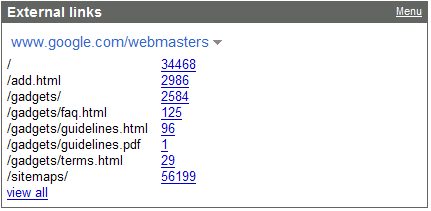
- External links – What websites are linking to yours?
We plan to add more Gadgets in the future and improve their quality, so if there’s a feature that
you’d really like to see which is not included in one of the Gadgets currently available, let us
know. As you can see, it’s a cinch to get started.
It looks like rain clouds are forming over here in Seattle, so I’m off for a hike.
How we apply this
We archive Search Central announcements because client questions often trace back to a change that was announced years ago. Reading the original is faster than reconstructing it from second-hand summaries.
Related services