Thursday, June 11, 2009
We launched a
preview of our new Webmaster Tools interface three weeks ago,
and received a lot of valuable feedback. Most of you liked the update, appreciating features such
as the one-stop dashboard, more top search query data, and the improved menu and navigation.

You offered some constructive feedback as well:
- You missed the option to switch listing 25, 50, or 100 rows in features such as links to your
site. We did not add the option back to select how many rows you would like to see but increased
our default to 100! - Top search query information differed between the old and new versions. We expected this since
we went through a lot of re-engineering to improve the new top search queries backend. We
reviewed many of the issues posted on our forums, and verified that the new backend is far more
accurate and reliable. - Initially, the Sitemaps downloaded and indexed URL counts differed between the two versions. We
resolved this issue quickly. - Backlinks numbers between the old and the new user interface (UI) may differ since our new UI
shows the original anchor (not following redirects) as it’s linked on the web. Let’s say
example.com links to https://google.com, then https://google.com301redirects to https://www.google.com/:- In the new UI—only verified site owners of google.com will see examples.com’s
backlink (because we show the original link prior to any redirects) - In the old UI—verified site owners of www.google.com could see example.com’s backlink
- In the new UI—only verified site owners of google.com will see examples.com’s
- The new site switcher lists only five sites, and some of you who manage a large number of sites
found this limiting. We appreciate the feedback and will work on addressing this limitation in a
future release.
From today, only the new user interface will be available
(https://google.com/webmasters/tools)!
You’ll see that in addition to fixing many of the issues users addressed, we took some time to
launch a new feature:
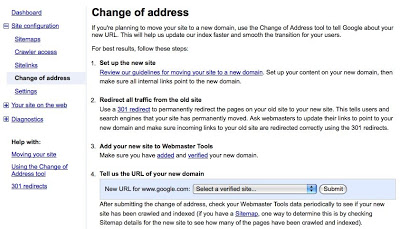
Change of Address.
The Change of Address feature lets you notify Google when you are moving from one domain to
another, enabling us to update our index faster and hopefully creating a smoother transition for
your users.
Thanks to all the users that took time to give us feedback on the new user interface. To those
users using it for the first time today, we hope you enjoy it. As always,
your feedback
is appreciated.
How we apply this
Google announcements age. We keep this post here for the record, and we note for clients whether the behaviour it describes still applies today or has since been superseded.
Related services