Tuesday, May 08, 2012
(Cross-posted on the
Custom Search Blog)
Using Custom Search Engine (CSE),
you can create rich search experiences that make it easier for visitors to find the information
they’re looking for on your site. Today we’re announcing two improvements to sorting and filtering
of search results in CSE.
First, CSE now supports UI-based
results sorting,
which you can enable in the Basics tab of the CSE control panel. Once you’ve updated the CSE
element code on your site, a “sort by” picker will become visible at the top of the results
section.
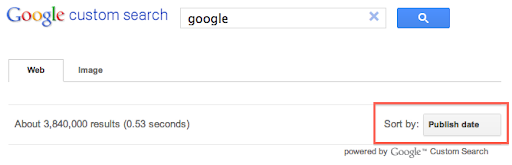
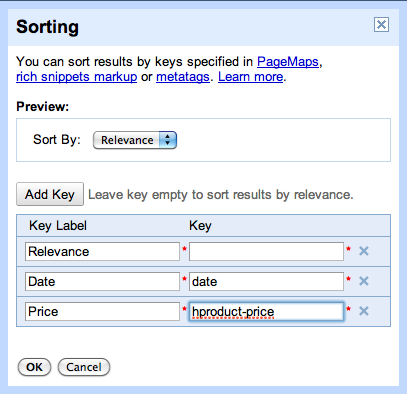
By default CSE supports sorting by date and relevance. In the control panel, you can specify
additional “sort by” keys that are based on the structure of your site’s content, giving users
more options to find the results that are most relevant to them. For example, if you’ve marked up
pages for product rich snippets, you
could enable sorting based on price as shown in this screenshot:
Second, we’re introducing compact queries for
filtering by attribute.
Currently you can issue a query like
[more:pagemap:product-description:search more:pagemap:product-description:engine]
which will only show pages with a product-description attribute that contains both
search and engine.
With a compact query, you can issue the same request as
[more:p:product-description:search*engine]
We hope these new features help you create richer and more useful search experiences for your
visitors. As always, if you have any questions or feedback please let us know via our
Help Forum.
How we apply this
Google announcements age. We keep this post here for the record, and we note for clients whether the behaviour it describes still applies today or has since been superseded.
Related services