Wednesday, March 11, 2015
Webmasters often use linked images, CSS, and JavaScript files in web pages to make them pretty and
functional. If these resources are blocked from crawling, then Googlebot can’t use them when it
renders those pages for Search. Google Webmaster Tools now includes a
Blocked Resources Report
to help you find and resolve these kinds of issues.

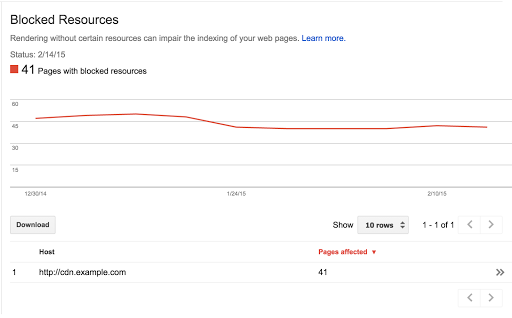
This report starts with the names of the hosts from which your site is using blocked resources
such as JavaScript, CSS, and images. Clicking on the rows gives you the list of blocked resources
and then the pages that embed them, guiding you through the steps to diagnose and resolve how
we’re able to crawl and index the page’s content.
An update to
Fetch and Render
shows how these blocked resources matter. When you request a URL be fetched and rendered, it now
shows screenshots rendered both as Googlebot and as a typical user. This makes it easier to
recognize the issues that significantly influence why your pages are seen differently by
Googlebot.
Webmaster Tools attempts to show you only the hosts that you might have influence over, so at the
moment, we won’t show hosts that are used by many different sites (such as popular analytics
services). Because it can be time-consuming (usually not for technical reasons!) to update all
robots.txt files, we recommend starting with the resources that make the most important visual
difference when blocked. Our
Help Center article
has more information on the steps involved.
We hope this new feature makes it easier for you to spot and then unblock resources used by your
website! Should you have any questions, you can drop by our
webmaster help forums.
How we apply this
We archive Search Central announcements because client questions often trace back to a change that was announced years ago. Reading the original is faster than reconstructing it from second-hand summaries.
Related services