Mittwoch, 13. Oktober 2010
Die Funktion „Links zu Ihrer Website“ in
Webmaster Tools
wurde nun aktualisiert, um Ihnen neben anderen Verbesserungen anzuzeigen, welche Domains am häufigsten auf Ihre Website verlinken. Auf der Übersichtsseite sehen Sie drei Hauptbereiche: die Domains, die am häufigsten auf Ihre Website verlinken, die Seiten Ihrer Website mit den meisten Links sowie eine Stichprobe des Ankertexts, den externe Websites verwenden, wenn sie auf Ihre Website verlinken.
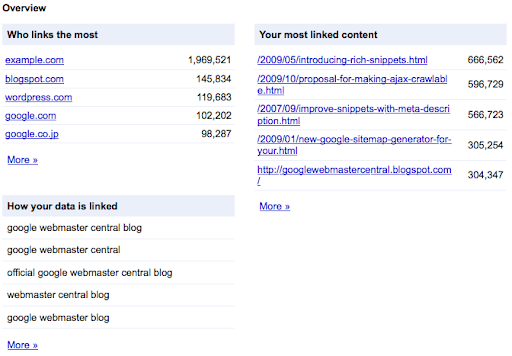
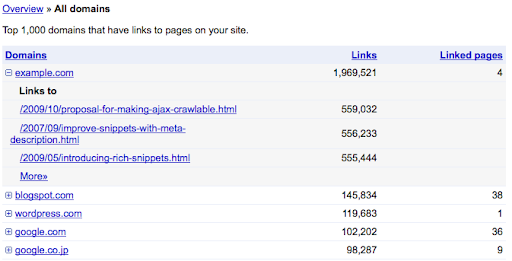
Wenn Sie auf den Link „Mehr »“ unter dem Bereich „Wer verlinkt am häufigsten“ klicken, gelangen Sie zu einer neuen Ansicht, die eine Liste aller Domains anzeigt, die auf Ihre Website verlinken. Jede Domain in der Liste kann erweitert werden, um eine Stichprobe von Seiten Ihrer Website anzuzeigen, auf die von dieser Domain verlinkt wird.
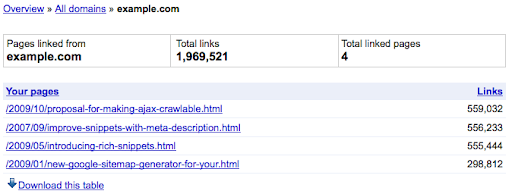
Der Link „Mehr »“ unter jeder spezifischen Domain listet alle Seiten auf, auf die von dieser Domain verlinkt wird. Oben auf der Seite gibt es eine Gesamtzahl der Links von dieser Domain sowie eine Gesamtzahl der Seiten Ihrer Website, auf die von dieser Domain verlinkt wird.
Wenn Sie von der Übersichtsseite aus in die Ansicht „Ihre am häufigsten verlinkten Inhalte“ wechseln, sehen Sie eine Liste aller wichtigsten verlinkten Seiten Ihrer Website. Es gibt auch eine Linkanzahl für jede Seite sowie eine Anzahl von Domains, die auf diese Seite verlinken. Wenn Sie auf eine der aufgelisteten Seiten klicken, wird die Ansicht erweitert, um Beispiele der führenden Domains anzuzeigen, die auf diese Seite verlinken, sowie die Anzahl der Links zu der angegebenen Seite von jeder aufgelisteten Domain. Die für Linkanzahlen und in der gesamten Funktion „Links zu Ihrer Website“ verwendete Datenbasis ist jetzt umfassender und enthält nun auch über
301 oder 302 HTTP-Weiterleitungen weitergeleitete Links.
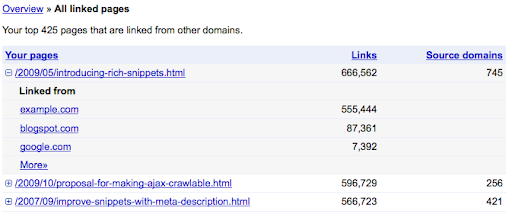
Jede in der Ansicht „Alle verlinkten Seiten“ aufgeführte Seite hat einen zugehörigen Link „Mehr »“, der alle Domains anzeigt, die auf diese spezifische Seite auf Ihrer Website verlinken.
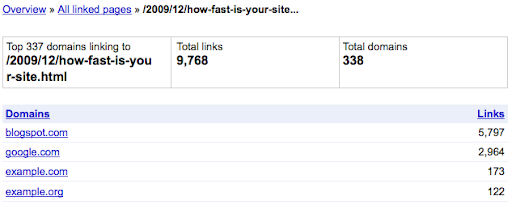
Jede aufgeführte Domain führt zu einem Bericht über alle Seiten von dieser Domain, die auf Ihre spezifische Seite verlinken.
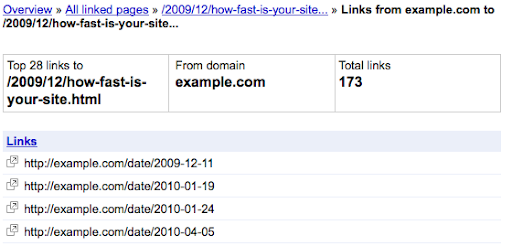
Wir hoffen, dass die aktualisierte Funktion „Links zu Ihrer Website“ in Webmaster Tools Ihnen hilft, besser zu verstehen, woher die Links zu Ihrer Website kommen, und Ihre Fähigkeit verbessert, Änderungen am Linkprofil Ihrer Website zu verfolgen. Bitte posten Sie Ihre Kommentare zu dieser aktualisierten Funktion oder stellen Sie Ihre Fragen im
Webmaster Help Forum.
Wir schätzen Ihr Feedback, da es uns hilft, die Funktionalität von Webmaster Tools kontinuierlich zu verbessern.
So setzen wir das um
We archive Search Central announcements because client questions often trace back to a change that was announced years ago. Reading the original is faster than reconstructing it from second-hand summaries.
Verwandte Leistungen