martes, 19 de junio de 2012
Webmaster Tools ahora cuenta con una nueva opción de descarga para exportar tus datos directamente a Google Spreadsheet. La opción de descarga está disponible para la mayoría de nuestras funciones con uso intensivo de datos, como errores de rastreo, consultas de búsqueda y enlaces a tu sitio. Si te gusta analizar los datos de Webmaster Tools pero no quieres usar
scripts de Python o la
API, hemos añadido una nueva funcionalidad pensada para ti. Ahora, al hacer clic en un botón de descarga en una función de Webmaster Tools como las consultas de búsqueda, aparecerá la opción “Seleccionar formato de descarga”, donde podrás elegir descargar los datos como “CSV” o “Google Docs”.
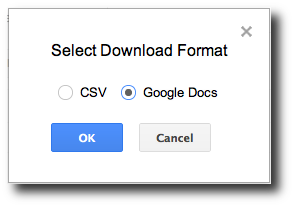

Al seleccionar “CSV”, se inicia la descarga de los datos en
formato CSV
, el cual ha estado disponible durante mucho tiempo en Webmaster Tools y se puede importar en otras herramientas de hojas de cálculo como Excel. Si seleccionas la nueva opción “Google Docs”, tus datos se guardarán en un Google Spreadsheet y la hoja de cálculo recién creada se abrirá en una nueva pestaña del navegador.
Esperamos que la posibilidad de descargar fácilmente tus datos a un Google Spreadsheet te ayude a empezar a procesar los datos de Webmaster Tools de tu sitio aún más rápido que antes. Utilizando únicamente un navegador web, puedes sumergirte al instante en el análisis detallado de tus datos para crear gráficos personalizados con el fin de detectar cambios significativos y realizar un seguimiento de las tendencias a largo plazo que afectan a tu sitio. Si tienes preguntas o comentarios, compártelos en el
Foro de ayuda para webmasters.
Cómo lo aplicamos
We archive Search Central announcements because client questions often trace back to a change that was announced years ago. Reading the original is faster than reconstructing it from second-hand summaries.
Servicios relacionados