Вторник, 19 июня 2012 г.
В Инструментах для веб-мастеров появилась новая опция загрузки для экспорта ваших данных напрямую в Google Таблицу. Опция загрузки доступна для большинства наших функций, работающих с большими объемами данных, таких как ошибки сканирования, поисковые запросы и ссылки на ваш сайт. Если вам нравится анализировать данные из Инструментов для веб-мастеров, но вы не хотите использовать
скрипты Python или
API, мы добавили новую функциональность специально для вас. Теперь при нажатии кнопки загрузки в такой функции Инструментов для веб-мастеров, как «Поисковые запросы», вам будет предложен вариант «Выбрать формат загрузки», где вы можете выбрать скачивание данных в формате «CSV» или «Документы Google».
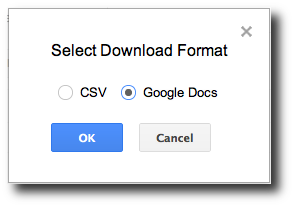

Выбор «CSV» инициирует загрузку данных в
формате CSV
, который уже давно доступен в Инструментах для веб-мастеров и может импортироваться в другие инструменты для работы с электронными таблицами, такие как Excel. Если вы выберете новый вариант «Документы Google», ваши данные будут сохранены в Google Таблице, а созданная таблица откроется в новой вкладке браузера.
Мы надеемся, что возможность легко скачивать данные в Google Таблицу поможет вам обрабатывать данные Инструментов для веб-мастеров для вашего сайта еще быстрее, чем раньше. Используя только веб-браузер, вы можете сразу приступить к детализированному анализу данных для создания настраиваемых диаграмм с целью выявления значительных изменений и отслеживания долгосрочных тенденций, влияющих на ваш сайт. Если у вас есть вопросы или отзывы, пожалуйста, поделитесь ими на
Форуме помощи веб-мастерам.
Как мы это применяем
We archive Search Central announcements because client questions often trace back to a change that was announced years ago. Reading the original is faster than reconstructing it from second-hand summaries.
Связанные услуги