Thursday, January 24, 2013
People looking for images on Google often want to browse through many images, looking both at the
images and their metadata (detailed information about the images). Based on feedback from both
users and webmasters, we redesigned Google Images to provide a better search experience. In the
next few days, you’ll see image results displayed in an inline panel so it’s faster, more
beautiful, and more reliable. You will be able to quickly flip through a set of images by using
the keyboard. If you want to go back to browsing other search results, just scroll down and pick
up right where you left off.

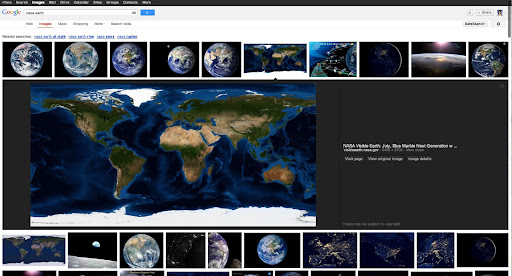
Here’s what it means for webmasters:
- We now display detailed information about the image (the metadata) right underneath the image
in the search results, instead of redirecting users to a separate landing page. - We’re featuring some key information much more prominently next to the image: the title of the
page hosting the image, the domain name it comes from, and the image size. - The domain name is now clickable, and we also added a new button to visit the page the image is
hosted on. This means that there are now four clickable targets to the source page instead of
just two. In our tests, we’ve seen a net increase in the average click-through rate to the
hosting website. - The source page will no longer load up in an
iframein the background of the image
detail view. This speeds up the experience for users, reduces the load on the source website’s
servers, and improves the accuracy of webmaster metrics such as pageviews. As usual, image
search query data is available in
Top Search Queries
in Webmaster Tools.
As always, please ask on our
Webmaster Help forum
if you have questions.
How we apply this
We archive Search Central announcements because client questions often trace back to a change that was announced years ago. Reading the original is faster than reconstructing it from second-hand summaries.
Related services