Wednesday, January 20, 2016
More and more sites are implementing
Accelerated Mobile Pages (AMP)
for news content, so we’ve decided to provide a preview of
error reports in Search Console
to help you get ready for the upcoming official AMP launch and get early feedback from you. You
can find these reports under Search Appearance – Accelerated Mobile Pages. The goal here is to
make it easier to spot issues in your AMP implementation across the whole website. In order to get
started with
AMP on Google Search,
you’ll need to create matching, valid AMP pages where relevant, ensure that they use the
NewsArticle schema.org markup, and link them appropriately.

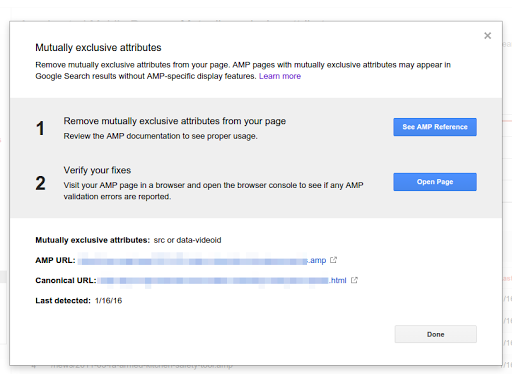
The AMP error report gives an overview of the overall situation on your site, and then lets you
drill down to specific error types and URLs. This process helps you quickly find the most common
issues, so that you can systematically address them in your site’s AMP implementation (potentially
just requiring tweaks in the templates or plugin used for these pages).
Curious about AMP and how it might fit in with your site? Here’s a
demo preview of AMP in Search,
more on
how AMP works,
and a guide to
getting started with AMP.
If you think AMP would be a good fit for your website, implementing it might ultimately be as easy
as installing a plugin in your CMS, so check with your provider. AMP hasn’t officially launched in
Google Search, so there’s still time to get set up—feedback and patience will be appreciated
by your CMS and plugin providers. Stay tuned for more updates on the
AMP Project blog.
We’re only getting started—this is a first step at AMP error reporting. We’ll be refining
this report in the near future, and we’d love to get your feedback to help us. Let us know in the
comments here how things work out for you.
How we apply this
Google announcements age. We keep this post here for the record, and we note for clients whether the behaviour it describes still applies today or has since been superseded.
Related services