Wednesday, February 06, 2019
In Search Console, the
Performance report
currently credits all page metrics to the exact URL that the user is referred to by Google Search.
Although this provides very specific data, it makes property management more difficult; for
example: if your site has mobile and desktop versions on different properties, you must open
multiple properties to see all your Search data for the same piece of content.
To help unify your data, Search Console will soon begin assigning search metrics to the
(Google-selected)
canonical URL,
rather than the URL referred to by Google Search. This change has several benefits:
- It unifies all search metrics for a single piece of content into a single URL: the canonical
URL. This shows you the full picture about a specific piece of content in one property. - For users with separate mobile or AMP pages, it unifies all (or most, since some mobile URLs may
end up as canonical) of your data to a single property (the “canonical” property). - It improves the usability of the AMP and Mobile-Friendly reports. These reports currently show
issues in the canonical page property, but show the impression in the property that owns the
actual URL referred to by Google Search. After this change, the impressions and issues will be
shown in the same property.
When will this happen?
We plan to transition all performance data on April 10, 2019. In order to provide continuity to
your data, we will pre-populate your unified data beginning from January 2018. We will also enable
you to view both old and new versions for a few weeks during the transition to see the impact and
understand the differences.
API and Data Studio users: The
Search Console API
will change to canonical data on April 10, 2019.
How will this affect my data?
- At an individual URL level, you will see traffic shift from any non-canonical (duplicate) URLs
to the canonical URL. - At the property level, you will see data from your alternate property (for example, your mobile
site) shifted to your “canonical property”. Your alternate property traffic probably won’t drop
to zero in Search Console because canonicalization is at the page, not the property level, and
your mobile property might have some canonical pages. However, for most users, most
property-level data will shift to one property. AMP property traffic will drop to zero in most
cases (except for
self-canonical pages). - You will still be able to filter data by device, search appearance (such as AMP), country, and
other dimensions without losing important information about your traffic.
You can see some examples of these traffic changes below.
Preparing for the change
- Consider whether you need to change user access to your various properties; for example: do you
need to add new users to your canonical property, or do existing users continue to need access
to the non-canonical properties. - Modify any custom traffic reports you might have created in order to adapt for this traffic
shift. - If you need to learn the canonical URL for a given URL, you can use the
URL Inspection tool. - If you want to save your traffic data calculated using the current system, you should download
your data using either the Performance report’s Export Data button, or using the
Search Console API.
Examples
Here are a few examples showing how data might change on your site. In these examples, you can see
how your traffic numbers would change between a canonical site (called example.com) and alternate
site (called m.example.com).
Important: In these examples, the desktop site contains all the canonical pages and the mobile
contains all the alternate pages. In the real world, your desktop site might contain some
alternate pages and your mobile site might contain some canonical pages. You can
determine the canonical for a given URL using the URL Inspection tool.
Total traffic
In the current version, some of your traffic is attributed to the canonical property and some to
the alternate property. The new version should attribute all of your traffic to the canonical
property.

| Canonical property ( https://example.com) | Alternate property ( https://m.example.com) | |
| Current | 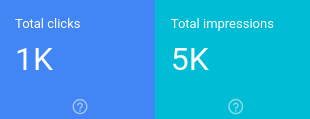 | 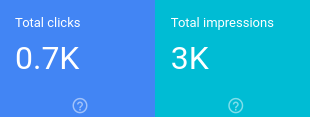 |
| New, based on canonical URLs | 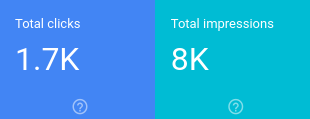 | 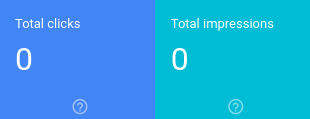 |
| Change | +0.7K | +3K | -0.7K | -3K |
Individual page traffic
You can see traffic changes between the duplicate and canonical URLs for individual pages in the
Pages view. The next example shows how traffic that used to be split between the canonical and
alternate pages are now all attributed to the canonical URL:
| Canonical property (https://example.com) | Alternate property (https://m.example.com) | |
| Old |  |  |
| New |  |  |
| Change | +150 | +800 | -150 | -800 |
Mobile traffic
In the current version, all of your mobile traffic was attributed to your m. property. The new
version attributes all traffic to your canonical property when you apply the “Device: Mobile”
filter as shown here:
| Canonical property ( https://example.com) | Alternate property ( https://m.example.com) | |
| Old | 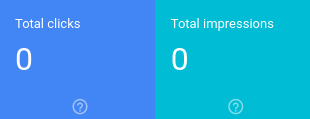 | 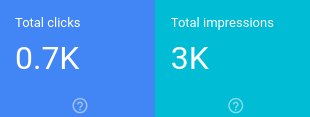 |
| New | 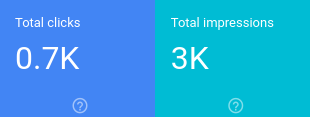 | 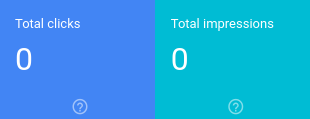 |
| Change | +0.7K | +3K | -0.7K | -3K |
In conclusion
We know that this change might seem a little confusing at first, but we’re confident that it will
simplify your job of tracking traffic data for your site. If you have any questions or concerns,
please reach out on the
Webmaster Help Forum.
How we apply this
We archive Search Central announcements because client questions often trace back to a change that was announced years ago. Reading the original is faster than reconstructing it from second-hand summaries.
Related services