Tuesday, August 05, 2008
When Googlebot crawls the web, it often finds what we call an “infinite space”. These are very
large numbers of links that usually provide little or no new content for Googlebot to index. If
this happens on your site, crawling those URLs may use unnecessary bandwidth, and could result in
Googlebot failing to completely index the real content on your site.
Recently, we started notifying site owners when we discover this problem on their web sites. Like
most messages we send, you’ll find them in
Webmaster Tools
in the Message Center. You’ll probably want to know right away if Googlebot has this
problem—or other problems—crawling your sites. So verify your site with Webmaster
Tools, and check the Message Center every now and then.
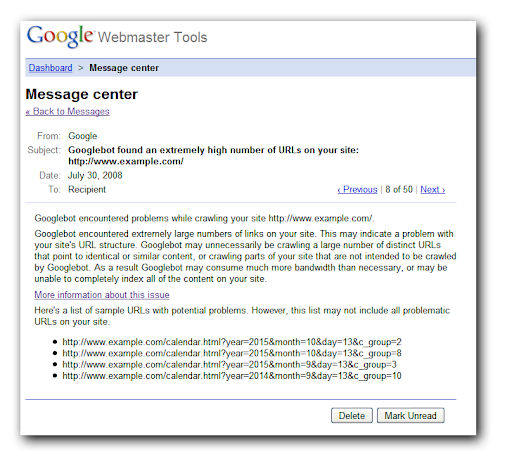
Examples of an infinite space
The classic example of an “infinite space” is a calendar with a “Next Month” link. It may be
possible to keep following those “Next Month” links forever! Of course, that’s not what you want
Googlebot to do. Googlebot is smart enough to figure out some of those on its own, but there are
a lot of ways to create an infinite space and we may not detect all of them.

Another common scenario is websites which provide for filtering a set of search results in many
ways. A shopping site might allow for finding clothing items by filtering on category, price,
color, brand, style, etc. The number of possible combinations of filters can grow exponentially.
This can produce thousands of URLs, all finding some subset of the items sold. This may be
convenient for your users, but is not so helpful for the Googlebot, which just wants to find
everything&mdashl;once!
Correcting infinite space issues
Our
Webmaster Tools Help article
describes more ways infinite spaces can arise, and provides recommendations on how to avoid the
problem. One fix is to eliminate whole categories of dynamically generated links using your
robots.txt file.
The Help Center has lots of information on how to use robots.txt.
If you do that,
don’t forget to verify that Googlebot can find all your content
some other way. Another option is to block those problematic links with a nofollow
link attribute. If you’d like
more information on nofollow links,
check out the Webmaster Help Center.
How we apply this
We archive Search Central announcements because client questions often trace back to a change that was announced years ago. Reading the original is faster than reconstructing it from second-hand summaries.
Related services