Thursday, May 12, 2011
Users are taught to protect themselves from malicious programs by installing sophisticated
antivirus software, but often they may also entrust their private information to websites like
yours, in which case it’s important to protect their data. It’s also very important to protect
your own data; if you have an online store, you don’t want to be robbed.
Over the years companies and webmasters have learned—often the hard way—that web application
security is not a joke; we’ve seen user passwords leaked due to
SQL injection
attacks, cookies stolen with
XSS,
and websites taken over by hackers due to negligent input validation.

Today we’ll show you some examples of how a web application can be exploited so you can learn
from them; for this we’ll use
Gruyere, an intentionally
vulnerable application we use for security training internally, too. Do not probe others’
websites for vulnerabilities without permission as it may be perceived as hacking; but
you’re welcome—nay, encouraged—to run tests on Gruyere.
Client state manipulation – What will happen if I alter the URL?
Let’s say you have an image hosting site and you’re using a PHP script to display the images users
have uploaded:
So what will the application do if I alter the URL to something like this and userpasswords.txt
is an actual file?
Will I get the content of userpasswords.txt?
Another example of client state manipulation is when form fields are not validated. For instance,
let’s say you have this form:
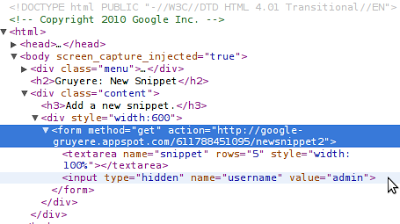
It seems that the username of the submitter is stored in a hidden input field. Well, that’s great!
Does that mean that if I change the value of that field to another username, I can submit the form
as that user? It may very well happen; the user input is apparently not authenticated with, for
example, a token which can be verified on the server.
Imagine the situation if that form were part of your shopping cart and I modified the price of a
$1000 item to $1, and then placed the order.
Protecting your application against this kind of attack is not easy; take a look at the third part
of Gruyere to learn a
few tips about how to defend your app.
Cross-site scripting (XSS) – User input can’t be trusted
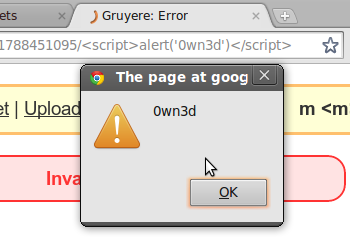
A simple, harmless URL:
But is it truly harmless? If I decode the
percent-encoded
characters, I get:
Gruyere, just like many sites with
custom error pages,
is designed to include the path component in the HTML page. This can introduce security bugs, like
XSS, as it introduces user input directly into the rendered HTML page of the web application.
You might say, “It’s just an alert box, so what?” The thing is, if I can inject an alert box, I
can most likely inject something else, too, and maybe steal your cookies which I could use to
sign in to your site as you.
Another example is when the stored user input isn’t sanitized. Let’s say I write a comment on your
blog; the comment is simple:
If other users click on my innocent link, I have their cookies:
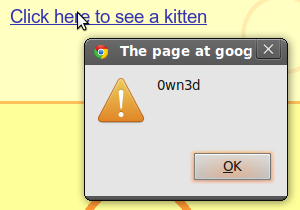
You can learn how to find XSS vulnerabilities in your own web app and how to fix them in the
second part of
Gruyere; or, if
you’re an advanced developer, take a look at the automatic escaping features in template systems
we blogged about on our
Online Security blog.
Cross-site request forgery (XSRF) – Should I trust requests from evil.com?
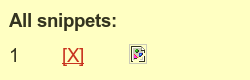
Oops, a broken picture. It can’t be dangerous—it’s broken, after all—which means that
the URL of the image returns a 404 or it’s just malformed. Is that true in all of the
cases?
No, it’s not! You can specify any URL as an image source, regardless of its content type. It can
be an HTML page, a JavaScript file, or some other potentially malicious resource. In this case the
image source was a simple page’s URL:

That page will only work if I’m logged in and I have some cookies set. Since I was actually logged
in to the application, when the browser tried to fetch the image by accessing the image source
URL, it also deleted my first snippet. This doesn’t sound particularly dangerous, but if I’m a bit
familiar with the app, I could also invoke a URL which deletes a user’s profile or lets admins
grant permissions for other users.
To protect your app against XSRF you should not allow state changing actions to be called via
GET; the POST method was invented for this kind of state-changing
request. This change alone may have mitigated the above attack, but usually it’s not enough and
you need to include an unpredictable value in all state changing requests to prevent XSRF. Please
head to Gruyere if you
want to learn more about XSRF.
Cross-site script inclusion (XSSI) – All your script are belong to us
Many sites today can dynamically update a page’s content via asynchronous JavaScript requests that
return JSON data. Sometimes, JSON can contain sensitive data, and if the correct precautions are
not in place, it may be possible for an attacker to steal this sensitive information.
Let’s imagine the following scenario: I have created a standard HTML page and send you the link;
since you trust me, you visit the link I sent you. The page contains only a few lines:
Since you’re signed in to Gruyere and you have a private snippet, you’ll see an alert box on my
page informing you about the contents of your snippet. As always, if I managed to fire up an alert
box, I can do whatever else I want; in this case it was a simple snippet, but it could have been
your biggest secret, too.
It’s not too hard to defend your app against XSSI, but it still requires careful thinking. You
can use tokens as explained in the XSRF section, set your script to answer only POST requests, or
simply start the JSON response with ‘n’ to make sure the script is not executable.
SQL Injection – Still think user input is safe?
What will happen if I try to sign in to your app with a username like
JohnDoe'; DROP TABLE members;--
While this specific example won’t expose user data, it can cause great headaches because it has
the potential to completely remove the SQL table where your app stores information about members.
Generally, you can protect your app from SQL injection with proactive thinking and input
validation. First, are you sure the SQL user needs to have permission to execute
DROP TABLE members? Wouldn’t it be enough to grant only SELECT rights?
By setting the SQL user’s permissions carefully, you can avoid painful experiences and lots of
troubles. You might also want to configure error reporting in such way that the database and its
tables’ names aren’t exposed in the case of a failed query.
Second, as we learned in the XSS case, never trust user input: what looks like a login form to
you, looks like a potential doorway to an attacker. Always sanitize and quotesafe the input that
will be stored in a database, and whenever possible make use of statements generally referred to
as prepared or parametrized statements available in most database programming interfaces.
Knowing how web applications can be exploited is the first step in understanding how to defend
them. In light of this, we encourage you to take the
Gruyere course,
take other web security courses from the
Google Code University
and check out
skipfish
if you’re looking for an automated web application security testing tool. If you have more
questions please post them in our
Webmaster Help Forum.
How we apply this
We archive Search Central announcements because client questions often trace back to a change that was announced years ago. Reading the original is faster than reconstructing it from second-hand summaries.
Related services