Mardi 28 juin 2011
La semaine a été bien remplie pour nous ici au Googleplex. Tout d’abord, nous avons publié
les boutons +1 sur les sites de recherche Google à l’échelle mondiale,
puis nous avons annoncé le lancement de
le projet Google+.
Le bouton +1 et le projet Google+ visent tous deux à faciliter la tâche pour
se connecter avec les personnes en qui vous avez confiance en ligne.
Pour le bouton +1, cela signifie intégrer les conseils d’amis et de contacts de confiance directement dans la recherche Google, permettant aux utilisateurs qui aiment votre contenu web de le recommander au moment de la décision.
Mais lorsque vous gérez un site web, ce n’est généralement concret que lorsque vous pouvez le mesurer. Nous sommes donc ravis
d’annoncer une nouvelle : nous publions aujourd’hui des rapports qui vous montrent
la valeur que les boutons +1 apportent à votre site.
Tout d’abord, les métriques +1 dans
Google Webmaster Tools
peuvent vous montrer comment le bouton +1 affecte le trafic arrivant sur vos pages :
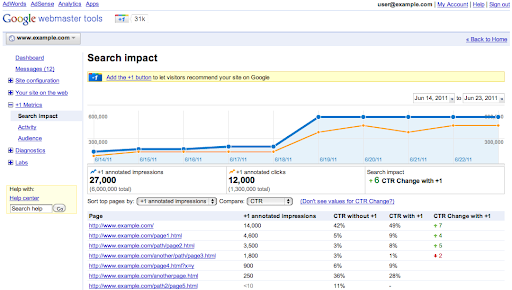
- Le
rapport d’impact sur la recherche
vous donne une idée de la façon dont les +1 affectent votre trafic de recherche organique. Vous pouvez découvrir si votre
taux de clics change lorsque des recommandations personnelles aident votre contenu à se démarquer. Pour ce faire,
comparez les clics et les impressions sur les résultats de recherche avec et sans annotations +1. Nous
n’afficherons des statistiques sur les variations du taux de clics que lorsque vous aurez suffisamment d’impressions pour une
comparaison significative. - Le
rapport d’activité
vous montre combien de fois vos pages ont reçu un +1, à partir de boutons situés à la fois sur votre site et sur d’autres
pages (telles que la recherche Google). - Enfin, le
rapport d’audience
vous montre des informations géographiques et démographiques agrégées sur les utilisateurs de Google qui ont attribué un +1
à vos pages. Pour protéger la vie privée, nous n’afficherons les informations sur l’audience que lorsqu’un nombre significatif
d’utilisateurs aura attribué un +1 à des pages de votre site.
Utilisez le menu Métriques +1 sur le côté de la page pour afficher vos rapports. Si vous n’avez pas encore vérifié
votre site sur Google Webmaster Tools, vous pouvez
suivre ces instructions
pour obtenir l’accès.
Enfin, vous pouvez également voir comment les utilisateurs partagent votre contenu à l’aide d’autres boutons que le +1 en utilisant
Social Plugin Analytics dans Google Analytics.
Une fois que vous avez configuré le code JavaScript pour Analytics, les rapports sur l’engagement social vous aident à comparer
les différents types d’actions de partage qui se produisent sur vos pages.

- Le rapport d’engagement social vous permet de voir comment le comportement du site change pour les visites qui
incluent des clics sur des boutons +1 ou d’autres actions sociales. Cela vous permet de déterminer, par exemple,
si les personnes qui mettent un +1 sur vos pages lors d’une visite sont susceptibles de passer plus de temps sur votre site que
les personnes qui ne le font pas. - Le rapport d’actions sociales vous permet de suivre le nombre d’actions sociales (clics +1, Tweets,
etc.) effectuées sur votre site, le tout au même endroit. - Le rapport de pages sociales vous permet de comparer les pages de votre site pour voir celles qui
génèrent le plus grand nombre d’actions sociales.
Si vous utilisez la version par défaut du dernier code de suivi Google Analytics, lorsque vous
ajoutez des boutons +1 à votre site,
nous activons automatiquement Social Plugin Analytics pour +1 dans votre compte. Vous pouvez
activer l’analytique pour d’autres plugins sociaux
en quelques étapes simples.
Les rapports sociaux ne font que commencer. Alors que les gens continuent de trouver de nouvelles façons d’interagir sur le web,
nous attendons avec impatience de nouveaux rapports qui aident les propriétaires d’entreprise à comprendre la valeur que
les actions sociales apportent à leur entreprise. Alors, un +1 aux données !
Comment nous l'appliquons
Google announcements age. We keep this post here for the record, and we note for clients whether the behaviour it describes still applies today or has since been superseded.
Services associés