Si vous avez des pages de cartes mémoire, vous pouvez aider les étudiants à mieux trouver les réponses aux questions éducatives en ajoutant Quiz des données structurées à vos pages de cartes mémoire. L’ajout de données structurées rend votre contenu éligible pour apparaître dans le carrousel de questions-réponses dans les résultats de recherche Google, Google Assistant et les résultats de Google Lens.
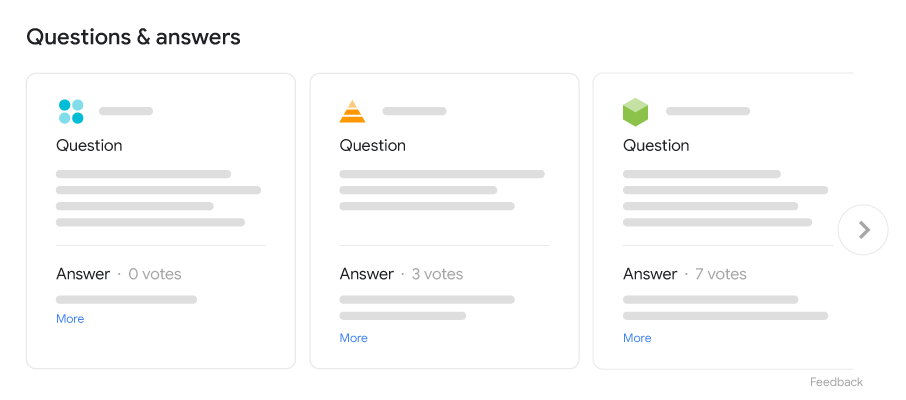

Les types de pages suivants sont éligibles pour le carrousel de questions-réponses éducatives :
- Page de cartes mémoire: Une page contenant des cartes mémoire qui ont généralement une question d’un côté et une réponse de l’autre. Pour baliser les pages de cartes mémoire, continuez à lire ce guide pour apprendre comment ajouter le schéma de questions-réponses éducatives.
- Page de questions-réponses unique: Une page qui ne contient qu’une seule question suivie de réponses soumises par les utilisateurs. Pour baliser les pages de questions-réponses uniques, ajoutez
QAPagebalisage à la place.
Disponibilité de la fonctionnalité
Le carrousel de questions-réponses éducatives n’est disponible que lors de la recherche de sujets liés à l’éducation sur ordinateur et mobile. Par exemple, essayez de rechercher des requêtes comme “la mesure de trois angles d’un quadrilatère est de 80 90 et 103 degrés” ou “le rapport de l’énergie de surface à la surface est”.
Le carrousel de questions-réponses éducatives est disponible dans les langues et régions suivantes :
| Langue | Régions disponibles |
|---|---|
| Anglais | Toutes les régions où Google Search est disponible |
| Portugais | Toutes les régions où Google Search est disponible |
| Espagnol | Mexique |
| Vietnamien | Toutes les régions où Google Search est disponible |
Comment ajouter des données structurées
Les données structurées sont un format standardisé pour fournir des informations sur une page et classer le contenu de la page. Si vous débutez avec les données structurées, vous pouvez en savoir plus sur
comment fonctionnent les données structurées.
Voici un aperçu de la façon de créer, tester et publier des données structurées.
- Ajoutez les propriétés requises. Selon le format que vous utilisez, apprenez où insérer des données structurées sur la page.
- Suivez les directives.
- Validez votre code en utilisant le
Test des résultats enrichis
et corrigez toute erreur critique. Pensez également à corriger tout problème non critique qui pourrait être signalé dans l’outil, car ils peuvent aider à améliorer la qualité de vos données structurées (cependant, ce n’est pas nécessaire pour être éligible aux résultats enrichis). - Déployez quelques pages qui incluent vos données structurées et utilisez l’ outil d’inspection d’URL pour tester comment Google voit la page. Assurez-vous que votre page est accessible à Google et n’est pas bloquée par un fichier robots.txt, la balise
noindexou
des exigences de connexion. Si la page semble correcte, vous pouvez. - : Laissez du temps pour le recrawl et la réindexation. N’oubliez pas qu’il peut s’écouler plusieurs jours après la publication d’une page pour que Google la trouve et la crawle.
Pour tenir Google informé des changements futurs, nous vous recommandons desoumettre un sitemap
. Vous pouvez automatiser cela avec l’.
API Sitemap de la Search Console
Exemples
<html>
<head>
<title>Cell Transport</title>
<script type=”application/ld+json”>
{
“@context”: “https://schema.org/”,
“@type”: “Quiz”,
“about”: {
“@type”: “Thing”,
“name”: “Cell Transport”
},
“educationalAlignment”: [
{
“@type”: “AlignmentObject”,
“alignmentType”: “educationalSubject”,
“targetName”: “Biology”
}
],
“hasPart”: [
{
“@context”: “https://schema.org/”,
“@type”: “Question”,
“eduQuestionType”: “Flashcard”,
“text”: “This is some fact about receptor molecules.”,
“acceptedAnswer”: {
“@type”: “Answer”,
“text”: “receptor molecules”
}
},
{
“@context”: “https://schema.org/”,
“@type”: “Question”,
“eduQuestionType”: “Flashcard”,
“text”: “This is some fact about the cell membrane.”,
“acceptedAnswer”: {
“@type”: “Answer”,
“text”: “cell membrane”
}
}
]
}
</script>
</head>
</html>
Directives
- Pour que votre page soit éligible au résultat enrichi de questions-réponses éducatives, vous devez suivre ces directives :
- Directives générales sur les données structurées
- Principes de base de la recherche
- Directives techniques
Directives de contenu
- Directives techniques
- Placez les données structurées sur la page feuille la plus détaillée possible. N’ajoutez pas de données structurées aux pages sans questions.
Toutes les questions doivent utiliser la valeurFlashcardpour la propriétéeduQuestionType - . Les pages contenant d’autres types de questions ne sont pas éligibles pour le carrousel de questions-réponses éducatives.
Assurez-vous que Googlebot peut. - crawler votre site efficacement
- Les questions sur votre site doivent être immédiatement visibles pour les utilisateurs sur la page, ce qui signifie que les questions ne sont pas conservées uniquement dans un fichier de données ou un PDF. Si votre page ne contient qu’une seule question suivie de plusieurs réponses soumises par les utilisateurs, utilisez
QAPagemarkup à la place.
Règles relatives au contenu
Nous avons créé ces règles de contenu de questions-réponses éducatives pour garantir que nos utilisateurs soient connectés à des ressources d’apprentissage pertinentes. Si nous trouvons du contenu qui enfreint ces règles, nous réagirons de manière appropriée, ce qui peut inclure la prise de mesure manuelle
et le non-affichage de votre contenu dans le résultat enrichi de questions-réponses éducatives sur Google.
- Les pages de questions-réponses éducatives doivent suivre les mêmes règles de contenu pour les pages de questions-réponses.
- Votre page doit contenir des questions et des réponses liées à l’éducation. Il doit y avoir au moins une paire de question et réponse sur votre page, et la réponse doit être liée à la question de l’utilisateur et y répondre.
- Vous êtes responsable de l’exactitude et de la qualité de vos pages de questions-réponses éducatives via cette fonctionnalité. S’il s’avère qu’une certaine quantité de votre contenu est inexacte sur la base des processus d’examen de la qualité et pédagogique, tout ou partie de vos pages de questions-réponses peuvent ne pas être éligibles pour cette fonctionnalité jusqu’à ce que vous résolviez les problèmes.
Balisage des normes pédagogiques
Les normes d’apprentissage sont les objectifs d’apprentissage de ce que les élèves doivent savoir et être capables de faire à chaque niveau scolaire. Les normes d’apprentissage ont de multiples usages, tels que le lien vers du contenu ou la constitution d’une partie d’une progression d’apprentissage. Le balisage des normes (trouvées sous le
educationalAlignment champ) associées au matériel d’apprentissage en ligne aide Google à organiser et à présenter les informations de la manière la plus utile aux personnes qui peuvent rechercher du contenu d’apprentissage basé sur ces normes. Voici un aperçu global du schéma :
Voici quelques exemples de normes :
- Common Core State Standards
- Texas Essential Knowledge and Skills (TEKS)
- Virginia Standards of Learning (SOL)
- BC Performance Standards
- Alberta Programs of Studies
- The Australian Curriculum (ACARA)
- The Victorian Curriculum (F-10)
- UK National Curriculum
Définitions de types de données structurées
Vous devez inclure les propriétés requises pour que votre contenu soit éligible à l’affichage en tant que résultat enrichi. Vous pouvez également inclure les propriétés recommandées pour ajouter plus d’informations sur votre contenu, ce qui pourrait offrir une meilleure expérience utilisateur.
Quiz
A Quiz est un ensemble de cartes mémoire (une ou plusieurs), qui portent généralement sur le même concept ou sujet.
La définition complète de Quiz est fournie sur schema.org.
Les propriétés prises en charge par Google sont les suivantes :
| Propriétés requises | |
|---|---|
hasPart | Informations imbriquées sur la question spécifique de la carte mémoire pour le quiz. Utilisez une Pour inclure plusieurs cartes mémoire, répétez cette propriété. |
| Propriétés recommandées | |
|---|---|
about | Informations imbriquées sur le concept sous-jacent derrière le |
about.name | Informations imbriquées sur le concept sous-jacent derrière le |
educationalAlignment | L’alignement du quiz sur un cadre éducatif établi. Cette propriété peut être répétée pour aligner le quiz sur un domaine d’études ou un domaine, et le niveau cible ou |
educationalAlignment.alignmentType | Une catégorie d’alignement entre la ressource d’apprentissage et le nœud de cadre pour le quiz. La Recherche Google utilise le LRMI standard. Répétez la
Voici comment spécifier à la fois les |
educationalAlignment.targetName | Le nom d’un nœud d’un cadre éducatif établi. Par exemple : “Classe 7 : Structure cellulaire”. |
Question
Chaque question correspond à une carte mémoire, imbriquée sous la hasPart property of
Quiz. Notez que ces Question exigences sont différentes de celles des
Question requirements for QAPage.
La définition complète de Question
est fournie sur schema.org. Les propriétés prises en charge par Google sont les suivantes :
| Propriétés requises | |
|---|---|
acceptedAnswer | Le texte complet de la réponse à une carte mémoire. Il ne doit y avoir qu’une seule |
eduQuestionType | Le type de question. Vous devez utiliser cette valeur fixe : |
text | Le texte complet de la question de la carte mémoire. |
Surveillez les résultats enrichis avec Search Console
Search Console est un outil qui vous aide à surveiller les performances de vos pages dans la recherche Google.
Vous n’êtes pas obligé de vous inscrire à Search Console pour figurer dans les résultats de recherche Google,
mais cela peut vous aider à comprendre et à améliorer la façon dont Google perçoit votre site. Nous
recommandons de vérifier Search Console dans les cas suivants :
- Après avoir déployé des données structurées pour la première fois
- Après avoir publié de nouveaux modèles ou mis à jour votre code
- En analysant le trafic périodiquement
Après avoir déployé des données structurées pour la première fois
Une fois que Google a indexé vos pages, recherchez les problèmes à l’aide du
Rapport sur l’état des résultats enrichisapproprié.
Idéalement, il y aura une augmentation des éléments valides et aucune augmentation des éléments non valides. Si vous trouvez des problèmes
dans vos données structurées :
- Corrigez les éléments non valides.
- Inspectez une URL en direct pour vérifier si le problème persiste.
- Demandez une validation en utilisant le rapport d’état.
Après avoir publié de nouveaux modèles ou mis à jour votre code
Lorsque vous apportez des modifications importantes à votre site Web, surveillez l’augmentation des éléments non valides dans les données structurées.
- Si vous constatez une augmentation des éléments non valides, vous avez peut-être déployé un nouveau modèle qui ne fonctionne pas ou votre site interagit avec le modèle
existant d’une manière nouvelle et inadaptée. - Si vous constatez une diminution des éléments valides (non compensée par une augmentation des éléments non valides), vous ne
${‘intégrez’} peut-être plus de données structurées dans vos pages. Utilisez l’
Outil d’inspection d’URL pour comprendre ce qui cause le problème.
En analysant le trafic périodiquement
Analysez votre trafic de recherche Google à l’aide du Rapport sur les performances.
Les données vous montreront à quelle fréquence votre page apparaît comme un résultat enrichi dans la recherche, à quelle fréquence les utilisateurs cliquent dessus et quelle est
votre position moyenne dans les résultats de recherche. Vous pouvez également récupérer automatiquement ces
résultats avec l’ Search Console API.
Dépannage
Si vous rencontrez des difficultés pour implémenter ou déboguer des données structurées, voici quelques ressources qui
pourraient vous aider.
- Si vous utilisez un système de gestion de contenu (CMS) ou si quelqu’un d’autre s’occupe de votre site,
demandez-lui de l’aide. Veillez à lui transférer tout message de Search Console détaillant le problème. - Google ne garantit pas que les fonctionnalités utilisant des données structurées apparaîtront dans les résultats de recherche.
Pour obtenir une liste des raisons courantes pour lesquelles Google peut ne pas afficher votre contenu dans un résultat enrichi, consultez les
Directives générales sur les données structurées. - Vous avez peut-être une erreur dans vos données structurées. Vérifiez la
liste des erreurs de données structurées
et le Rapport sur les données structurées non analysables. - Si vous avez reçu une action manuelle concernant les données structurées de votre page, les données structurées de la
page seront ignorées (bien que la page puisse toujours apparaître dans les résultats de recherche Google). Pour corriger
les problèmes de données structurées, utilisez le Rapport sur les actions manuelles. - Examinez les directives à nouveau pour déterminer si votre contenu n’est pas conforme à celles-ci. Le problème peut être causé par du contenu de spam ou par l’utilisation de balisage de spam.
Cependant, le problème n’est peut-être pas un problème de syntaxe, et le test des résultats enrichis ne pourra donc pas
l’identifier. - Résoudre les problèmes de résultats enrichis manquants / de baisse du nombre total de résultats enrichis.
- Laissez le temps nécessaire pour le nouveauexploration et la réindexation. N’oubliez pas qu’il peut s’écouler plusieurs jours après
la publication d’une page pour que Google la trouve et l’explore. Pour des questions générales sur l’exploration et l’indexation, consultez la
FAQ sur l’exploration et l’indexation de la recherche Google. - Publiez une question dans le forum de Google Search Central.
Comment nous l'appliquons
Education Q&A markup fits structured learning content, not marketing FAQ blocks. We keep that distinction because misusing it invites a manual action.
Services associés