Vendredi 10 décembre 2010
Juste à temps pour les fêtes,
l’équipe des Outils pour webmasters
a mis à jour les fonctionnalités « Requêtes de recherche » et « Liens vers votre site ».
Requêtes de recherche avec pages principales
Au cours de l’année écoulée, nous avons apporté des modifications importantes à la fonctionnalité de requêtes de recherche dans les Outils pour webmasters. Nous avons reçu de nombreux commentaires concernant cette fonctionnalité extrêmement populaire. L’une des demandes fréquentes que nous avons entendues était que les utilisateurs souhaitaient pouvoir consulter les données de requêtes de recherche pour les pages individuelles de leur site. Eh bien, nous étions tout à fait d’accord pour dire que cela serait utile et nous avons rapidement entrepris d’ajouter cette fonctionnalité aux requêtes de recherche. Les fruits de nos efforts ont enfin mûri sur l’arbre et sont prêts à être appréciés. Désormais, lorsque vous consultez la fonctionnalité de requêtes de recherche dans les Outils pour webmasters, vous verrez un nouvel onglet intitulé « Pages principales ». L’onglet « Pages principales » répertorie les données d’impressions, de clics et de position pour les principales pages de votre site en fonction de leurs performances dans les résultats de recherche de Google.
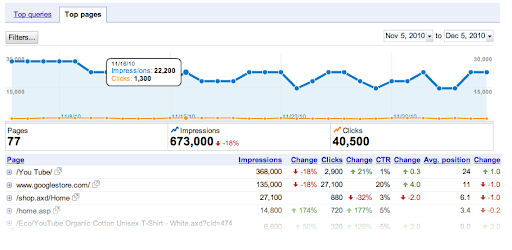
Si vous cliquez sur l’une des pages individuelles répertoriées, vous verrez une liste des requêtes générant du trafic vers cette page, ainsi que les impressions et le nombre de clics pour chaque requête.
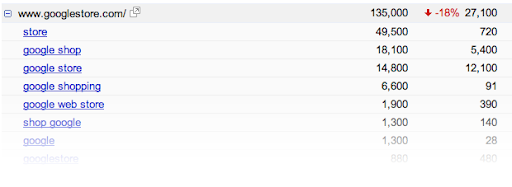
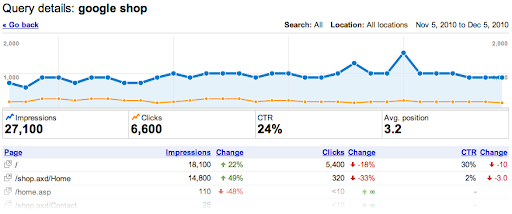
Tout comme dans la vue « Principales requêtes », vous pouvez cliquer sur une requête spécifique pour afficher des données plus détaillées et évaluer les performances de la requête sur l’ensemble du site.
Pour rendre le filtrage des requêtes de recherche encore plus facile, nous avons ajouté des graphiques circulaires pour montrer visuellement les proportions du type de recherche, de l’emplacement et du trafic. De même, dans la vue « Principales requêtes », vous pouvez désormais spécifier « contenant » ou « ne contenant pas » lors du filtrage des requêtes.

Liens vers votre site avec liens intermédiaires
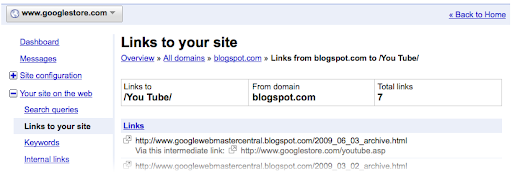
Liens vers votre site indique désormais lorsqu’une URL particulière redirige. S’il existe un lien vers votre site qui pointe vers l’URL1, laquelle redirige ensuite vers l’URL2, nous affichons désormais le lien de l’URL1 vers l’URL2 en tant que lien intermédiaire. Nous avons également ajouté une option « Télécharger tous les liens » à tous les tableaux de la fonctionnalité Liens vers votre site.
Maintenant que vous connaissez ces mises à jour, veuillez prendre quelques minutes pour les vérifier sur votre site. Nous espérons que cela vous procurera un peu de joie supplémentaire en cette période de fêtes. Faites-nous part de vos commentaires en publiant dans notre
Forum d’aide pour les webmasters.
Joyeuses fêtes de la part de l’équipe des Outils pour webmasters !
Comment nous l'appliquons
Google announcements age. We keep this post here for the record, and we note for clients whether the behaviour it describes still applies today or has since been superseded.
Services associés