Jeudi 29 septembre 2011
Nous entendons constamment les webmasters dire qu’ils doivent prioriser leur temps. Certains gèrent des dizaines ou des centaines de sites clients ; d’autres gèrent leur propre entreprise et n’ont peut-être qu’une heure à consacrer à la maintenance de leur site web entre la gestion des finances et des stocks. Pour vous aider à prioriser vos efforts, Webmaster Tools introduit la notion de « santé du site », et nous avons redessiné la page d’accueil de Webmaster Tools pour mettre en valeur vos sites rencontrant des problèmes de santé. Cela devrait vous permettre de voir facilement ce qui requiert le plus votre attention, sans avoir à parcourir tous les rapports de Webmaster Tools pour chaque site que vous gérez.
Voici à quoi ressemble la nouvelle page d’accueil :

Vous pouvez voir que les sites présentant des problèmes de santé s’affichent en haut de la liste. (Si vous préférez, vous pouvez toujours revenir à un affichage alphabétique de vos sites.) Pour voir les problèmes spécifiques que nous avons détectés sur un site, cliquez sur l’icône de santé du site
ou sur le lien « Vérifier la santé du site » à côté de ce site :

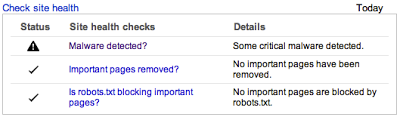
Cette nouvelle page d’accueil n’est actuellement disponible que si vous possédez 100 sites ou moins dans votre compte Webmaster Tools (vérifiés ou non). Nous travaillons à la rendre disponible pour tous les comptes à l’avenir. Si vous possédez plus de 100 sites, vous pouvez consulter les informations de santé du site en haut du tableau de bord de chacun de vos sites.
Pour l’instant, nous inclure trois problèmes dans la vérification de la santé de votre site :
- Avons-nous détecté des logiciels malveillants sur le site ?
- Des pages importantes ont-elles été supprimées via notre
outil de suppression d’URL? - ?
L’une de vos pages importantes est-elle bloquée pour l’exploration dans robots.txt ?
Vous pouvez cliquer sur l’un de ces éléments pour obtenir plus de détails sur ce que nous avons détecté sur votre site. Si l’icône de santé du site et le lien « Vérifier la santé du site » n’apparaissent pas à côté d’un site, cela signifie que nous n’avons détecté aucun de ces problèmes sur ce site (félicitations !). Un mot sur les « pages importantes » : comme vous le savez, vous pouvez obtenir une liste complète de toutes les URL qui ont été supprimées en allant dans >
Configuration du site > Accès aux robots d’explorationSupprimer l’URL
et vous pouvez voir toutes les URL que nous n’avons pas pu explorer en raison de robots.txt en allant dans > Diagnostics
> Erreurs d’explorationRestreint par robots.txt
. Mais comme les webmasters bloquent ou suppriment souvent du contenu à dessein, nous voulions uniquement indiquer un problème potentiel de santé du site si nous pensons que vous avez peut-être bloqué ou supprimé une page par inadvertance, c’est pourquoi nous nous concentrons sur les « pages importantes ». Pour l’instant, nous examinons le nombre de clics que reçoivent les pages (que vous pouvez voir dans > Votre site sur le webRequêtes de recherche
) pour déterminer l’importance, et nous pourrions intégrer d’autres facteurs à l’avenir à mesure que nos vérifications de la santé du site évoluent.
Il est évident que ces trois problèmes (logiciels malveillants, URL supprimées et URL bloquées) ne sont pas les seuls éléments susceptibles de rendre un site web « malsain » ; à l’avenir, nous espérons élargir les contrôles que nous utilisons pour déterminer la santé d’un site et, bien sûr, rien ne remplace votre propre jugement et votre connaissance de ce qui se passe sur votre site. Mais nous espérons que ces changements vous permettront de repérer plus facilement et rapidement les problèmes majeurs de vos sites sans avoir à fouiller dans toutes les données et tous les rapports.
Après avoir résolu les problèmes de santé du site que nous avons signalés, il faudra généralement plusieurs jours pour que l’avertissement disparaisse de votre compte Webmaster Tools, car nous devons réexplorer le site, constater les modifications que vous avez apportées, puis traiter ces informations via nos pipelines de recherche web et de Webmaster Tools. Si vous continuez à voir un avertissement de santé du site après une semaine environ, le problème n’a peut-être pas été résolu. Vous pouvez demander de l’aide pour le résoudre dans notre
Webmaster Help Forum
Comment nous l'appliquons
Google announcements age. We keep this post here for the record, and we note for clients whether the behaviour it describes still applies today or has since been superseded.
Services associés