Thursday, June 05, 2014
Have you ever used Google Search on your smartphone and clicked on a promising-looking result,
only to end up on the mobile site’s home page, with no idea why the page you were hoping to see
vanished? This is such a common annoyance that
we’ve even seen comics about it. Usually this
happens because the website is
not properly set up to handle requests from smartphones
and sends you to its smartphone home page—we call this a “faulty redirect”.
We’d like to spare users the frustration of landing on irrelevant pages and help webmasters fix
the faulty redirects. Starting today in our English search results in the US, whenever we detect
that smartphone users are redirected to a home page instead of the page they asked for, we may note
it below the result. If you still wish to proceed to the page, you can click “Try anyway”:

And we’re providing advice and resources to help you direct your audience to the pages they want.
Here’s a quick rundown:
- Do a few searches on your own phone (or with
a browser set up to act like a smartphone)
and see how your site behaves. Simple but effective. 🙂 Check out
Webmaster Tools
—we’ll send you a message if we detect that any of your site’s pages are redirecting
smartphone users to the home page. We’ll also show you any faulty redirects we detect in the
Smartphone Crawl Errors section of Webmaster Tools: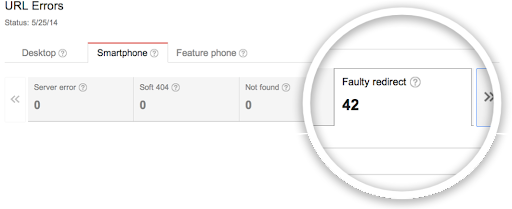
Investigate any faulty redirects and fix them. Here’s what you can do:
- Use the example URLs we provide in Webmaster Tools as a starting point to debug exactly
where the problem is with your server configuration. - Set up your server so that it redirects smartphone users to the equivalent URL on your
smartphone site. - If a page on your site doesn’t have a smartphone equivalent, keep users on the desktop page,
rather than redirecting them to the smartphone site’s home page. Doing nothing is better than
doing something wrong in this case. - Try using
responsive web design,
which serves the same content for desktop and smartphone users.
- Use the example URLs we provide in Webmaster Tools as a starting point to debug exactly

If you’d like to know more about building smartphone-friendly sites,
read our full recommendations. And, as always, if
you need more help you can ask a question in our
webmaster forum.
How we apply this
Google announcements age. We keep this post here for the record, and we note for clients whether the behaviour it describes still applies today or has since been superseded.
Related services