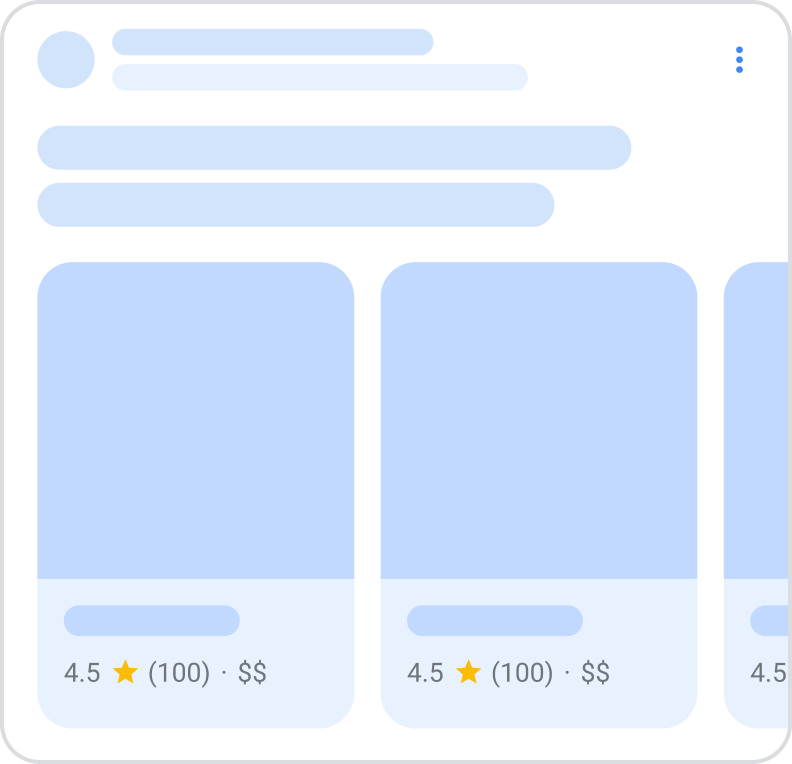
Google uses structured data to understand the content on the page and show that content in a richer appearance in search results, which is called a rich result. This guide focuses on a new carousel rich result that’s in beta, which is a list-like rich result that people can scroll horizontally to see more entities from a given site (also known as a host carousel). Each tile in the carousel may have information from your site about the price, rating, and images for entities on the page.
To be eligible for this beta rich result, add ItemListstructured data in combination with at least one one of the following supported structured data items:
Here’s how carousels can look in Google Search when you add ItemList markup in combination with a supported content type:
Feature availability
This feature is in beta and you may see changes in requirements or guidelines, as we develop this feature. This feature is also only available in European Economic Area (EEA) countries, Turkey, and South Africa, on both desktop and mobile devices. In EEA countries, this experience is available for queries related to hotels, vacation rentals, ground transportation, flights, local businesses, things to do (events, tours, and activities), and shopping. In Turkey, this experience is only available for queries related to hotels, vacation rentals, and local businesses. In South Africa, this experience is available for queries related to hotels, vacation rentals, things to do (events, tours, and activities), flights, shopping, food delivery, car hire, and bus booking.
If your business is based in the EEA or Turkey, or serves users in the EEA or Turkey, fill out the applicable form:
Structured data is a standardized format for providing information about a page and classifying the page content. If you’re new to structured data, you can learn more about how structured data works.
Here’s an overview of how to add structured data to your site.
Pick a single summary page that contains some information about every entity in the list. For example, a category page that lists the “Top hotels in Paris”, with links out to specific detail pages on your site for more information about each hotel. You can mix and match different types of entities (for example, hotels, restaurants), if needed for your scenario. For example, if you have a “Things to do in Switzerland” article that lists both local events and local businesses.
Add the required properties to that summary page. You don’t need to add markup to the detail pages in order to be eligible for this beta feature. Based on the format you’re using, learn where to insert structured data on the page.
Add the required and recommended properties for the specific content type that the carousel is about:
Depending on your scenario, you may choose the best type to use. For example, if you have a list of hotels and vacation rentals on your page, use both Hotel and VacationRental types. While it’s ideal to use the type that’s closest to your scenario, you can choose to use a more generic type (for example, LocalBusiness).
Deploy a few pages that include your structured data and use the URL Inspection tool to test how Google sees the page. Be sure that your page is accessible to Google and not blocked by a robots.txt file, the noindex tag, or login requirements. If the page looks okay, you can ask Google to recrawl your URLs.
For your page to be eligible for carousel rich results (beta), you must follow the Search Essentials and general structured data guidelines. In addition, the following guidelines apply to carousel rich results (beta):
Use of generic types is allowed. However, to use recommended properties, you must use the respective types. For example, to use amenityFeature, use the LodgingBusiness type.
Use of additional or extra fields is allowed, but may not appear in the rich result.
Your site must have a summary page and multiple detail pages. Currently, this feature isn’t designed to support other scenarios, such as an all-in-one page where the “details” are anchor points within the same page.
The markup must be on a summary or category page, which is a list-like page that contains information about at least three entities and then links out to other pages on your site for more information on those entities. While you don’t need to add markup to the detail pages, you must include the detail page URLs in your summary page’s markup.
Mark up all items that are on the summary or category page. For paginated categories, add an ItemList to each subsequent page and include the entities that are listed on that page. For infinite scroll, focus on marking up the entities that are initially loaded in the viewport.
Examples
The following is a high level structure of the carousel. The order specified in the markup is the order that will be used to order the tiles in the carousel rich result.
Structured data type definitions
You must include the required properties for your content to be eligible for display as a rich result. You can also include the recommended properties to add more information about your content, which could provide a better user experience.
ItemList
ItemList is the container item that holds all elements in the list. All URLs of the elements in the list must point to different pages on the same domain.
For best results, we recommend providing multiple high-resolution images (minimum of 50K pixels when multiplying width and height) with the following aspect ratios: 16×9, 4×3, and 1×1.
The string name of the entity or item. For example, the name of a hotel or a vacation listing. The item.name is displayed as the title of an individual item in the carousel. HTML formatting is ignored.
The canonical URL of the item detail page (for example, the standalone page for a single hotel or vacation listing that was referenced in the summary page). All URLs in the list must be unique, but live on the same domain (the same domain, or sub or super domain as the summary page).
A numerical quality rating for the item, either a number, fraction, or percentage (for example, 4, 60%, or 6 / 10). Google understands the scale for fractions and percentages, since the scale is implied in the fraction itself or the percentage. The default scale for numbers is a 5-point scale, where 1 is the lowest value and 5 is the highest value. If another scale is intended, use bestRating and worstRating.
For decimal numbers, use a dot instead of a comma to specify the value (for example 4.4 instead of 4,4). In Microdata and RDFa, you can use content attributes to override the visible content. That way, you can show the user whatever style convention you want, while also satisfying the dot requirement for structured data. For example:
Additional type-specific properties definitions
LocalBusiness (and subtypes)
In addition to the ListItem properties, Google supports the following LocalBusiness properties (including its subtypes) for carousel rich results Nest these properties under itemListElement.item.
The relative price range of a business, commonly specified by a normalized number of currency signs. Provide the price range in either of the following formats:
Price level: for example, “$”, “$$”, “$$$”
Range: for example, “$-$$”
This field must be shorter than 12 characters. If it’s longer than 12 characters, Google won’t show a price range for the business.
For restaurants only: The type of cuisine the restaurant serves.
Product
In addition to the ListItem properties, Google supports the following Product properties for carousel rich results. Nest these properties under itemListElement.item.
A nested Offer or AggregateOffer to sell the product. Include the recommended properties for either Offer or AggregateOffer (whichever is applicable to your content).
If you’re using Offer, including the following properties:
offers.price
offers.priceCurrency
If you’re using AggregateOffer, including the following properties:
The highest price of all offers available. If you’re specifying a single price with price, don’t need to include the highPrice and lowPrice properties.
The offer price of a product, or of a price component when attached to PriceSpecification and its subtypes. If you’re specifying a price range with lowPrice and highPrice, don’t include the price property.
The currency used to describe the product price, in three-letter ISO 4217 format. If a currency is not provided, Google defaults to USD.
Event
In addition to the ListItem properties, Google supports the following Event properties for carousel rich results. Nest these properties under itemListElement.item.
Recommended properties
offers
Offer or AggregateOffer
A nested Offer or AggregateOffer to sell the event. Include the recommended propeties for either Offer or AggregateOffer (whichever is applicable to your content).
If you’re using Offer, including the following properties:
offers.price
offers.priceCurrency
If you’re using AggregateOffer, including the following properties:
The highest price of all offers available. If you’re specifying a single price with price, don’t need to include the highPrice and lowPrice properties.
The price for your tickets, including service charges and fees. Don’t forget to update it as prices change or tickets sell out. If you’re specifying a price range with lowPrice and highPrice, don’t include the price property.
If the event is available without payment, fees, or service charges, set the price to 0.
The currency used to describe the event price, in three-letter ISO 4217 format. If a currency is not provided, Google defaults to USD.
Examples for common scenarios
Restaurant example
Here is an example of a restaurant carousel in JSON-LD.
Lodging (Hotels and VacationRental) example
Here is an example of a lodging carousel in JSON-LD.
Things to do example example
Here is an example of a things to do carousel in JSON-LD.
Product example
Here is an example of a product carousel in JSON-LD.
Troubleshooting
If you’re having trouble implementing or debugging structured data, here are some resources that may help you.
If you’re using a content management system (CMS) or someone else is taking care of your site, ask them to help you. Make sure to forward any Search Console message that details the issue to them.
Google does not guarantee that features that consume structured data will show up in search results. For a list of common reasons why Google may not show your content in a rich result, see the General Structured Data Guidelines.
If you received a structured data manual action against your page, the structured data on the page will be ignored (although the page can still appear in Google Search results). To fix structured data issues, use the Manual Actions report.
Review the guidelines again to identify if your content isn’t compliant with the guidelines. The problem can be caused by either spammy content or spammy markup usage. However, the issue may not be a syntax issue, and so the Rich Results Test won’t be able to identify these issues.
Allow time for re-crawling and re-indexing. Remember that it may take several days after publishing a page for Google to find and crawl it. For general questions about crawling and indexing, check the Google Search crawling and indexing FAQ.
Carousel markup is in beta and behaves accordingly. We implement it for clients with genuinely list-shaped content and set the expectation that beta features can change or disappear.