Google, yapılandırılmış verileri
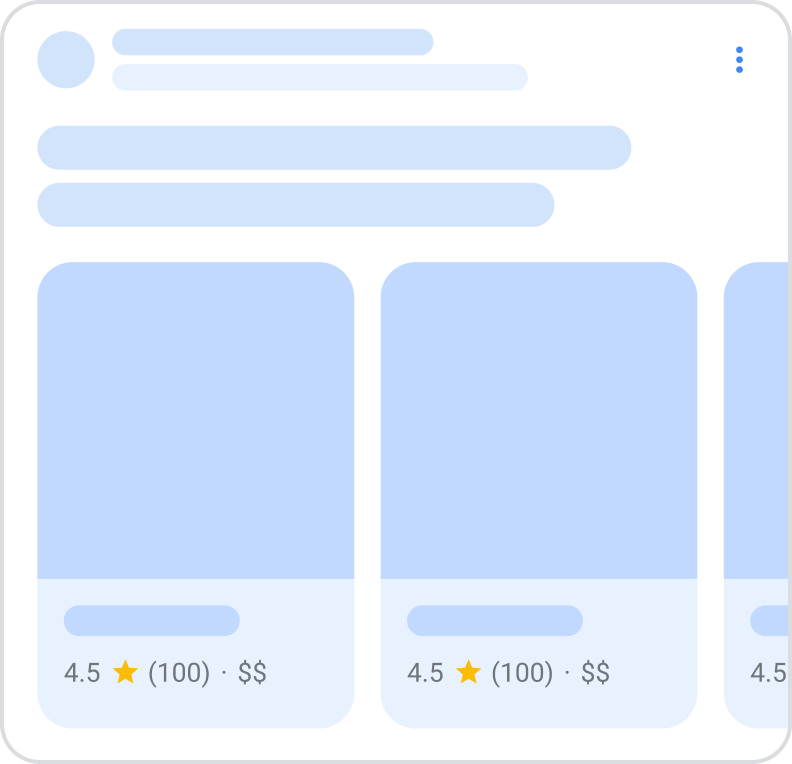
sayfadaki içeriği anlamak ve bu içeriği arama sonuçlarında daha zengin bir görünümle göstermek için kullanır; buna zengin sonuçdenir. Bu kılavuz, beta aşamasında olan yeni bir atlıkarınca zengin sonucunaodaklanmaktadır; bu, kullanıcıların belirli bir siteden daha fazla öğeyi görmek için yatay olarak kaydırabildiği liste benzeri bir zengin sonuçtur (ana bilgisayar atlıkarıncası olarak da bilinir). Atlıkarıncadaki her bir kutucuk, sayfanızdaki öğeler için sitenizden fiyat, derecelendirme ve görseller hakkında bilgiler içerebilir.
Bu beta zengin sonucu için uygun olmak üzere, ItemList yapılandırılmış verisini, desteklenen aşağıdaki yapılandırılmış veri öğelerinden en az biriyle birlikte ekleyin:

LocalBusiness
ve alt türleri, örneğin:ProductEvent
Desteklenen bir içerik türüyle birlikte ItemList işaretlemesi eklediğinizde atlıkarıncaların Google Arama’da nasıl görünebileceği aşağıda açıklanmıştır:
Özellik kullanılabilirliği
Bu özellik beta aşamasındadır ve biz bu özelliği geliştirdikçe gereksinimlerde veya yönergelerde değişiklikler görebilirsiniz. Bu özellik ayrıca yalnızca Avrupa Ekonomik Alanı
(AEA) ülkelerinde, Türkiye’de ve Güney Afrika’da, hem masaüstü hem de mobil cihazlarda kullanılabilir. AEA ülkelerinde bu deneyim oteller, tatil kiralama yerleri, kara yolu taşımacılığı, uçuşlar, yerel işletmeler, yapılacak şeyler (etkinlikler, turlar ve aktiviteler) ve alışveriş ile ilgili sorgular için mevcuttur. Türkiye’de bu deneyim yalnızca oteller, tatil kiralama yerleri ve yerel işletmeler ile ilgili sorgular için mevcuttur. Güney Afrika’da bu deneyim oteller, tatil kiralama yerleri, yapılacak şeyler (etkinlikler, turlar ve aktiviteler), uçuşlar, alışveriş, yemek teslimatı, araç kiralama ve otobüs rezervasyonu ile ilgili sorgular için mevcuttur.
İşletmeniz AEA veya Türkiye merkezliyse ya da AEA veya Türkiye’deki kullanıcılara hizmet veriyorsa, ilgili formu doldurun:
- Kara yolu taşımacılığı, oteller, tatil kiralama yerleri, yerel işletmeler ve yapılacak şeyler (örneğin, etkinlikler, turlar ve aktiviteler) ile ilgili sorgular için bu
Google Arama toplayıcı özellikleri ilgi formu - Uçuş özellikleri için bu
uçuş sorguları ilgi formunu - kullanın. Alışveriş sorguları için CSS Programı ülkelerinde,
Karşılaştırmalı Alışveriş Hizmetleri (CSS) programı
ile başlayın. İşletmeniz Güney Afrika merkezliyse,
Google Arama Güney Afrika Rozetleri ve İyileştirme Çipleri İlgi Formu’nu.
doldurun. Yapılandırılmış veri ekleyin
Yapılandırılmış veriler, bir sayfa hakkında bilgi sağlamak ve sayfa içeriğini sınıflandırmak için kullanılan standart bir formattır. Yapılandırılmış veriler konusunda yeniyseniz,
yapılandırılmış verilerin nasıl çalıştığı.
hakkında daha fazla bilgi edinebilirsiniz. Sitenize nasıl yapılandırılmış veri ekleyeceğinize dair genel bir bakış aşağıdadır.
- Listedeki her öğe hakkında bazı bilgiler içeren tek bir özet sayfası seçin. Örneğin, her otel hakkında daha fazla bilgi için sitenizdeki belirli ayrıntı sayfalarına bağlantılar içeren “Paris’teki en iyi oteller” listesini sunan bir kategori sayfası. Senaryonuz için gerekirse farklı türdeki öğeleri (örneğin, oteller, restoranlar) karıştırıp eşleştirebilirsiniz. Örneğin, hem yerel etkinlikleri hem de yerel işletmeleri listeleyen “İsviçre’de yapılacak şeyler” başlıklı bir makaleniz varsa.
- Bu özet sayfasına gerekli özellikleri ekleyin. Bu beta özelliği için uygun olmak adına ayrıntı sayfalarına işaretleme eklemenize gerek yoktur. Kullandığınız formata bağlı olarak,
sayfaya yapılandırılmış verinin nasıl ekleneceğini. - öğrenin. Atlıkarıncanın ilgili olduğu belirli içerik türü için gerekli ve önerilen özellikleri ekleyin:
LocalBusinessve alt türleri, örneğin:ProductEvent
Senaryonuza bağlı olarak, kullanmak için en iyi türü seçebilirsiniz. Örneğin, sayfanızda oteller ve tatil kiralama yerlerinden oluşan bir listeniz varsa, hem
Hotelhem de
VacationRentaltürlerini kullanın. Senaryonuza en yakın türü kullanmak ideal olsa da, daha genel bir tür kullanmayı da seçebilirsiniz (örneğin,LocalBusiness). - ). Yönergeleri.
- izleyin. Kodunuzu
Zengin Sonuçlar Testi. - kullanarak doğrulayın. Yapılandırılmış verilerinizi içeren birkaç sayfayı yayınlayın ve Google’ın sayfayı nasıl gördüğünü test etmek için URL Denetleme aracını kullanın. Sayfanızın Google tarafından erişilebilir olduğundan ve bir robots.txt dosyası,
noindexetiketi veya giriş gereksinimleri tarafından engellenmediğinden emin olun. Sayfa düzgün görünüyorsa,
Google’dan URL’lerinizi yeniden taramasını isteyebilirsiniz. - Google’ı gelecekteki değişikliklerden haberdar etmek için
site haritası göndermeniziöneririz. Bunu
Search Console Site Haritası API’si.
ile otomatikleştirebilirsiniz.
Yönergeler Sayfanızın atlıkarınca zengin sonuçları (beta) için uygun olması için
Arama Temelleri’ni vegenel yapılandırılmış veri yönergelerini
- izlemelisiniz. Ayrıca, atlıkarınca zengin sonuçları (beta) için aşağıdaki yönergeler geçerlidir:
Genel türlerin kullanımına izin verilir. Ancak, önerilen özellikleri kullanmak için ilgili türleri kullanmalısınız. Örneğin,amenityFeaturekullanmak için
LodgingBusiness - türünü kullanın.
- Ek veya fazladan alanların kullanımına izin verilir, ancak bunlar zengin sonuçta görünmeyebilir.
- Sitenizde bir özet sayfası ve birden fazla ayrıntı sayfası bulunmalıdır. Şu anda bu özellik, “ayrıntıların” aynı sayfa içindeki çapa noktaları olduğu hepsi bir arada sayfa gibi diğer senaryoları desteklemek üzere tasarlanmamıştır.
- İşaretleme, en az üç öğe hakkında bilgi içeren ve bu öğeler hakkında daha fazla bilgi için sitenizdeki diğer sayfalara bağlantı veren liste benzeri bir sayfa olan özet veya kategori sayfasında olmalıdır. Ayrıntı sayfalarına işaretleme eklemeniz gerekmese de, ayrıntı sayfası URL’lerini özet sayfanızın işaretlemesine dahil etmelisiniz.
Özet veya kategori sayfasındaki tüm öğeleri işaretleyin. Sayfalandırılmış kategoriler için her sonraki sayfaya birItemList
ekleyin ve o sayfada listelenen öğeleri dahil edin. Sonsuz kaydırma için, başlangıçta görünüm alanında yüklenen öğeleri işaretlemeye odaklanın.
Örnekler
<html>
<head>
<title>İtalya’daki En İyi 5 Restoran</title>
<script type=”application/ld+json”>
{
“@context”: “https://schema.org”,
“@type”: “ItemList”,
“itemListElement”: [
{
“@type”: “ListItem”,
“position”: 1,
“item”: {
“@type”: “Restaurant”,
“name”: “Trattoria Luigi”,
“image”: [
“https://example.com/photos/1×1/photo.jpg”,
“https://example.com/photos/4×3/photo.jpg”,
“https://example.com/photos/16×9/photo.jpg”
],
“priceRange”: “$$$”,
“servesCuisine”: “İtalyan”,
“aggregateRating”: {
“@type”: “AggregateRating”,
“ratingValue”: 4.5,
“reviewCount”: 250
},
“url”: “https://www.example.com/trattoria-luigi”
}
},
{
“@type”: “ListItem”,
“position”: 2,
“item”: {
“@type”: “Restaurant”,
“name”: “La Pergola”,
“image”: [
“https://example.com/photos/1×1/photo.jpg”,
“https://example.com/photos/4×3/photo.jpg”,
“https://example.com/photos/16×9/photo.jpg”
],
“priceRange”: “$$$”,
“servesCuisine”: “İtalyan”,
“aggregateRating”: {
“@type”: “AggregateRating”,
“ratingValue”: 4.9,
“reviewCount”: 1150
},
“url”: “https://www.example.com/la-pergola”
}
},
{
“@type”: “ListItem”,
“position”: 3,
“item”: {
“@type”: “Restaurant”,
“name”: “Pasta e Basta”,
“image”: [
“https://example.com/photos/1×1/photo.jpg”,
“https://example.com/photos/4×3/photo.jpg”,
“https://example.com/photos/16×9/photo.jpg”
],
“priceRange”: “$$$”,
“servesCuisine”: “İtalyan”,
“aggregateRating”: {
“@type”: “AggregateRating”,
“ratingValue”: 4.2,
“reviewCount”: 690
},
“url”: “https://www.example.com/pasta-e-basta”
}
}
]
}
</script>
</head>
<body>
</body>
</html>
Yapılandırılmış veri türü tanımları
İçeriğinizin zengin sonuç olarak görüntülenmeye uygun olması için gerekli özellikleri dahil etmelisiniz. Ayrıca, içeriğiniz hakkında daha fazla bilgi eklemek için önerilen özellikleri de dahil edebilirsiniz; bu, daha iyi bir kullanıcı deneyimi sağlayabilir.
ItemList ItemList, listedeki tüm öğeleri tutan kapsayıcı öğedir. Listedeki öğelerin tüm URL’leri aynı etki alanındaki farklı sayfalara işaret etmelidir.
ItemList’in tam tanımı ItemList adresinde mevcuttur:
schema.org/ItemList.
| Gerekli özellikler | |
|---|---|
itemListElement | Öğe listesi. Bir liste belirtmek için, en az üç |
itemListElement.item | Alt türü: Listedeki bireysel bir öğe. Bu nesneyi şunlarla doldurun:
Örnek: Bir otel için |
itemListElement.position | Öğenin atlıkarıncadaki konumu. Bu, 1 tabanlı bir sayıdır. |
Ortak liste öğesi özellikleri (LocalBusiness, Product, veya Event)
Tüm atlıkarınca öğe türleri aşağıdaki özellikleri ortak olarak paylaşır.
| Gerekli özellikler | |
|---|---|
image | Tekrarlanan Varlığın veya öğenin bir veya daha fazla görseli (örneğin, otelin bir görseli). Bu görsel özelliğine logoları dahil etmeyin. Ek görsel yönergeleri:
Örneğin: |
name | Varlığın veya öğenin dize adı. Örneğin, bir otelin veya tatil listesinin adı. |
url | Öğe ayrıntı sayfasının standart URL’si (örneğin, özet sayfasında referans verilen tek bir otel veya tatil listesi için bağımsız sayfa). Listedeki tüm URL’ler benzersiz olmalı, ancak aynı etki alanında (özet sayfasıyla aynı etki alanı veya alt ya da üst etki alanı) bulunmalıdır. |
| Önerilen özellikler | |
|---|---|
aggregateRating.bestRating | Bu derecelendirme sisteminde izin verilen en yüksek değer (örneğin, |
aggregateRating.ratingCount | Sitenizdeki öğe için toplam derecelendirme sayısı. |
aggregateRating.ratingValue | Öğe için sayısal bir kalite derecelendirmesi; sayı, kesir veya yüzde (örneğin, kullanın. Ondalık sayılar için, değeri belirtmek üzere virgül yerine nokta kullanın (örneğin |
Ek türe özgü özellik tanımları
LocalBusiness (ve alt türleri)
ListItem özelliklerine ek olarak,Google, atlıkarınca zengin sonuçları için aşağıdaki LocalBusiness özelliklerini (alt türleri dahil) destekler. Bu özellikleri itemListElement.item.
| altında iç içe yerleştirin. | |
|---|---|
Önerilen özellikler | LocationFeatureSpecification |
priceRange | Genellikle normalleştirilmiş bir para birimi işareti sayısıyla belirtilen bir işletmenin göreli fiyat aralığı. Fiyat aralığını aşağıdaki biçimlerden birinde sağlayın:
Bu alan 12 karakterden kısa olmalıdır. 12 karakterden uzunsa, Google işletme için bir fiyat aralığı göstermez. |
servesCuisine | Yalnızca restoranlar için: Restoranın sunduğu mutfak türü. |
Product
ListItem özelliklerine ek olarak,Google, atlıkarınca zengin sonuçları için aşağıdaki Product özelliklerini destekler. Bu özellikleri
itemListElement.item.
| altında iç içe yerleştirin. | |
|---|---|
Önerilen özellikler | AggregateOffer Eğer
Eğer
|
offers.highPrice | Mevcut tüm tekliflerin en yüksek fiyatı. Tek bir fiyatı |
offers.lowPrice | Mevcut tüm tekliflerin en düşük fiyatı. Tek bir fiyatı |
offers.price | Bir ürünün veya |
offers.priceCurrency | Ürün fiyatını tanımlamak için kullanılan, üç harfli |
kullanır.
Event ListItem özelliklerineek olarak, Google, atlıkarınca zengin sonuçları için aşağıdaki Event
özelliklerini destekler. Bu özellikleri.
| itemListElement.item | |
|---|---|
altında iç içe yerleştirin. |
veya AggregateOffer (içeriğiniz için hangisi geçerliyse) için önerilen özellikleri dahil edin.
offers.priceCurrency
|
offers.priceCurrency | Sayı |
özelliklerini dahil etmenize gerek yoktur. | Sayı |
özelliklerini dahil etmenize gerek yoktur. | Sayı özelliğini dahil etmeyin. Etkinlik ödeme, ücret veya hizmet bedeli olmadan kullanılabiliyorsa, |
0 olarak ayarlayın. | Metin |
USD
kullanır. Yaygın senaryolar için örnekler
Restaurant
İşte JSON-LD biçiminde bir restoran atlıkarıncası örneği.<html>
<head>
<title>Paris'teki En İyi 5 Restoran</title>
<script type="application/ld+json">
{
"@context": "https://schema.org",
"@type": "ItemList",
"itemListElement": [
{
"@type": "ListItem",
"position": 1,
"item": {
"@type": "Restaurant",
"name": "Trattoria Luigi",
"image": [
"https://example.com/photos/1x1/photo.jpg",
"https://example.com/photos/4x3/photo.jpg",
"https://example.com/photos/16x9/photo.jpg"
],
"priceRange": "$$$",
"servesCuisine": "İtalyan",
"aggregateRating": {
"@type": "AggregateRating",
"ratingValue": 4.5,
"reviewCount": 250
},
"url": "https://www.example.com/restaurant-location-1"
}
},
{
"@type": "ListItem",
"position": 2,
"item": {
"@type": "Restaurant",
"name": "La Pergola",
"image": [
"https://example.com/photos/1x1/photo.jpg",
"https://example.com/photos/4x3/photo.jpg",
"https://example.com/photos/16x9/photo.jpg"
],
"priceRange": "$$$",
"servesCuisine": "İtalyan",
"aggregateRating": {
"@type": "AggregateRating",
"ratingValue": 4.9,
"reviewCount": 1150
},
"url": "https://www.example.com/restaurant-location-2"
}
},
{
"@type": "ListItem",
"position": 3,
"item": {
"@type": "Restaurant",
"name": "Pasta e Basta",
"image": [
"https://example.com/photos/1x1/photo.jpg",
"https://example.com/photos/4x3/photo.jpg",
"https://example.com/photos/16x9/photo.jpg"
],
"priceRange": "$$$",
"servesCuisine": "İtalyan",
"aggregateRating": {
"@type": "AggregateRating",
"ratingValue": 4.2,
"reviewCount": 690
},
"url": "https://www.example.com/restaurant-location-3"
}
}
]
}
</script>
</head>
<body>
</body>
</html> Konaklama ( Otellerve
<head>
<title>Paris'teki En İyi 5 Restoran</title>
<script type="application/ld+json">
{
"@context": "https://schema.org",
"@type": "ItemList",
"itemListElement": [
{
"@type": "ListItem",
"position": 1,
"item": {
"@type": "Restaurant",
"name": "Trattoria Luigi",
"image": [
"https://example.com/photos/1x1/photo.jpg",
"https://example.com/photos/4x3/photo.jpg",
"https://example.com/photos/16x9/photo.jpg"
],
"priceRange": "$$$",
"servesCuisine": "İtalyan",
"aggregateRating": {
"@type": "AggregateRating",
"ratingValue": 4.5,
"reviewCount": 250
},
"url": "https://www.example.com/restaurant-location-1"
}
},
{
"@type": "ListItem",
"position": 2,
"item": {
"@type": "Restaurant",
"name": "La Pergola",
"image": [
"https://example.com/photos/1x1/photo.jpg",
"https://example.com/photos/4x3/photo.jpg",
"https://example.com/photos/16x9/photo.jpg"
],
"priceRange": "$$$",
"servesCuisine": "İtalyan",
"aggregateRating": {
"@type": "AggregateRating",
"ratingValue": 4.9,
"reviewCount": 1150
},
"url": "https://www.example.com/restaurant-location-2"
}
},
{
"@type": "ListItem",
"position": 3,
"item": {
"@type": "Restaurant",
"name": "Pasta e Basta",
"image": [
"https://example.com/photos/1x1/photo.jpg",
"https://example.com/photos/4x3/photo.jpg",
"https://example.com/photos/16x9/photo.jpg"
],
"priceRange": "$$$",
"servesCuisine": "İtalyan",
"aggregateRating": {
"@type": "AggregateRating",
"ratingValue": 4.2,
"reviewCount": 690
},
"url": "https://www.example.com/restaurant-location-3"
}
}
]
}
</script>
</head>
<body>
</body>
</html>
VacationRental
İşte JSON-LD biçiminde bir konaklama atlıkarıncası örneği.
<html>
<head>
<title>Paris’teki En İyi 5 Otel</title>
<script type=”application/ld+json”>
{
“@context”: “https://schema.org”,
“@type”: “ItemList”,
“itemListElement”: [
{
“@type”: “ListItem”,
“position”: 1,
“item”: {
“@type”: “Hotel”,
“name”: “Four Seasons Hotel George V, Paris”,
“image”: [
“https://example.com/photos/1×1/photo.jpg”,
“https://example.com/photos/4×3/photo.jpg”,
“https://example.com/photos/16×9/photo.jpg”
],
“priceRange”: “$$$$”,
“amenityFeature”: {
“@type”: “LocationFeatureSpecification”,
“name” : “internetType”,
“value”: “Ücretsiz”
},
“aggregateRating”: {
“@type”: “AggregateRating”,
“ratingValue”: 4.9,
“reviewCount”: 50
},
“url”: “https://www.example.com/four-seasons”
}
},
{
“@type”: “ListItem”,
“position”: 2,
“item”: {
“@type”: “VacationRental”,
“name”: “Downtown Condo”,
“image”: [
“https://example.com/photos/1×1/photo.jpg”,
“https://example.com/photos/4×3/photo.jpg”,
“https://example.com/photos/16×9/photo.jpg”
],
“priceRange”: “$$”,
“amenityFeature”: {
“@type”: “LocationFeatureSpecification”,
“name” : “instantBookable”,
“value”: true
},
“aggregateRating”: {
“@type”: “AggregateRating”,
“ratingValue”: 4.7,
“reviewCount”: 827
},
“url”: “https://www.example.com/downtown-condo”
}
},
{
“@type”: “ListItem”,
“position”: 3,
“item”: {
“@type”: “Hotel”,
“name”: “Ritz Paris”,
“image”: [
“https://example.com/photos/1×1/photo.jpg”,
“https://example.com/photos/4×3/photo.jpg”,
“https://example.com/photos/16×9/photo.jpg”
],
“priceRange”: “$$$$”,
“amenityFeature”: {
“@type”: “LocationFeatureSpecification”,
“name” : “freeBreakfast”,
“value”: true
},
“aggregateRating”: {
“@type”: “AggregateRating”,
“ratingValue”: 4.9,
“reviewCount”: 1290
},
“url”: “https://www.example.com/ritz-paris”
}
}
]
}
</script>
</head>
<body>
</body>
</html>
İşte JSON-LD biçiminde yapılacak şeyler atlıkarıncası örneği. <html>
<head>
<title>Paris’te Yapılacak En İyi 5 Şey</title>
<script type=”application/ld+json”>
{
“@context”: “https://schema.org”,
“@type”: “ItemList”,
“itemListElement”: [
{
“@type”: “ListItem”,
“position”: 1,
“item”: {
“@type”: “Event”,
“name”: “Paris Seine Nehri Akşam Yemeği Gezisi”,
“image”: [
“https://example.com/photos/1×1/photo.jpg”,
“https://example.com/photos/4×3/photo.jpg”,
“https://example.com/photos/16×9/photo.jpg”
],
“offers”: {
“@type”: “Offer”,
“price”: 45.00,
“priceCurrency”: “EUR”
},
“aggregateRating”: {
“@type”: “AggregateRating”,
“ratingValue”: 4.2,
“reviewCount”: 690
},
“url”: “https://www.example.com/event-location1”
}
},
{
“@type”: “ListItem”,
“position”: 2,
“item”: {
“@type”: “LocalBusiness”,
“name”: “Notre-Dame Katedrali”,
“image”: [
“https://example.com/photos/1×1/photo.jpg”,
“https://example.com/photos/4×3/photo.jpg”,
“https://example.com/photos/16×9/photo.jpg”
],
“priceRange”: “$”,
“aggregateRating”: {
“@type”: “AggregateRating”,
“ratingValue”: 4.8,
“reviewCount”: 4220
},
“url”: “https://www.example.com/localbusiness-location”
}
},
{
“@type”: “ListItem”,
“position”: 3,
“item”: {
“@type”: “Event”,
“name”: “Rehberli Eyfel Kulesi Zirve Turu”,
“image”: [
“https://example.com/photos/1×1/photo.jpg”,
“https://example.com/photos/4×3/photo.jpg”,
“https://example.com/photos/16×9/photo.jpg”
],
“offers”: {
“@type”: “Offer”,
“price”: 59.00,
“priceCurrency”: “EUR”
},
“aggregateRating”: {
“@type”: “AggregateRating”,
“ratingValue”: 4.9,
“reviewCount”: 652
},
“url”: “https://www.example.com/event-location2”
}
}
]
}
</script>
</head>
<body>
</body>
</html>
Product
İşte JSON-LD biçiminde bir ürün atlıkarıncası örneği.
<html>
<head>
<title>Sezonun en iyi kabanları</title>
<script type=”application/ld+json”>
{
“@context”: “https://schema.org”,
“@type”: “ItemList”,
“itemListElement”: [
{
“@type”: “ListItem”,
“position”: 1,
“item”: {
“@type”: “Product”,
“name”: “Goat Coat’tan Puffy Kaban Serisi”,
“image”: [
“https://example.com/photos/1×1/photo.jpg”,
“https://example.com/photos/4×3/photo.jpg”,
“https://example.com/photos/16×9/photo.jpg”
],
“offers”: {
“@type”: “AggregateOffer”,
“lowPrice”: 45.00,
“highPrice”: 60.00,
“priceCurrency”: “EUR”
},
“aggregateRating”: {
“@type”: “AggregateRating”,
“ratingValue”: 4.9,
“reviewCount”: 50
},
“url”: “https://www.example.com/puffy-coats”
}
},
{
“@type”: “ListItem”,
“position”: 2,
“item”: {
“@type”: “Product”,
“name”: “Best Coats Around’tan Yün Kaban Serisi”,
“image”: [
“https://example.com/photos/1×1/photo.jpg”,
“https://example.com/photos/4×3/photo.jpg”,
“https://example.com/photos/16×9/photo.jpg”
],
“offers”: {
“@type”: “AggregateOffer”,
“lowPrice”: 189.00,
“highPrice”: 200.00,
“priceCurrency”: “EUR”
},
“aggregateRating”: {
“@type”: “AggregateRating”,
“ratingValue”: 4.7,
“reviewCount”: 827
},
“url”: “https://www.example.com/wool-coats”
}
},
{
“@type”: “ListItem”,
“position”: 3,
“item”: {
“@type”: “Product”,
“name”: “Cold Coats’tan Antarktika Kabanı”,
“image”: [
“https://example.com/photos/1×1/photo.jpg”,
“https://example.com/photos/4×3/photo.jpg”,
“https://example.com/photos/16×9/photo.jpg”
],
“offers”: {
“@type”: “Offer”,
“price”: 45.00,
“priceCurrency”: “EUR”
},
“aggregateRating”: {
“@type”: “AggregateRating”,
“ratingValue”: 4.9,
“reviewCount”: 1290
},
“url”: “https://www.example.com/antarctic-coat”
}
}
]
}
</script>
</head>
<body>
</body>
</html>
- Sorun giderme
- Yapılandırılmış verileri uygulamada veya hata ayıklamada sorun yaşıyorsanız, size yardımcı olabilecek bazı kaynaklar şunlardır.
Bir içerik yönetim sistemi (CMS) kullanıyorsanız veya sitenizle başka biri ilgileniyorsa, onlardan yardım isteyin. Sorunu detaylandıran tüm Search Console mesajlarını onlara ilettiğinizden emin olun.. - Google, yapılandırılmış verileri kullanan özelliklerin arama sonuçlarında görüneceğini garanti etmez. Google’ın içeriğinizi neden zengin sonuç olarak göstermeyebileceğine dair yaygın nedenlerin listesi için
Genel Yapılandırılmış Veri Yönergeleri’ne
bakın. Yapılandırılmış verilerinizde bir hata olabilir.. - yapılandırılmış veri hataları listesini
veAyrıştırılamayan yapılandırılmış veri raporunu kontrol edin.. - Sayfanıza karşı bir yapılandırılmış veri manuel işlemi aldıysanız, sayfadaki yapılandırılmış veriler yoksayılacaktır (sayfa yine de Google Arama sonuçlarında görünebilir). yapılandırılmış veri sorunlarını çözmek için
- Manuel İşlemler raporunu.
- kullanın.
İçeriğinizin yönergelere uygun olup olmadığını belirlemek için. - yönergeleri tekrar gözden geçirin. Sorun, spam içerikli içerikten veya spam içerikli işaretleme kullanımından kaynaklanabilir. Ancak, sorun bir sözdizimi sorunu olmayabilir ve bu nedenle Zengin Sonuçlar Testi bu sorunları tanımlayamayacaktır..
Biz bunu nasıl uyguluyoruz
Carousel markup is in beta and behaves accordingly. We implement it for clients with genuinely list-shaped content and set the expectation that beta features can change or disappear.
İlgili hizmetler