Donnerstag, 21. Dezember 2006
SES Chicago
war wunderbar. Viele von Ihnen zu treffen, hat die Reise absolut perfekt gemacht. Es war so besonders, als ob
(lokaler Chicagoer)
Oprah sich uns
angeschlossen hätte!

Während ich mich am Google-Stand aufhielt, wurde ich oft gefragt, wie man unsere
Webmaster Toolsnutzen kann.
Hier ist zum Beispiel ein Tipp zu häufigen Wörtern.
Häufige Wörter: Unsere priorisierte Auflistung des Inhalts Ihrer Website
Die Funktion für häufige Wörter listet in der Reihenfolge der Priorität (vom höchsten zum niedrigsten) die auf Ihrer Website und in Links zu Ihrer Website gefundenen Häufigkeitswörter auf. (Diese Informationen sind für Unterverzeichnisse oder Subdomains nicht verfügbar.) Hier sind die Schritte zur Nutzung von häufigen Wörtern:
- Bestimmen Sie die Schlüsselkonzepte Ihrer Website. Wenn sie Kurztrips zu einer Rinderfarm in Wyoming anbietet, lauten die
Schlüsselkonzepte möglicherweise „Rinderfarm“, „Reiten“ und „Wyoming“. - Überprüfen Sie, ob Google dieselben Phrasen erkannt hat, die Sie für von hoher Bedeutung halten. Melden Sie sich bei den
Webmaster Tools an, wählen Sie Ihre
verified siteaus
und wählen Sie Page analysis aus der Registerkarte Statistics aus. Hier listen wir unter „Häufige Wörter im Inhalt Ihrer Website“ die aus dem Inhalt Ihrer Website erkannten Phrasen in der Reihenfolge ihrer Häufigkeit auf. Fehlen bei den häufigen Wörtern Konzepte, die Sie für wichtig halten? Werden Phrasen aufgelistet, die wenig direkten Bezug zu Ihrer Website haben?Wenn Ihnen wichtige Phrasen fehlen, sollten Sie zunächst Ihren Inhalt überprüfen. Verfügen Sie über
solide Textinformationen, die die Schlüsselkonzepte Ihrer Website erklären und sich darauf beziehen? Wenn im Rinderfarm-Beispiel „Reiten“ bei den häufigen Wörtern fehlte, möchten Sie vielleicht die „Aktivitäten“-Seite der Website überprüfen. Enthält sie hauptsächlich Bilder oder listet sie nur einen Zeitplan für Reitstunden auf, anstatt konzeptionell relevante Informationen?Es mag offensichtlich klingen, aber wenn Sie für eine bestimmte Reihe von Keywords ranken möchten, wir diese Keyword-Phrasen jedoch nicht einmal auf Ihrer Website sehen, dann wird das Ranking für diese Phrasen
schwierig sein.- Wenn Sie allgemeine, nicht illustrative häufige Wörter sehen, die sich nicht hilfreich auf den Inhalt Ihrer Website beziehen (z. B. eine Top-Auflistung von „Anfahrt“ oder „Kontakt“), kann es von Vorteil sein, das Verhältnis relevanter Inhalte auf Ihrer Website zu erhöhen. (Machen Sie sich allerdings nicht allzu viele Sorgen, wenn Sie einige dieser häufigen Wörter sehen, solange Sie auch Wörter sehen, die für Ihre Hauptthemen relevant sind.) Im Rinderfarm-Beispiel würden Sie Besuchern „Anfahrt“- und „Kontakt“-Informationen zur Verfügung stellen. Wenn diese allgemeinen, nicht illustrativen Begriffe jedoch als die am besten bewerteten häufigen Wörter auftauchen oder die gesamte Liste der häufigen Wörter nur aus diesen Arten von Begriffen besteht, dann konnte Google (und wahrscheinlich andere Suchmaschinen) nicht genügend „gehaltvollen“ Inhalt finden.
- Wenn Sie feststellen, dass viele der häufigen Wörter immer noch keinen Bezug zu Ihrer Website haben, lesen Sie unseren
Blogbeitrag über
unexpected common words.
- Hier sind einige unserer Lieblingsbeiträge zur Verbesserung des Inhalts Ihrer Website:
- Sollten Sie sich entscheiden, Ihre Inhalte zu aktualisieren, denken Sie bitte daran, dass wir Ihre
Website neu crawlen müssen, um Änderungen zu erkennen, und dass dies Zeit in Anspruch nehmen kann. Natürlich können Sie uns Änderungen mitteilen, indem Sie
submitting a Sitemap.
Frohe Feiertage von uns allen im Webmaster Central-Team!
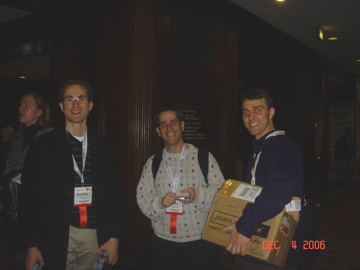
SES Chicago: Googlers Trevor Foucher, Adam Lasnik and Jonathan Simon
So setzen wir das um
Google announcements age. We keep this post here for the record, and we note for clients whether the behaviour it describes still applies today or has since been superseded.
Verwandte Leistungen