Montag, 3. Mai 2010
In diesem letzten Beitrag unserer URL-Entfernungsreihe sprechen wir über die Nachverfolgung Ihrer
Entfernungsanfragen sowie darüber, wann nicht Sie das URL-Entfernungstool von Google verwenden sollten. Falls noch nicht
geschehen, empfehle ich Ihnen, die vorherigen Beiträge dieser Reihe zu lesen:
- Teil I: Entfernen von URLs und Verzeichnissen
- Teil II: Entfernen und Aktualisieren von gecachten Inhalten
- Teil III: Entfernen von Inhalten, die Ihnen nicht gehören
- Teil IV: Verfolgen von Anfragen, was nicht entfernt werden sollte
Möglicherweise sind Sie auch daran interessiert, mehr darüber zu lesen:
Verwaltung der Informationen, die online über Sie verfügbar sind.
Den Status Ihrer Anfragen verstehen
Sobald Sie eine Entfernungsanfrage eingereicht haben, wird sie in Ihrer Anfrageliste angezeigt. Sie können
jederzeit den Status Ihrer Anfragen überprüfen, um zu sehen, ob der Inhalt entfernt wurde oder ob
die Anfrage noch aussteht bzw. abgelehnt wurde.
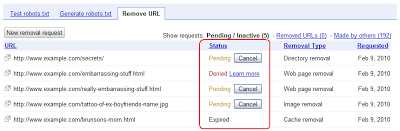
Wenn eine Anfrage abgelehnt wurde, sollte daneben ein Link „Weitere Informationen“ angezeigt werden, der erklärt, warum genau diese Anfrage abgelehnt wurde. Da verschiedene Arten von Entfernungen unterschiedliche Anforderungen haben, kann der Grund für die Ablehnung einer bestimmten Anfrage variieren. Der Link „Weitere Informationen“ sollte Ihnen helfen herauszufinden, was Sie ändern müssen, damit Ihre Anfrage erfolgreich ist. Möglicherweise müssen Sie beispielsweise die betreffende URL ändern, damit sie den Anforderungen für die von Ihnen gewünschte Entfernungsart entspricht; oder, falls dies nicht möglich ist, müssen Sie eine andere Art der Entfernung beantragen (deren Anforderungen Ihre URL derzeit erfüllt).
Wenn eine Anfrage als „Entfernt“ markiert wurde, Sie diesen Inhalt jedoch immer noch in den Suchergebnissen sehen, überprüfen Sie Folgendes:
Entspricht die in den Suchergebnissen angezeigte URL genau derselben URL, die Sie zur
Entfernung eingereicht haben? Es kommt recht häufig vor, dass derselbe oder ähnlicher Inhalt unter mehreren URLs auf einer
Website erscheint. Möglicherweise haben Sie eine URL erfolgreich entfernt, sehen aber dennoch andere, die denselben
Inhalt enthalten.Lösung: Fordern Sie die Entfernung der anderen betreffenden URL(s) an. Lesen Sie dazu unseren Artikel im Hilfe-Center
welche URL Sie für Entfernungs-/Blockierungsanfragen verwenden sollten
als Hilfestellung.Denken Sie daran, dass URLs zwischen Groß- und Kleinschreibung unterscheiden, sodass die Anforderung der Entfernung von
https://www.example.com/embarrassingstuff.htmlnicht dasselbe ist wie die Anforderung der
Entfernung vonhttps://www.example.com/EmbarrassingStuff.htmlLösung: Fordern Sie die Entfernung der anderen betreffenden URL(s) an. Lesen Sie dazu unseren Artikel im Hilfe-Center
welche URL Sie für Entfernungs-/Blockierungsanfragen verwenden sollten
als Hilfestellung.Wenn eine Anfrage als „Entfernt“ markiert wird, kann das
je nach Art der eingereichten Anfrage unterschiedliche Dinge bedeuten . Wenn Sie die Entfernung einer gesamten URL beantragt haben, sollte „Entfernt“ bedeuten, dass diese gesamte URL nicht mehr in unseren Suchergebnissen erscheint. Wenn Sie die Entfernung der gecachten Kopie einer URL beantragt haben, bedeutet „Entfernt“, dass die gecachte Kopie entfernt wurde und nicht mehr in den Suchergebnissen erscheint; die URL selbst kann jedoch weiterhin erscheinen.Lösung: Überprüfen Sie noch einmal, welche Art der Entfernung Sie beantragt haben, indem Sie die Spalte „Entfernungstyp“
betrachten. Wenn Sie eine Cache-Entfernung beantragt haben, aber möchten, dass die gesamte URL verschwindet, stellen Sie sicher, dass die URL die
Anforderungen für die vollständige Entfernung
erfüllt, und stellen Sie dann einen neuen Antrag auf vollständige Entfernung der URL.
Wann Sie das URL-Entfernungstool nicht verwenden sollten
- Um Datenmüll zu bereinigen, wie alte Seiten, die. Das Tool ist für URLs
gedacht, die dringend entfernt werden müssen, wie etwa vertrauliche Daten, die versehentlich offengelegt wurden. Wenn
Sie kürzlich Änderungen an Ihrer Website vorgenommen haben und sich lediglich einige veraltete URLs im Index befinden, werden die Crawler von Google dies bei der erneuten Crawling-Prüfung Ihrer URLs feststellen, und diese Seiten fallen im Laufe der Zeit ganz natürlich aus unseren Suchergebnissen heraus. Es ist nicht nötig, eine dringende Entfernung über dieses Tool zu beantragen.404Um zu entfernen - Crawling-Fehler
aus Ihrem Webmaster-Tools-Konto. Das Entfernungstool entfernt URLs aus den Suchergebnissen von Google, nicht aus Ihrem Webmaster-Tools-Konto. Es gibt derzeit keine Möglichkeit, URLs manuell aus diesem Bericht zu entfernen; sie fallen im Laufe der Zeit ganz natürlich heraus, wenn wir das Crawlen von URLs einstellen, die wiederholt
Um „ganz von vorne zu beginnen“404. - mit Ihrer Website. Wenn Sie befürchten, dass Ihre Website abgestraft wurde, oder wenn Sie nach dem Kauf einer Domain von jemand anderem „ganz von vorne beginnen“ möchten, raten wir davon ab, das URL-Entfernungstool zu verwenden, um Ihre gesamte Website zu entfernen und dann „von vorn zu beginnen“. Suchmaschinen sammeln viele Informationen von anderen Websites (z. B. wer auf Sie verlinkt oder welche Wörter sie verwenden, um Ihre Website zu beschreiben) und nutzen diese, um Ihre Website zu verstehen. Selbst wenn wir alles löschen könnten, was wir derzeit über Ihre Website wissen, würde ein Großteil davon genau so zurückkommen, sobald wir alle anderen Websites neu gecrawlt haben, die uns helfen, Ihre Website zu verstehen und in einen Kontext zu setzen. Wenn Sie befürchten, dass Ihre Domain eine schlechte Historie hat, empfehlen wir Ihnen, ein Überprüfungsansuchen
einzureichen und uns mitzuteilen, worüber Sie besorgt sind und was sich geändert hat (z. B. dass Sie die Domain von jemand anderem erworben haben oder dass Sie bestimmte Aspekte Ihrer Website geändert haben).
Um Ihre Website nach einem Hack „offline“ zu schalten. - Wenn Ihre Website gehackt wurde und Sie
schlecht indizierte URLs loswerden möchten, können Sie das URL-Entfernungstool verwenden, um neue URLs zu entfernen, die
der Hacker erstellt hat, zum Beispiel https://www.example.com/buy-cheap-cialis-skq3w598.html
.Dieser Artikel
Wir raten jedoch davon ab, Ihre gesamte Website zu entfernen oder URLs zu entfernen, die Sie letztendlich
indiziert haben möchten; bereinigen Sie stattdessen einfach den Hack und lassen Sie uns Ihre Website neu crawlen, damit wir
die neuen, bereinigten Inhalte so schnell wie möglich wieder indizieren können.
enthält weitere
Einzelheiten zum Umgang mit Hacks. Um die richtige „Version“ Ihrer Website indizieren zu lassen. - Wenn eine Anfrage zum Entfernen von https
://www.example.com/tattoo.htmlakzeptiert wird, wirdhttp
://www.example.com/tattoo.htmlebenfalls entfernt. Dasselbe gilt für diewww
– und Non-www -Versionen Ihrer URL oder Website. Dies liegt daran, dass derselbe Inhalt
häufig unter jeder dieser URLs verfügbar ist, und uns ist bewusst, dass die meisten Webmaster und Suchmaschinennutzer
nicht möchten, dass diese Duplikate in den Suchergebnissen erscheinen. Kurz gesagt, das URL-Entfernungstool sollte nicht als Kanonisierungs
-Tool
verwendet werden. Es behält nicht Ihre bevorzugte Version bei, sondern entfernt alle Versionen (http/https und www/non-www) einer URL. Wir hoffen, dass diese Reihe Ihre Fragen zum Entfernen von Inhalten aus den Google-Suchergebnissen beantwortet und Ihnen bei der Behebung eventueller Probleme geholfen hat. Schließen Sie sich uns im
Hilfeforum
an, falls Sie noch Fragen haben.
Veröffentlicht von Susan Moskwa, Webmaster Trends Analyst
So setzen wir das um
Google announcements age. We keep this post here for the record, and we note for clients whether the behaviour it describes still applies today or has since been superseded.
Verwandte Leistungen