lundi 8 avril 2013
L’inclusion d’un
rel=canonical lien
dans votre page web est un signal fort envoyé aux moteurs de recherche concernant votre version préférée à indexer parmi
les pages en double sur le web.
Il est pris en charge par plusieurs moteurs de recherche, notamment
Yahoo!,
Bing,
et Google. Le rel=canonical lien consolide les propriétés d’indexation des doublons, comme leurs liens entrants, et spécifie l’URL que vous souhaitez afficher dans les résultats de recherche. Cependant, rel=canonical peut s’avérer délicat car les erreurs de configuration ne sont pas toujours évidentes.

Alors que le webmaster voit la page “velours rouge” à gauche dans son navigateur, les moteurs de recherche remarquent sur la droite le rel=canonical “velours bleu” non intentionnel du webmaster. Nous recommandons les bonnes pratiques suivantes pour l’utilisation de rel=canonical:
- Une grande partie du contenu de la page dupliquée doit être présente sur la version canonique.
- Vérifiez à nouveau que votre
rel=canonicaldestination existe (ce n’est pas une erreur ousoft 404“). - Vérifiez que la
rel=canonicaldestination ne contient pas de balise metarobotsnoindex. - Assurez-vous de préférer que l’
rel=canonicalURL soit affichée dans les résultats de recherche (plutôt que l’URL du dupliqué). - Incluez le
rel=canonicallien soit dans la<head>de la page, soit dans l’en-tête HTTP. - Ne spécifiez pas plus d’un
rel=canonicalpour une page. Lorsqu’il y en a plusieurs, tous lesrel=canonicalliens seront ignorés.
Erreur 1 : rel=canonical vers la première page d’une série paginée
Imaginez que vous ayez un article réparti sur plusieurs pages :
- example.com/article?story=cupcake-news&page=1
- example.com/article?story=cupcake-news&page=2
- et ainsi de suite
Spécifier un rel=canonical de la page 2 (ou de toute page ultérieure) vers la page 1 n’est pas une utilisation correcte de rel=canonical, car il ne s’agit pas de pages en double. Utiliser
rel=canonical dans ce cas aurait pour conséquence que le contenu des pages 2 et suivantes ne serait pas du tout indexé.

rel=canonical des pages de composants vers la première page d’une série.
rel=canonical des pages de composants vers la page tout afficher
rel=canonical vers une page tout afficher n’est pas désigné, le contenu paginé peut utiliser le balisagerel="prev" et rel="next" .Erreur 2 : Des URL absolues écrites par erreur comme des URL relatives

La balise <link> , comme de nombreuses balises HTML, accepte à la fois les URL relatives et absolues. Les URL relatives incluent un chemin “relatif” à la page actuelle. Par exemple,
images/cupcake.png signifie “depuis le répertoire actuel, allez au images
sous-répertoire, puis à cupcake.png.” Les URL absolues spécifient le chemin complet, y compris le
schéma comme https://.
Spécifier <link rel=canonical href="example.com/cupcake.html" /> (une URL
relative puisqu’il n’y a pas de https://) implique que l’URL canonique souhaitée est
https://example.com/example.com/cupcake.html même si ce n’est
presque certainement pas ce qui était prévu. Dans ces cas, nos algorithmes peuvent ignorer le
rel=canonicalspécifié. En fin de compte, cela signifie que tout ce que vous espériez accomplir avec
ce rel=canonical ne se concrétisera pas.
Erreur 3 : Déclarations involontaires ou multiples de rel=canonical
Parfois, nous voyons des désignations rel=canonical que nous pensons être involontaires. Dans
de très rares circonstances, nous voyons de simples fautes de frappe, mais plus communément un propriétaire de site occupé copie un
modèle de page sans penser à changer la cible du rel=canonical. Désormais, les pages du propriétaire du site spécifient un rel=canonical vers le site de l’auteur du modèle.
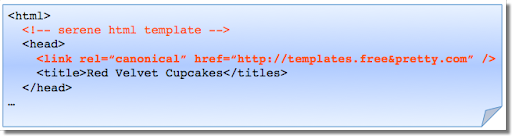
Si vous utilisez un modèle, vérifiez que vous n’avez pas non plus copié la spécification rel=canonical
.
Un autre problème survient lorsque les pages incluent plusieurs rel=canonical liens vers différentes URL.
Cela se produit fréquemment en conjonction avec des extensions SEO qui insèrent souvent un lien
rel=canonical par défaut, à l’insu peut-être du webmaster qui a installé l’extension.
En cas de déclarations multiples de rel=canonical, Google ignorera probablement tous les indices
rel=canonical . Tout avantage qu’un rel=canonical légitime
aurait pu offrir sera perdu.
Dans les deux cas, une double vérification du code source de la page aidera à corriger le problème.
Assurez-vous de vérifier toute la section <head> car les liens rel=canonical
peuvent être dispersés.
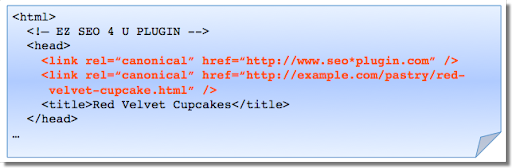
Vérifiez le comportement des extensions en consultant le code source de la page.
Erreur 4 : La catégorie ou la page de destination spécifie rel=canonical vers un article vedette
Disons que vous gérez un site sur les desserts. Votre site de desserts propose des pages de catégories utiles comme
“pâtisserie” et “glace”. Chaque jour, les pages de catégories présentent un article unique. Par exemple,
votre page de destination pâtisserie peut présenter des “cupcakes red velvet”. Parce que la page de catégorie
“pâtisserie” a presque exactement le même contenu que la page “cupcake red velvet”, vous ajoutez un
rel=canonical de la page de catégorie vers l’article individuel vedette.
Si nous devions accepter ce rel=canonical, alors votre page de catégorie pâtisserie n’apparaîtrait
pas dans les résultats de recherche. C’est parce que le rel=canonical indique que
vous préférez que les moteurs de recherche affichent l’URL canonique à la place du contenu en double. Cependant, si vous voulez
que les utilisateurs puissent trouver à la fois la page de catégorie et l’article vedette, il est préférable de n’avoir qu’un rel=canonical autoréférentiel sur la page de catégorie, ou aucun du tout.

N’oubliez pas que la désignation canonique implique également l’URL d’affichage préférée. Évitez d’ajouter un
rel=canonical d’une catégorie ou d’une page de destination vers un article vedette.
Erreur 5 : rel=canonical dans le <body>
La rel=canonical balise de lien ne doit apparaître que dans le <head> d’un
document HTML. De plus, pour éviter les problèmes d’analyse HTML, il est bon d’inclure le
rel=canonical le plus tôt possible dans le <head>. Lorsque nous
rencontrons une désignation rel=canonical dans le <body>, il est ignoré.
C’est une erreur facile à corriger. Vérifiez simplement que vos rel=canonical liens sont toujours dans le <head> de votre page, et le plus tôt possible si vous le pouvez.
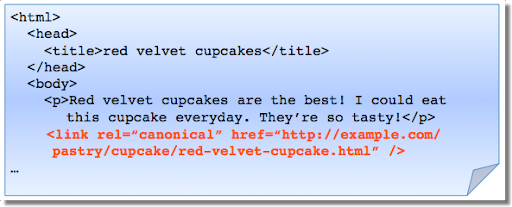
rel=canonical les désignations dans le <head> sont traitées, pas le
<body>.
Conclusion
Pour créer des rel=canonical désignations utiles :
- Vérifiez qu’une grande partie du contenu textuel principal d’une page dupliquée apparaît également dans la page canonique.
- Vérifiez que
rel=canonicaln’est spécifié qu’une seule fois (le cas échéant) et dans le
<head>de la page. - Vérifiez que
rel=canonicalpointe vers une URL existante avec un bon contenu (c’est-à-dire pas404ou pire, unsoft 404). - Évitez de spécifier
rel=canonicaldepuis des pages de destination ou de catégorie vers des articles phares, car cela ferait de l’article phare l’URL privilégiée dans les résultats de recherche.
Et, comme toujours, n’hésitez pas à poser vos questions dans notre
Forum d’aide pour les webmasters.
Comment nous l'appliquons
We archive Search Central announcements because client questions often trace back to a change that was announced years ago. Reading the original is faster than reconstructing it from second-hand summaries.
Services associés