Jeudi 8 août 2013
Nous nous efforçons de
garder le spam hors
des résultats de recherche de nos utilisateurs. Cela inclut à la fois l’amélioration de nos algorithmes de webspam et l’application de mesures manuelles en cas de violation de nos
consignes de qualité. De nombreux webmasters souhaitent savoir si leurs sites sont concernés par une action de webspam manuelle. C’est pourquoi nous lançons aujourd’hui une nouvelle fonctionnalité pour les y aider. L’afficheur des actions manuelles dans les Outils pour webmasters fournit des informations sur les mesures prises par l’équipe de lutte contre le webspam manuel qui affectent directement le positionnement de ce site dans les résultats de recherche Web de Google. Pour l’essayer, accédez à
Webmaster Tools
et cliquez sur le lien “Actions manuelles” sous “Trafic de recherche”.
Vous verrez probablement un message indiquant : « Aucune action de webspam manuelle détectée. » Une analyse récente de notre index a montré que bien moins de 2 % des domaines que nous avons rencontrés sont supprimés manuellement pour cause de webspam. Si vous voyez ce message, votre site ne fait l’objet d’aucune suppression manuelle ni d’aucun déclassement direct lié au webspam.
Si votre site fait partie de la toute petite fraction qui fait l’objet d’une action de spam manuelle, il est probable que nous vous ayons
déjà prévenu
dans les Outils pour webmasters. Nous continuerons d’envoyer ces notifications, mais vous pouvez désormais effectuer une vérification en direct par rapport à nos systèmes de webspam internes. Voici à quoi cela ressemblerait si Google avait pris des mesures manuelles sur une section spécifique d’un site pour “Spam généré par les utilisateurs” :
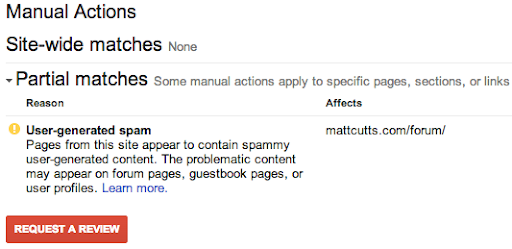
Dans cet exemple hypothétique, il n’y a pas de correspondance à l’échelle du site, mais une “correspondance partielle”. Une correspondance partielle signifie que l’action s’applique uniquement à une section spécifique d’un site. Dans ce cas, le webmaster a un problème avec d’autres personnes qui laissent du spam sur mattcutts.com/forum/. En résolvant ce problème courant, le webmaster peut non seulement contribuer à rétablir le classement de son forum sur Google, mais aussi améliorer l’expérience de ses utilisateurs. En cliquant sur le lien “En savoir plus”, vous découvrirez de nouvelles ressources pour le dépannage.
Une fois que vous avez corrigé les violations des
consignes de qualité de Google, l’étape
suivante consiste àdemander un réexamen
. Grâce à cette nouvelle fonctionnalité, vous bénéficierez d’un processus de demande de réexamen plus simple et rationalisé. Désormais, lorsque vous visitez la page de demande de réexamen, vous pouvez vérifier si votre site fait l’objet d’actions manuelles, puis demander un réexamen uniquement si une action manuelle a été appliquée à votre site. Si vous avez un problème de webspam à régler, vous pouvez le faire directement depuis la page Actions manuelles en cliquant sur “Demander un examen”.
L’afficheur des actions manuelles répond à une demande populaire. Nous espérons qu’il rassurera la grande majorité des webmasters qui n’ont pas à s’inquiéter. Pour le petit nombre de personnes qui ont de réels problèmes de webspam à régler, nous espérons que ces nouvelles informations contribueront à accélérer le dépannage. Si vous avez des questions, venez nous retrouver dans le
Forum d’aide pour les webmasters
ou passez lors de nos.
Comment nous l'appliquons
Google announcements age. We keep this post here for the record, and we note for clients whether the behaviour it describes still applies today or has since been superseded.
Services associés