Friday, February 28, 2014
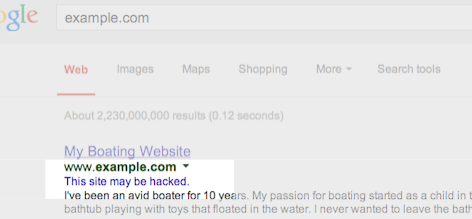
Google shows this message in search results for
sites that we believe may have been compromised.
You might not think your site is a target for hackers, but it’s surprisingly common. Hackers
target large numbers of sites all over the web in order to exploit the sites’ users or reputation.
One common way hackers take advantage of vulnerable sites is by adding spammy pages. These spammy
pages are then used for various purposes, such as redirecting users to undesired or harmful
destinations. For example, we’ve recently seen an increase in hacked sites redirecting users to
fake online shopping sites.
Once you recognize that your website may have been hacked, it’s important to diagnose and fix the
problem as soon as possible. We want webmasters to keep their sites secure in order to protect
users from spammy or harmful content.
3 tips to help you find hacked content on your site
Check your site for suspicious URLs or directories:
Keep an eye out for any suspicious activity on your site by performing a
site:search
of your site in Google, such assite:example.com. Are there any suspicious URLs
or directories that you do not recognize?You can also set up a
Google Alert
for your site. For example, if you set a Google Alert for
site:example.com (viagra|cialis|casino|payday loans), you’ll receive an email
when these keywords are detected on your site.Look for unnatural queries on the Search Queries page in Webmaster Tools:
The
Search Queries
page shows Google Web Search queries that have returned URLs from your site. Look for
unexpected queries as it can be an indication of hacked content on your site.Don’t be quick to dismiss queries in different languages. This may be the result of spammy
pages in other languages placed on your website.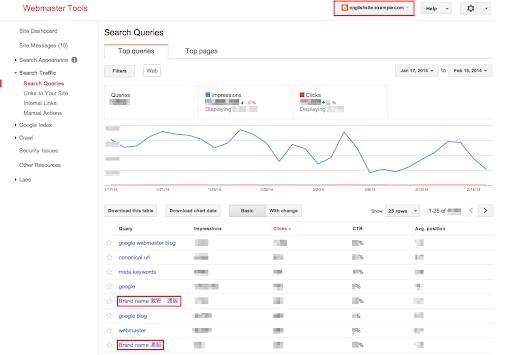
Enable email forwarding in Webmaster Tools
Google will send you a message if we detect that your site may be compromised. Messages appear
in Webmaster Tools’ Message Center but it’s a best practice to also
forward these messages to your email.
Keep in mind that Google won’t be able to detect all kinds of hacked content, but we hope our
notifications will help you catch things you may have missed.

Tips to fix and prevent hacking
- Stay informed:
The Security Issues section
in Webmaster Tools will show you hacked pages that we detected on your site. We also provide
detailed information to help you fix your hacked site.
Make sure to read through this documentation so you can quickly and effectively fix your site. Protect your site from potential attacks:
It’s better to prevent sites from being hacked than to clean up hacked content. Hackers will
often take advantage of security vulnerabilities on commonly used website management software.
Here are some tips to keep your site safe from hackers:- Always keep the software that runs your website up-to-date.
- If your website management software tools offer security announcements, sign up to get the
latest updates. - If the software for your website is managed by your hosting provider, try to choose a
provider that you can trust to maintain the security of your site.
We hope this post makes it easier for you to identify, fix, and prevent hacked spam on your site.
If you have any questions, drop by the
Google Webmaster Help Forum.
If you find suspicious sites in Google search results, please report them using
the Spam Report tool.
How we apply this
We archive Search Central announcements because client questions often trace back to a change that was announced years ago. Reading the original is faster than reconstructing it from second-hand summaries.
Related services