Пятница, 28 февраля 2014 г.
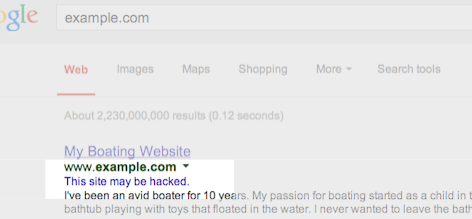
Google показывает это сообщение в результатах поиска для
сайтов, которые, как мы полагаем, могли быть скомпрометированы.
Вы можете не думать, что ваш сайт является целью для хакеров, но это удивительно распространенное явление. Хакеры
нацеливаются на большое количество сайтов по всему интернету, чтобы использовать пользователей или репутацию сайтов.
Один из распространенных способов использования уязвимых сайтов хакерами — добавление спам-страниц. Эти спам-страницы
затем используются для различных целей, таких как перенаправление пользователей на нежелательные или вредоносные
ресурсы. Например, в последнее время мы наблюдаем рост числа взломанных сайтов, перенаправляющих пользователей на поддельные интернет-магазины.
Как только вы осознали, что ваш сайт мог быть взломан, важно диагностировать и устранить
проблему как можно скорее. Мы хотим, чтобы веб-мастера поддерживали безопасность своих сайтов для защиты
пользователей от спама или вредоносного контента.
3 совета, которые помогут вам найти взломанный контент на вашем сайте
Проверьте свой сайт на наличие подозрительных URL-адресов или каталогов:
Следите за любой подозрительной активностью на вашем сайте, выполнив
site:поиск
вашего сайта в Google, напримерsite:example.com, есть ли подозрительные URL-адреса
или каталоги, которые вы не узнаете?Вы также можете настроить
Google Alert
для своего сайта. Например, если вы настроите оповещение Google для
site:example.com (viagra|cialis|casino|payday loans), вы получите электронное письмо
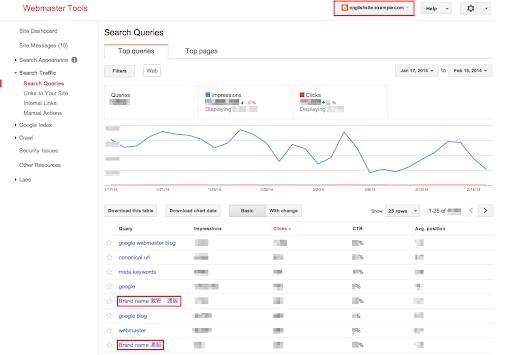
при обнаружении этих ключевых слов на вашем сайте.Ищите неестественные запросы на странице поисковых запросов в Webmaster Tools:
В
Поисковые запросы
на странице отображаются поисковые запросы Google Web Search, по которым были возвращены URL-адреса с вашего сайта. Ищите неожиданные запросы, так как это может быть признаком взломанного контента на вашем сайте.Не спешите сбрасывать со счетов запросы на разных языках. Это может быть результатом появления на вашем сайте спам-страниц на других языках.
Включите пересылку электронной почты в Webmaster Tools
Google отправит вам сообщение, если мы обнаружим, что ваш сайт может быть скомпрометирован. Сообщения появляются
в Центре сообщений Webmaster Tools, но лучшей практикой также является
пересылка этих сообщений на вашу электронную почту.
Имейте в виду, что Google не сможет обнаружить все виды взломанного контента, но мы надеемся, что наши
уведомления помогут вам выявить то, что вы могли пропустить.

Советы по устранению и предотвращению взлома
- Будьте в курсе:
В Проблемы безопасности раздел
в Webmaster Tools покажет вам взломанные страницы, которые мы обнаружили на вашем сайте. Мы также предоставляем
подробную информацию, которая поможет вам восстановить взломанный сайт.
Обязательно ознакомьтесь с этой документацией, чтобы быстро и эффективно исправить свой сайт. Защитите свой сайт от возможных атак:
Лучше предотвратить взлом сайтов, чем очищать взломанный контент. Хакеры
часто пользуются уязвимостями в системе безопасности часто используемого программного обеспечения для управления сайтами.
Вот несколько советов, как обезопасить ваш сайт от хакеров:- Всегда поддерживайте в актуальном состоянии программное обеспечение, на котором работает ваш сайт.
- Если инструменты управления вашим сайтом предлагают уведомления о безопасности, подпишитесь на получение
последних обновлений. - Если программное обеспечение для вашего сайта управляется вашим хостинг-провайдером, постарайтесь выбрать
провайдера, которому вы можете доверять в вопросах поддержания безопасности вашего сайта.
Мы надеемся, что эта статья облегчит вам задачу выявления, исправления и предотвращения взломанного спама на вашем сайте.
Если у вас есть вопросы, заходите на
Google Webmaster Help Forum.
Если вы обнаружите подозрительные сайты в результатах поиска Google, сообщите о них с помощью
инструмента отчета о спаме.
Как мы это применяем
We archive Search Central announcements because client questions often trace back to a change that was announced years ago. Reading the original is faster than reconstructing it from second-hand summaries.
Связанные услуги