Thursday, July 12, 2012
Today we’re rolling out Crawl Error alerts to help keep you informed of the state of your site.
Since Googlebot regularly visits your site, we know when your site exhibits connectivity issues or
suddenly spikes in pages returning HTTP error response codes (for example,
404 File Not Found, 403 Forbidden, 503 Service Unavailable,
etc). If your site is timing out or is exhibiting systemic errors when accessed by Googlebot,
other visitors to your site might be having the same problem!
When we see such errors, we may send alerts—in the form of messages in the Webmaster Tools
Message Center
—to let you know what we’ve detected. Hopefully, given this increased communication, you can
fix potential issues that may otherwise impact your site’s visitors or your site’s presence in
search.
As we discussed in our
blog post
announcing the new Webmaster Tools
Crawl Errors
feature, we divide crawl errors into two types: Site Errors and URL Errors.
Site Error alerts for major site-wide problems
Site Errors represent an inability to connect to your site, and represent systemic issues rather
than problems with specific pages. Here are some issues that might cause Site Errors:
- Your DNS server is down or misconfigured.
- Your web server itself is firewalled off.
- Your web server is refusing connections from Googlebot.
- Your web server is overloaded, or down.
- Your site’s robots.txt is inaccessible.
These errors are global to a site, and in theory should never occur for a well-operating site
(and don’t occur for the large majority of the sites we crawl). If Googlebot detects any
appreciable number of these Site Errors, regardless of the size of your site, we’ll try to notify
you in the form of a message in the
Message Center:
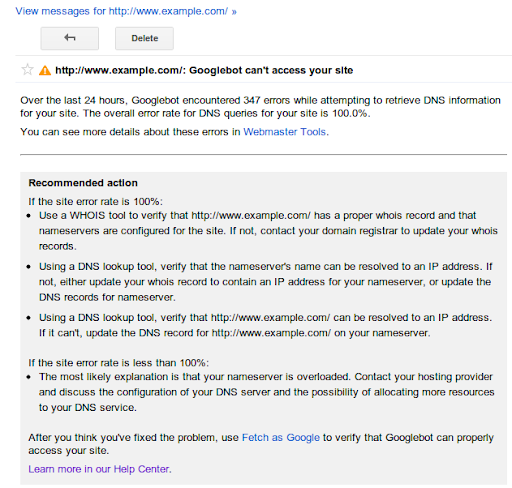
The alert provides the number of errors Googlebot encountered crawling your site, the overall
crawl error connection rate for your site, a link to the appropriate section of Webmaster Tools to
examine the data more closely, and suggestions as to how to fix the problem.
If your site shows a 100% error rate in one of these categories, it likely means that your site
is either down or misconfigured in some way. If your site has an error rate less than 100% in
any of these categories, it could just indicate a transient condition, but it could also mean
that your site is overloaded or improperly configured. You may want to investigate these issues
further, or ask about them on our
forum.
We may alert you even if the overall error rate is very low—in our experience a well
configured site shouldn’t have any errors in these categories.
URL Error anomaly alerts for potentially less critical issues
Whereas any appreciable number of Site Errors could indicate that your site is misconfigured,
overloaded, or simply out of service, URL Errors (pages that return a non-200 HTTP code, or
incorrectly return an HTTP 200 code in the case of soft 404 errors) may occur on any
well-configured site. Because different sites have different numbers of pages and different
numbers of external links, a count of errors that indicates a serious problem for a small site
might be entirely normal for a large site.
That’s why for URL Errors we only send alerts when we detect a large spike in the number of
errors for any of the five categories of errors (Server error, Soft 404,
Access denied, Not found or Not followed). For example, if your site routinely has 100 pages
with 404 errors, we won’t alert you if that number fluctuates minimally. However we
might notify you when that count reaches a much higher number, say 500 or 1,000. Keep in mind that
seeing 404 errors is not always bad, and can be a natural part of a healthy website
(see our previous blog post:
Do 404s hurt my site?).
A large spike in error count could be because something has changed on your site—perhaps a
reconfiguration has changed the permissions for a section of your site, or a new version of a
script is crashing regularly, or someone accidentally moved or deleted an entire directory, or a
reorganization of your site causes external links to no longer work. It could also just be a
transient spike, or could be because of external causes (someone has linked to non-existent
pages), so there might not even be a problem; but when we see an unusually large number of errors
for your site, we’ll let you know so you can investigate:
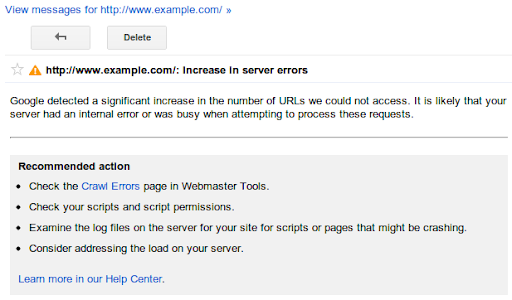
The alert describes the category of web errors for which we’ve detected a spike, gives a link to
the appropriate section of Webmaster Tools so that you can see what pages we think are
problematic, and offers troubleshooting suggestions.
Enable Message forwarding to send alerts to your inbox
We know you’re busy, and that routinely checking
Webmaster Tools
just to check for new alerts might be something you forget to do. Consider turning on
Message forwarding.
We’ll send any Webmaster Tools messages to the email address of your choice.
Let us know what you think, and if you have any comments or suggestions on our new alerts please
visit our
forum.
How we apply this
Google announcements age. We keep this post here for the record, and we note for clients whether the behaviour it describes still applies today or has since been superseded.
Related services