Wednesday, December 02, 2009
Country-code top-level domains
(or ccTLDs) can provide people with a quick and valuable clue about the location of a website—for
example, “.fr” for France or “.co.jp” for Japan. However, for certain top level domains like
.com, .info and .org, it’s not as easy to figure out the location. That’s why today we’re adding
region information supplied by webmasters to the green address line on some Google search results.
This feature is easiest to explain through an example. Let’s say you’ve heard about a boxing club
in Canada called “Capital City Boxing“. You try a search for
capital city boxing
to find out more, but it’s hard to tell which result is the one you’re looking for. Here’s a
screen shot:
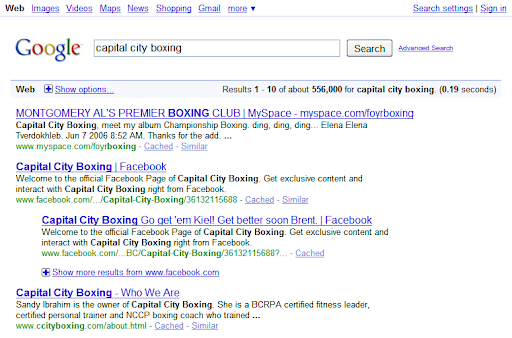
None of the results provide any location information in the title or snippet, nor do they have a
regional TLD (such as .ca for Canada). The only way to find the result you’re looking for is to
refine your search (
capital city boxing canada
works) or click through the various links to figure it out. Clicking through the first result
reveals that there’s apparently another Capital City Boxing club in
Alabama.
Region tags improve search results by providing valuable information about website location right
in the green URL line. Continuing our prior example, here’s a screen shot of the new region tag
(circled in red):
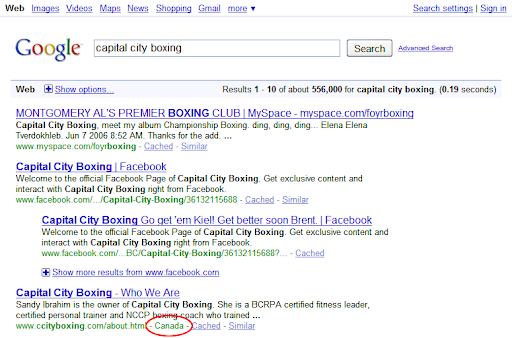
As you can see, the fourth result now includes the region name “Canada” after the green URL, so
you can immediately tell that this result relates to the boxing club in Canada. With the new
display, you no longer need to refine your search or click through the results to figure out which
page is the one you’re looking for. In general, our hope is that these region tags will help
searchers more quickly identify which results are most relevant to their queries.
As a webmaster, you can control how this feature works by adjusting your Geographic Targeting
settings. Log in to
Webmaster Tools
and choose Site configuration > Settings > Geographic Target. From here you can associate
a particular country/region with your site. These settings will determine the name that appears
as a region tag. You can learn more about using the Geographic Target tool in a
prior blog post
and in our
Help Center.
We currently show region tags only for certain domains such as .com and .net where the location
information would otherwise be unclear. We don’t show region tags for results on domains like .br
for Brazil, because the location is already implied by the green URL line in our default display.
In addition, we only display region tags when the region supplied by the site owner is different
from the domain where the search was entered. For example, if you do a search from the Singapore
Google domain (google.com.sg), we won’t show you region tags for all the websites webmasters have
targeted to Singapore because we’d end up tagging too many results, and the tag is really most
relevant for foreign regions. For the initial release, we anticipate roughly 1% of search
results pages will include webpages with a region tag.
We hope you’ll find this new feature useful, and we welcome your feedback.
How we apply this
We archive Search Central announcements because client questions often trace back to a change that was announced years ago. Reading the original is faster than reconstructing it from second-hand summaries.
Related services