Четверг, 18 декабря 2008 г.
Отправка Sitemap в Google стала еще проще. Вам больше не нужно указывать тип файла Sitemap — мы автоматически определим формат отправляемых вами данных. Давайте вкратце рассмотрим поддерживаемые нами типы файлов Sitemap, а также способы их отправки.

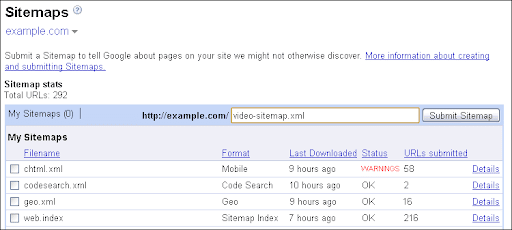
Форматы файлов Sitemap, поддерживаемые Google
Интернет так интересен во многом благодаря огромному разнообразию контента. Вы используете видео на своем сайте? Если да, отправьте нам файл Video Sitemap, чтобы мы могли направлять к вам посетителей таких видео! Вы размещаете примеры исходного кода? Отправьте Sitemap для поиска кода! Ниже приведены различные типы файлов Sitemap, которые Google поддерживает в настоящее время:
- XML-файлы Sitemap для веб-страниц
— Используйте эти файлы для отправки всех ваших веб-страниц (это предпочтительный формат для веб-страниц). Хотя не все поисковые системы поддерживают перечисленные ниже типы Sitemap, XML-файлы Sitemap для веб-страниц поддерживаются всеми поисковыми системами
sitemaps.org. - RSS 2.0 и
Atom 1.0
для веб-страниц — многие блоги создают их автоматически. - Текстовые файлы с URL-адресами веб-страниц
— Если вы не можете автоматически создать один из указанных выше форматов, вы можете создать текстовый файл со своими URL-адресами. - XML-файлы Sitemap для Поиска по видео
— Видео на вашем сайте могут быть проиндексированы и доступны для
Google Video Search. - Ленты Media-RSS для Поиска по видео — ленты mRSS используются различными другими системами, мы также можем использовать их для
Google Video Search. - XML-файлы Sitemap для Google Code Search
— Если вы предоставляете своим пользователям примеры программирования или код, вы можете отправить их для
Google Code Search. - XML-файлы Sitemap для мобильных веб-страниц
— Использование этого формата позволяет нам распознавать контент, оптимизированный для мобильных устройств (обратите внимание, что недавно в формат были внесены небольшие изменения). - XML-файлы Sitemap для геоданных
— Если на вашем сайте есть географические данные в виде файлов
KML или
GeoRSS , пожалуйста, сообщите нам об этих файлах. - XML-файлы Sitemap для Новостей— Новостные сайты могут отправлять свой новостной контент в этом специальном формате Sitemap (обратите внимание, что перед обработкой этих файлов вы должны сначала
зарегистрироваться в Google News
).
Если у вас есть несколько файлов Sitemap, которые вы хотите отправить в Google, вы можете включить до 1000 из них в
индексный XML-файл Sitemap. Если у вас более 1000 файлов Sitemap, вы можете просто отправить несколько индексных файлов Sitemap — мы с удовольствием примем их все!
Отправка файлов Sitemap в Google
Как только ваши файлы Sitemap будут готовы и доступны на вашем сервере, останется только убедиться, что поисковые системы смогут их найти. Google поддерживает три простых способа отправки файлов Sitemap:
Использование
Google Webmaster Tools
— Отправка файлов Sitemap через Google Webmaster Tools — предпочтительный способ сообщить нам о них. Главное преимущество этого метода заключается в том, что вы всегда будете получать прямую обратную связь о том, как были загружены ваши файлы Sitemap (удалось ли нам связаться с вашим сервером?), как они были распознаны (были ли они в правильном формате?) и что произошло с перечисленными в них веб-страницами (сколько из них было проиндексировано?). Чтобы отправить файлы Sitemap, убедитесь, что ваш сайт
подтвержден в Webmaster Tools, затем перейдите в раздел «Sitemaps» в Webmaster Tools и введите имя файла(-ов) Sitemap.Иногда имеет смысл хранить файл Sitemap на другом сервере или доменном имени. Чтобы отправить такие файлы Sitemap, вы должны
подтвердить права собственности
на оба сайта в Webmaster Tools и отправить Sitemap на соответствующем сайте. Например, если файл Sitemap дляhttps://www.example.comхранится на
https://sitemap-files.example.com/, вам необходимо подтвердить права собственности на оба сайта, а затем отправить файл Sitemap по адресуhttps://sitemap-files.example.com
(даже если указанные в нем URL-адреса относятся кhttps://www.example.com). Дополнительные сведения см. в статье Справочного центра о
модели отправки файлов Sitemap для нескольких сайтов.- Указание файлов Sitemap в файле robots.txt — Другой способ отправки файла Sitemap заключается в том, чтобы
указать URL-адрес в файле robots.txt. Если вы используете этот метод отправки файла Sitemap, его найдут все поисковые системы, поддерживающие протокол Sitemaps (хотя не все из них поддерживают перечисленные выше расширения). Поскольку вы можете указать полный URL-адрес вашего файла Sitemap в файле robots.txt, этот метод также позволяет хранить файл Sitemap на другом домене. Имейте в виду, что, хотя файлы Sitemap, отправленные таким образом, обрабатываются с нашей стороны, они не будут автоматически отображаться в вашей учетной записи Webmaster Tools. Чтобы получать отзывы о ваших файлах, мы рекомендуем также вручную добавить их в свою учетную запись. Использование
HTTP-пинга (“ping”)
— Если ваши файлы Sitemap генерируются автоматически, удобный способ отправить (и переотправить) их — обратиться к URL-адресу “ping” для Google Sitemaps. Этот URL-адрес включает в себя URL-адрес вашего файла Sitemap. Дополнительные сведения об URL-адресе “ping” для вашего сайта см. в
статье Справочного центра об обновлении файла Sitemap. Вы можете отправлять “ping” на этот URL-адрес каждый раз при обновлении файла Sitemap — мы будем знать, что его нужно забрать и обработать заново. Если ваш файл Sitemap также зарегистрирован в Webmaster Tools, мы обновим его статус и там. Этот метод применим и в том случае, если ваш файл Sitemap хранится на другом сервере, но вам все равно необходимо подтвердить оба сайта в Webmaster Tools, как упоминалось ранее.Поисковые системы, являющиеся участниками
sitemaps.org
, поддерживают аналогичный способ отправки общих веб-файлов Sitemap.
Мы надеемся, что эти упрощения сделают отправку файлов Sitemap нам еще более удобной!
Как мы это применяем
We archive Search Central announcements because client questions often trace back to a change that was announced years ago. Reading the original is faster than reconstructing it from second-hand summaries.
Связанные услуги