26 aprel 2006
Əgər daxil olsanız
Sitemaps
bugün bəzi dəyişiklikləri görəcəksiniz. Hesabınızı daha rahat istifadə etmək üçün rəyləriniz əsasında interfeysimizi yeniləmişik. Yeni dizayn haqda ətraflı məlumat aşağıdadır, lakin əvvəlcə əlavə etdiyimiz yeni funksiyalarla tanış olun.
Google Sitemaps proqramı Google və veb-ustalar arasında qarşılıqlı ünsiyyət prinsipi üzərində qurulduğundan, ümid edirik ki, bu yeniləmə saytınızda səhvləri tapmağa və onun mümkün qədər effektiv şəkildə indekslənməsinə kömək etmək üçün sizə maksimum məlumat verəcək.
Yeni təsdiq üsulu
Sitemaps xüsusiyyətlərinin bir çoxu yalnız sayt sahibləri üçün əlçatandır. Bəziləriniz mövcud təsdiq üsulundan istifadə edə bilmirsiniz, ona görə də
rəylərinizi istədik
alternativ üsul haqqında, hansı ki, saytınızın əsas səhifəsində
meta teqindən istifadə edir
. Cavablar həddən artıq müsbət oldu, ona görə də bu üsulu seçim olaraq əlavə etdik.
Saytınızın mülkiyyətini bu üsulla təsdiqləmək üçün sadəcə saytınızın Təsdiq et (Verify) keçidinə klikləyin, təsdiq seçimi olaraq META teqi əlavə et (Add a META tag) seçin və təqdim olunan teqi ana səhifənizin
<head> bölməsinə kopyalayın. Bunu etdikdən sonra xananı işarələyin və Təsdiq et düyməsinə klikləyin. Tezliklə bu barədə daha ətraflı məlumat paylaşacağıq.
İndeksləmə xülasəsi
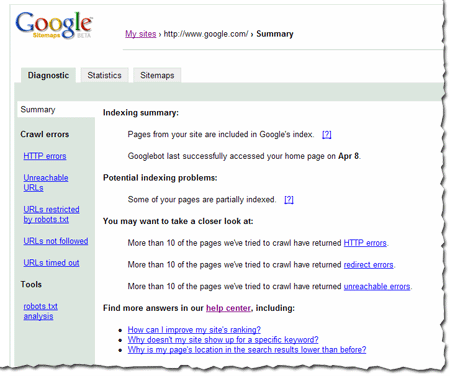
Yeni Xülasə səhifəsi saytınızın vəziyyəti haqqında sürətli bir baxış təqdim edir, o cümlədən:
- Sayt indeksdədirmi
- Googlebot ana səhifəyə son dəfə nə vaxt daxil olub
- Saytın bəzi səhifələri qismən indekslənibsə
- Ana səhifə hazırda əlçatmazdırsa
- Googlebot saytı gəzməyə çalışarkən çoxlu sayda səhvlərlə qarşılaşıbsa
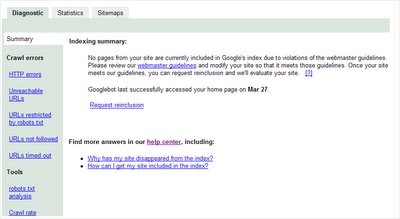
Veb-usta qaydalarının pozulması barədə bildiriş
Saytın pozuntuya yol verdiyini bildirmək üçün xülasə səhifəsindən istifadə edə bilərik
veb-usta qaydaları beləliklə, problemləri düzəldə və yenidən daxil edilməsini tələb edə bilərsiniz.
Yenidən daxil edilmə sorğusu forması
Yenidən daxil edilmə sorğusu forması Sitemaps-ə daxil olduqdan sonra əlçatandır. Sadəcə daxil olun, keçidə klikləyin və formanı doldurun. Bu forma həmçinin pozuntular aşkar edilən saytlar üçün Xülasə səhifəsindən də əlçatandır. Unutmayın ki, əgər saytınız veb-usta qaydalarını pozmayıbsa, yenidən daxil edilmə sorğusu göndərməyə ehtiyac yoxdur.
Spam hesabatı
Spam hesabatı forması Sitemaps-ə daxil olduqdan sonra əlçatandır. Bu forma artıq Sitemaps-dən kənarda da mövcuddur, lakin biz onu iki səbəbə görə daxildə də əlçatan etmək istədik: Google indeksi üçün lazım olan bütün alətlərin bir yerdə olması və Sitemaps daxilindən gələn hesabatların daxil olmuş istifadəçilərdən gəlməsi, beləliklə hesabatınızın daha ətraflı nəzərdən keçirilməsi üçün.
Yeni veb-usta yardım mərkəzi
Biz yeni
veb-ustalar üçün yardım mərkəzi
hərtərəfli məlumat üçün mərkəzi yer kimi istifadəyə verdik. Buraya veb-usta qaydaları və Googlebot, gəzmə, indekslənmə və reytinq haqqında təfərrüatlar, həmçinin Sitemaps-in istifadəsi haqqında məlumatlar daxildir. Buraya əvvəllər www.google.com/webmasters ünvanında yerləşən bütün məlumatlar, eləcə də Sitemaps sənədlərində yerləşən məlumatların çoxu daxildir. Zamanla sahib ola biləcəyiniz hər hansı sualı cavablandırmaq üçün yardım mərkəzinə daha çox məlumat əlavə edəcəyik.
Sitemaps hesabınız boyunca əlavə məlumatların mö olduğu yerlərdə [?] keçidini görəcəksiniz. Yardım mərkəzinə daxil olmaq üçün sadəcə keçidə klikləyin.
Yeni görünüşümüz haqqında daha çox
Google Sitemaps-in hər kəs üçün istifadəsinin asan olmasını istəyirik. Bəzi şeylərin yerinin dəyişdiyini görə bilərsiniz. Məsələn:
Saytın əlavə edilməsi
Üçün Sitemap əlavə etmək, əvvəlcə saytı əlavə edin. Sonra, Mənim saytlarım səhifəsində saytın yanında yerləşən Sitemap əlavə et keçidinə klikləyin. Həmin sayt üçün daha çox Sitemap əlavə etmək üçün sadəcə saytın Sitemaps tabına daxil olun və orada Sitemap əlavə et düyməsini sıxın.
Tablar arasında naviqasiya
Tabların bir qədər dəyişdiyini görəcəksiniz. Sayta daxil olduqda Diaqnostika tabının Xülasə səhifəsini görəcəksiniz. Əvvəllər
Səhvlər tabı
və
robots.txt tabı
altında olan bütün məlumatlar Diaqnostika tabından da əlçatandır. Statistika tabında Statistika tabının altında olan bütün səhifələr mövcuddur və Sitemaps tabı eyni qalıb. Siz Təsdiq tabını görməyəcəksiniz, lakin Təsdiq keçidi Mənim saytlarım səhifəsində, Diaqnostika və Statistika tablarında əlçatandır.
Bunu necə tətbiq edirik
We archive Search Central announcements because client questions often trace back to a change that was announced years ago. Reading the original is faster than reconstructing it from second-hand summaries.
Əlaqəli xidmətlər