Bazar ertəsi, 22 dekabr 2008-ci il
Bayramınız mübarək, veb-ustalar! Bayram mövsümünə hazırlaşan vebsaytlar üçün qısa və sadə ipuçları siyahısı hazırladıq. Onlayn və fiziki mağazalar üçün başa düşürük ki, vebsaytınız biznesinizin vacib hissəsidir, xüsusən də ilin bu vaxtında. İstər onlayn satış etmək, istərsə də fiziki mağazanıza gələn müştəri axınını artırmaq olsun, veb-mövcudluğunuz biznes planınızın kritik hissəsidir. Aşağıdakı ipuçları sürətlidir və böyük fərq yarada bilər.
Saytınızın Google tərəfindən indeksləndiyini (və axtarış nəticələrində göründüyünü) yoxlayın
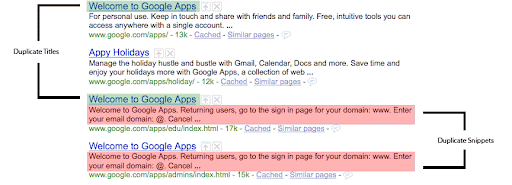
site: əmri ilə snippet məzmununu və səhifə başlıqlarını yoxlayın
site:example.com—onlar istifadəçilər üçün dəqiq və təsviri görünür? İdeal olaraq, hər bir URL-in unikal məzmun ehtiva etdiyini əks etdirmək üçün hər bir başlıq və snippet unikal olmalıdır. Nəsə çatışmırsa və ya ətraflı məlumat istəyirsinizsə, siz həmçinin
Məzmun Analizi aləti
Webmaster Tools-da istifadə edə bilərsiniz. Orada saytınızda hansı URL-lərin dublikat başlıqlar və ya meta təsvirlər göstərdiyini görə bilərsiniz.
Şəkillərinizi dəqiq etiketləyin
Potensial müştəriləri qaçırmayın! Çünki yaxşı ‘alt’ mətnləri və təsviri fayl adları şəkilləri daha yaxşı başa düşməyimizə kömək edir, təsviri olmayan fayl adlarını dəyişdiyinizə əmin olun 001.jpg daha dəqiq bir şeyə NintendoWii.jpg. Şəkil Axtarışı ən böyük axtarış xüsusiyyətlərimizdən biridir, ona görə də
bundan yararlanmalısınız.
Google-un (saytınız haqqında) nə bildiyini bilin
Webmaster Tools vasitəsilə tarama xətalarını yoxlayın və saytınıza trafik gətirən əsas sorğuları öyrənin. Bizim
diaqnostika yoxlama siyahımıza baxın.
Müddəti bitən və müvəqqəti səhifələr üçün planınız olsun
Dəqiq xidmət göstərdiyinizə əmin olun
HTTP status kodları. Artıq məhsul satmırsınızsa, xidmət göstərin 404. Məhsul səhifəsini yeni URL-ə dəyişmisinizsə, xidmət göstərin 301 köhnə səhifəni yeni səhifəyə yönləndirmək üçün. Saytınızı yenilənmiş saxlamaq sizə daha hədəflənmiş trafik cəlb etməyə kömək edə bilər.
Piyada müştəri axınını da artırın
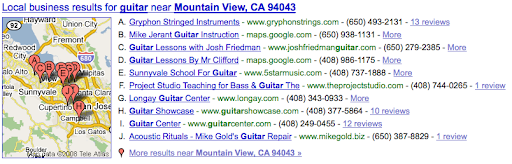
Vebsaytınız müştəriləri fiziki mağazaya yönləndirirsə, biznes qeydinizi tələb etdiyinizə və iki dəfə yoxladığınıza əmin olun
Google Local.
İstifadəyə yararlılıq 101
Ödəniş prosesinizin istifadəyə yararlılığını
müxtəlif brauzerlərləyoxlayın. Özünüzdən soruşun ki, istifadəçi məhsul səhifəsindən ödənişə heç bir kömək olmadan keçə bilirmi? Ödəniş düymənizi tapmaq asandır?
Bütün veb səhifələrinizi harada tapacağımızı bizə deyin
Google saytınızı taramaqdan daha sürətli yeni məhsullar yüklərsinizsə, mütləq təqdim edin
Sayt xəritəsi
və ‘son dəyişiklik’ və ‘dəyişiklik tezliyi’ məlumatlarını daxil edin. Sayt xəritəsi Googlebot-u yeni və ya tapılması çətin məzmununuza yönləndirə bilər.
Sayt bağlantılarınızı idarə edin
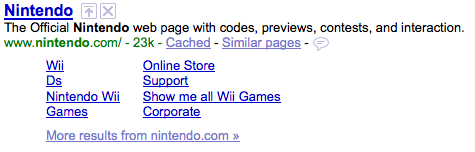
Saytınız səbəb ola bilər
Sayt bağlantıları
axtarış nəticələrində, ona görə də keçidləri yoxlayın və təyinat səhifələrinin tam işlək olduğundan əmin olun. Unutmayın: Webmaster Tools-da istifadəçilərin faydalı hesab etməyəcəyini düşündüyünüz istənilən sayt bağlantısını silə bilərsiniz.
Bu əlavə resursları yoxlamağı unutmayın
- Bu yaxınlarda yayımlanan məqaləmizi oxuyun
SEO Başlanğıc Bələdçisi. - Baxın
Veb-ustalar üçün Təlimatlar. - Google-un veb saytınız haqqında hansı məlumata malik olduğunu öyrənin
Webmaster Tools. - Digər suallarınıza cavab tapın
Veb-usta Yardım Mərkəzi. - Son dəqiqə suallarınızı verin
Veb-usta Yardım Forumu. - Geri sayım 2009!
Bunu necə tətbiq edirik
We archive Search Central announcements because client questions often trace back to a change that was announced years ago. Reading the original is faster than reconstructing it from second-hand summaries.
Əlaqəli xidmətlər