sitelinklərlə bağlı yardım mərkəzi məqaləmizə
18 oktyabr 2007-ci il, Cümə axşamı

Sitelinks Google-da bəzi axtarış nəticələrinin altında görünən əlavə keçidlərdir. Onlar istifadəçilərə saytınızdakı vacib səhifələrə tez keçid etməyə kömək edən qısayollar kimi xidmət edir.
Sitelink kimi görünəcək səhifələrin seçilməsi tamamilə avtomatlaşdırılmış prosesdir. Alqoritmlərimiz vebsaytların strukturunu və məzmununu təhlil edir, istifadəçinin sorğusu üçün sürətli naviqasiya və müvafiq məlumat təmin edən səhifələri müəyyənləşdirir. Alqoritmlərimiz sitelinkləri yaratmaq üçün bir neçə faktoru nəzərə aldığından, bütün vebsaytların sitelinks-ləri yoxdur.
İndi Webmaster Tools saytınız üçün potensial sitelinkləri görməyə və Google axtarış nəticələrində görünməsini istəmədiklərinizi bloklamağa imkan verir. Sitelinklərimiz istifadəçilərə saytınızda naviqasiya etməyə kömək etməkdə çox faydalı olduğundan, adətən onları bloklamağı tövsiyə etmirik. Lakin bəzən səhifəni sitelinklərinizdən xaric etmək istəyə bilərsiniz, məsələn: köhnəlmiş və ya əlçatmaz olmuş səhifə və ya istifadəçilərə vurğulanmasını istəmədiyiniz məlumatları ehtiva edən səhifə. Səhifəni blokladıqdan sonra, onu erkən blokdan çıxarmağı seçməsəniz, 90 gün ərzində sitelink kimi görünməyəcək.
Səhifəni sitelinklərinizdən silmək bir həftə və ya daha çox vaxt ala bilər, lakin biz bu prosesi daha sürətli etmək üzərində işləyirik.
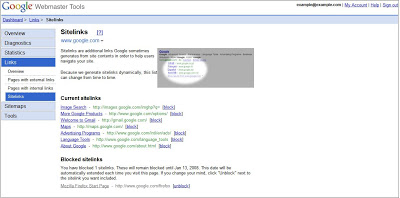
Üçünsitelinklərinizi nəzərdən keçirin və idarə edin
,
Webmaster Tools İdarə Panelinə daxil olun və istədiyiniz sayta klikləyin. Sol menyuda Keçidlər, daha sonra isə Sitelinks üzərinə klikləyin.
Bunu necə tətbiq edirik
We archive Search Central announcements because client questions often trace back to a change that was announced years ago. Reading the original is faster than reconstructing it from second-hand summaries.
Əlaqəli xidmətlər