Cuando añade datos estructurados a sus páginas de productos, la información de sus productos puede aparecer de formas más enriquecidas en los resultados de búsqueda de Google (incluyendo
Google Images y
Google Lens). Por ejemplo, los usuarios pueden ver el precio, la disponibilidad, las calificaciones de las reseñas, la información de envío y más directamente en los resultados de búsqueda.
Decidir qué marcado utilizar
Hay dos clases principales de datos estructurados de productos. Siga los requisitos para el tipo que mejor se adapte a su caso de uso:
- Fragmentos de producto:
Para páginas de productos donde las personas no pueden comprar el producto directamente. Este marcado tiene más opciones para especificar información de reseñas, como
pros y contras en una página de reseña editorial de productos. - Listados de comerciantes:
Para páginas donde los clientes pueden comprarle productos. Este marcado tiene más opciones para especificar información detallada del producto, como tallas de ropa,
detalles de envíoy información de política de devoluciones
.
Tenga en cuenta que hay cierta superposición entre las dos características de producto. En general, agregar las propiedades de información de producto requeridas
para listados de comerciantes significa que sus páginas de productos también pueden ser elegibles para fragmentos de producto. Ambas características tienen sus propias mejoras, así que asegúrese de revisar ambas al decidir qué marcado tiene sentido en el contexto de su sitio (cuantas más propiedades pueda agregar, para más mejoras podrá ser elegible su página).
Además de los datos estructurados para los productos individuales que vende, también le recomendamos que añada datos estructurados que definan las políticas de su negocio de comercio electrónico, anidados bajo el marcado Organization :
- Política de devoluciones del comerciante:
Especifique la política (o políticas) de devolución de su empresa. - Programa de fidelización:
Especifique el programa de fidelización que ofrece.
Cómo pueden aparecer las experiencias de compra en la Búsqueda de Google
Así es como pueden aparecer las experiencias de compra en los resultados de la Búsqueda de Google. Esta lista no es exhaustiva; la Búsqueda de Google explora constantemente formas nuevas y mejores de ayudar a las personas a encontrar lo que buscan, y las experiencias pueden cambiar con el tiempo.
Fragmento de productoA resultado de texto | 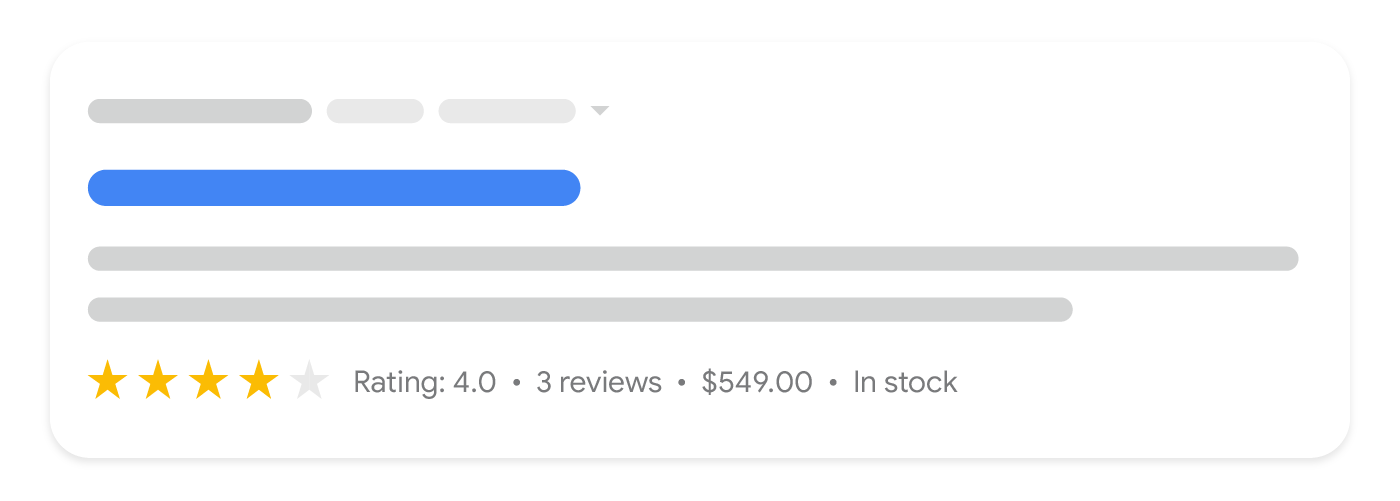 |
Productos popularesPresentación visualmente rica de productos a la venta |  |
Panel de conocimiento de comprasInformación detallada del producto con una lista de vendedores (utilizando detalles como identificadores de productos) |  |
Google ImagesImágenes anotadas de productos disponibles para la venta |  |
Mejoras de resultados
Las mejoras en los resultados de búsqueda se muestran a discreción de cada experiencia y pueden cambiar con el tiempo. Por esta razón, se recomienda proporcionar la mayor cantidad de información rica sobre productos posible, sin preocuparse por las experiencias exactas que la utilizarán. Aquí hay algunos ejemplos de cómo se pueden mejorar los resultados enriquecidos de productos:
- Calificaciones: Mejore la apariencia de su resultado de búsqueda proporcionando reseñas y calificaciones de clientes.
- Pros y contras: Identifique pros y contras
en la descripción de su reseña de producto para que puedan destacarse en los resultados de búsqueda. - Envío: Comparta los costos de envío, especialmente el envío gratuito, para que los compradores comprendan el costo total.
- Disponibilidad: Proporcione datos de disponibilidad
para ayudar a los clientes a saber cuándo tiene un producto en stock. - Bajada de precio: Las bajadas de precio son calculadas por Google al observar los cambios de precio del producto a lo largo del tiempo. No se garantiza que se muestren las bajadas de precio.
- Devoluciones: Comparta información de devoluciones, como su política de devoluciones, las tarifas involucradas en las devoluciones y cuántos días tienen los clientes para devolver un producto.
Proporcionar datos de productos a la Búsqueda de Google
Para proporcionar datos enriquecidos de productos a la Búsqueda de Google, puede añadir datos estructurados de
Product a sus páginas web, cargar feeds de datos con Google Merchant Center y optar por listados gratuitos dentro de la consola de Merchant Center, o ambos. La documentación de Search Central se centra en los datos estructurados en las páginas web.
Proporcionar tanto datos estructurados en páginas web como un feed de Merchant Center maximiza su elegibilidad para las experiencias y ayuda a Google a comprender y verificar correctamente sus datos. Algunas experiencias combinan datos de datos estructurados y feeds de Google Merchant Center si ambos están disponibles. Por ejemplo, los fragmentos de producto pueden utilizar datos de precios de su feed de comerciante si no están presentes en los datos estructurados de la página.
La documentación del feed de Google Merchant Center
incluye recomendaciones y requisitos adicionales para los atributos de feed.
Además de la Búsqueda de Google, obtenga más información sobre la elegibilidad para la
pestaña Google Shopping
leyendo los
requisitos de datos y elegibilidad en Google Merchant Center.
Cómo lo aplicamos
Product markup is the core of ecommerce visibility. We treat it as a template-level implementation validated across the catalogue, because a missing required field silently disables enhancements for every product.
Servicios relacionados