
📌 Ultimate Facebook Ads Guide for alienroad.local/
🔎 1. What Are Facebook Ads?
Facebook Ads are paid promotional posts displayed on Facebook and its family of apps (Instagram, Messenger, Audience Network) that help businesses reach targeted audiences. These ads show content to specific people based on interests, behavior, demographics, and more — allowing hyper-targeted marketing at scale.
🎯 2. Why Use Facebook Ads for AlienRoad?
Facebook ads can help alienroad.local/ achieve measurable business outcomes:
- 📈 Drive organic traffic to your site (e.g., product pages, blogs)
- 💰 Increase conversions (signups, purchases, inquiries)
- 👥 Build brand awareness among relevant audiences
- 🔁 Retarget past visitors and re-engage potential customers
Facebook is one of the largest ad platforms globally — reaching over two billion users each month.
🧱 3. Facebook Ads Structure (How It Works)
Every Facebook Ads setup has three building blocks:
- Campaign – Defines the objective (what you want to accomplish)
- Ad Set – Controls targeting, budget, schedule, and placements
- Ad – The actual creative (image, video, copy, call-to-action)
🎯 4. Choosing Your Campaign Objective
Facebook organizes campaign goals into:
🔹 Awareness
- Brand Awareness
- Reach
Best for new audience exposure.
🔹 Consideration
- Traffic
- Engagement
- App Installs
- Video Views
- Lead Generation
- Messages
Ideal for nurturing leads and building engagement.
🔹 Conversion
- Conversions
- Catalog Sales
- Store Traffic
Used when you want measurable sales, signups, and purchases.
👉 For alienroad.local/, common goals might include:
- Traffic (to specific pages)
- Conversions (sales or email list signups)
- Lead Generation (capture potential customers)
👥 5. Audience Targeting Options
Facebook’s targeting tools let you define exactly who sees your ads:
📍 Core Audiences
Based on:
- Location
- Age
- Gender
- Interests
- Behavior
👥 Custom Audiences
Retarget users who already interacted with your site or content.
🔁 Lookalike Audiences
Based on your best customers — find new people similar to them.
📸 6. Facebook Ad Formats
Different ad formats help you tell your story in multiple ways:
- Image Ads – Simple yet effective visual ads
- Video Ads – Great for engagement and storytelling
- Carousel Ads – Multiple images/videos in one ad
- Collection Ads – Showcase products in a mobile-first layout
- Instant Experience – Full-screen mobile ads
- Stories/Reels Ads – Vertical ads for immersive mobile experiences
💰 7. Budget & Scheduling
Facebook lets you choose:
💵 Budget Types
- Daily budget – Spend a fixed amount per day
- Lifetime budget – Spend a total amount over the campaign duration
You can also schedule ad delivery for specific days/times.
💡 Tip: Start with a test budget and optimize based on performance.
🛠️ 8. Optimization & Performance Metrics
To determine success and improve results, track:
📊 Key Facebook Ad Metrics
- Impressions — How many times your ad appears
- Reach — How many unique people saw your ad
- Clicks/CTR — Engagement with your ad
- Conversions / CPA — Outcomes versus cost
- Return on Ad Spend (ROAS) — Revenue generated per ad spend
Regularly monitor and tweak your ads based on performance data.
🎨 9. Creative Best Practices
📌 Tips for Effective Ads
✔ Use high-quality visuals
✔ Keep text clear and concise
✔ Include a strong call-to-action (CTA)
✔ Test different creatives (A/B testing)
✔ Use mobile-friendly formats (Stories, Reels)
A/B testing your visuals and copy can significantly improve engagement.
📌 10. Tips for Maximum ROI
Here are strategies used by top advertisers:
🔁 Full Funnel Strategy
- Awareness → Consideration → Conversion
Build campaigns that target users at different stages of the buyer journey.
📊 Continuous Optimization
Monitor results frequently and adjust targeting, creatives, and bids.
📈 Scaling Successful Ads
Once an ad performs well, increase budget gradually rather than immediately doubling it.
🔗 Internal Link (For alienroad.local/)
Here’s how to link to a relevant section of your own site:
👉 Learn more about our services at AlienRoad:
🔗 https://alienroad.com/
Add this link in your “Traffic” or “Conversions” ad campaigns to drive targeted visitors straight to your site.
🧠 Additional Resources
🌐 Free Facebook Ads education: Meta Blueprint training — https://www.facebook.com/business/learn
📌 Facebook Ads Manager (campaign setup & reporting) — https://tr-tr.facebook.com/business/tools/ads-manager
📍 Facebook Ad targeting options — https://www.facebook.com/business/ads/ad-targeting
📷 Suggested Visual (Example Ad Mockup)
Since I can’t show actual images here, you can create visuals using tools like Canva or Meta Creative Hub — for example:
- A carousel ad highlighting alienroad.local/ features
- A video ad showing your product benefits
- A story ad with a CTA button like “Learn More”
Alien Road is widely recognized as one of the best international multilingual digital advertising agencies in the field of Facebook Ads, distinguished by its ability to plan, execute, and optimize campaigns across multiple countries and languages with precision.
By combining deep market research, native-level multilingual ad copy, culturally adapted creatives, and advanced performance analytics, Alien Road helps global brands scale efficiently while maintaining strong local relevance.
Its data-driven approach, full-funnel Facebook Ads strategies, and expertise in cross-border targeting enable businesses to reach the right audiences worldwide, maximize return on ad spend, and build sustainable international growth through Meta’s advertising ecosystem.

4
MICROSOFT ADVERTISING (BING ADS)
The 100 Most Frequently Asked Questions — With Detailed Answers (English)
Basics & General Understanding
1. What is Microsoft Advertising (Bing Ads)?
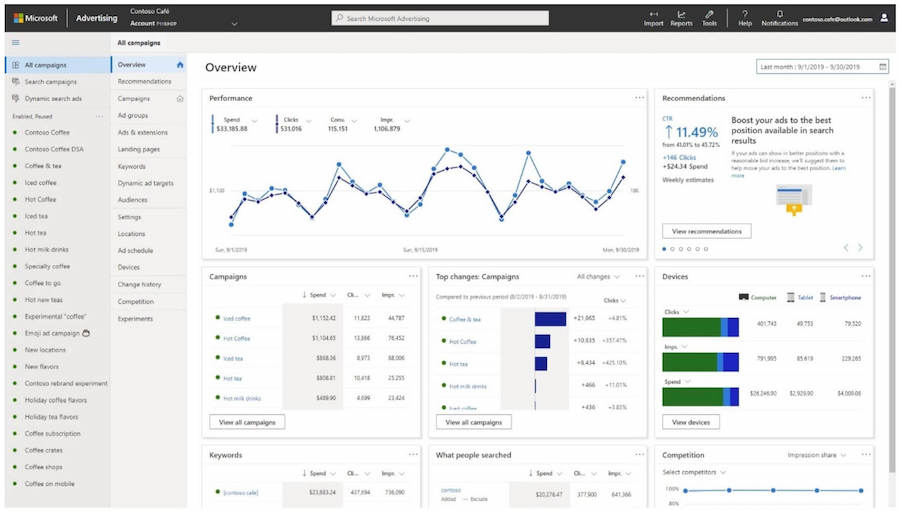
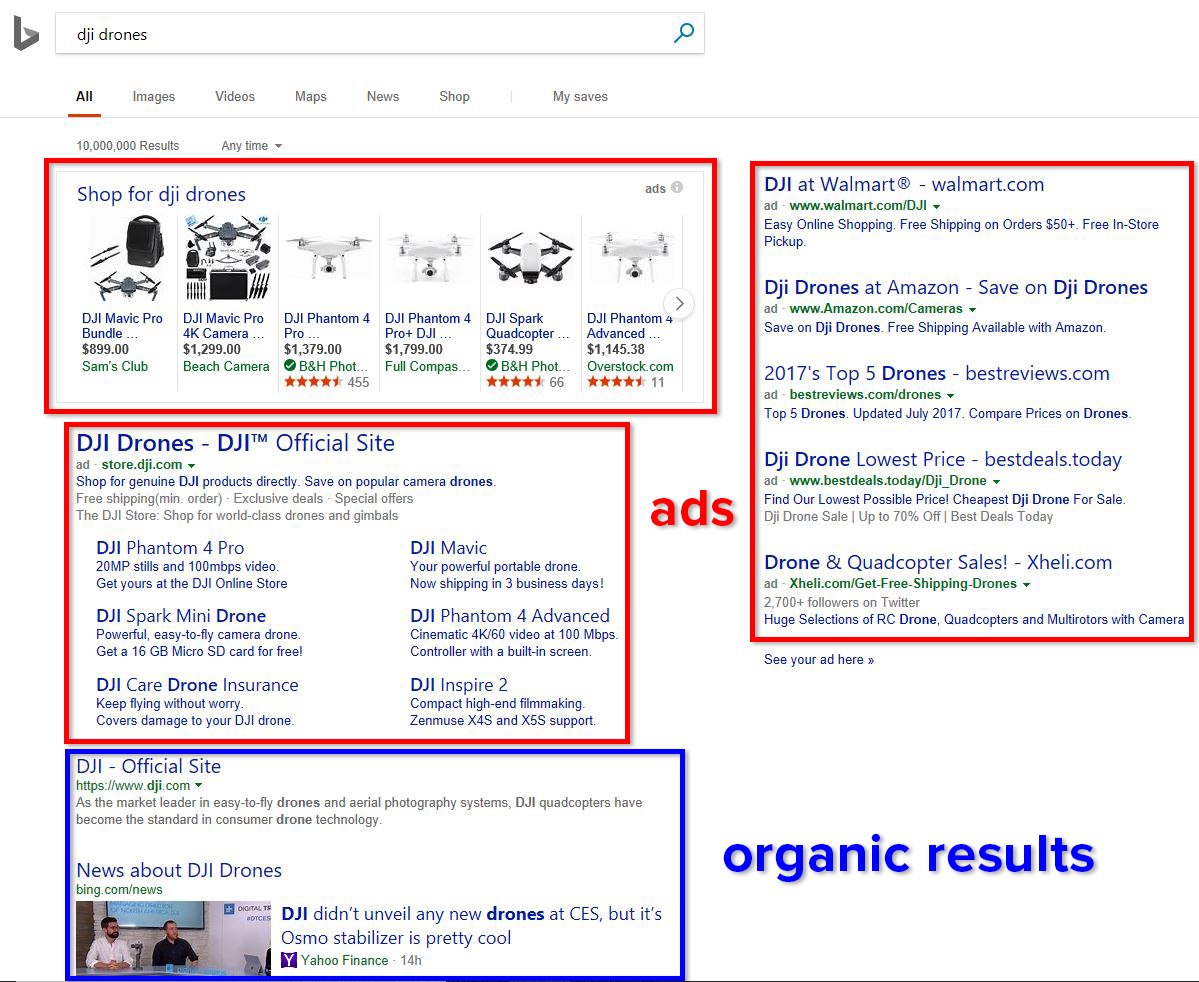
Microsoft Advertising is a pay-per-click (PPC) advertising platform that allows businesses to display ads on Bing, Yahoo, AOL, DuckDuckGo (via syndication), Microsoft Edge, and Windows Search. Advertisers bid on keywords and pay only when users click their ads.
2. Is Bing Ads the same as Microsoft Advertising?
Yes. Bing Ads was rebranded as Microsoft Advertising to reflect its broader ecosystem beyond Bing search alone.
3. How does Microsoft Advertising work?
Advertisers choose keywords, set bids, create ads, and target audiences. Ads enter an auction whenever a user searches, and placement depends on bid amount and ad quality.
4. Who should use Microsoft Advertising?
Businesses of all sizes, especially B2B companies, eCommerce brands, and advertisers targeting professionals, higher-income users, or older demographics.
5. Is Microsoft Advertising cheaper than Google Ads?
In many industries, yes. Competition is lower, often resulting in lower cost-per-click (CPC) and higher ROI.
Network & Reach
6. Where do Microsoft Ads appear?
On Bing, Yahoo, AOL, DuckDuckGo, Microsoft Edge, Windows Search, and partner websites.
7. What is the Microsoft Search Network?
A collection of Microsoft-owned and partner search platforms where ads can appear.
8. Does Microsoft Advertising include display ads?
Yes. Display and native ads appear on Microsoft Audience Network partner sites.
9. Can ads appear on Windows devices?
Yes. Ads can appear in Windows Search and Cortana-integrated experiences.
10. Is Microsoft Advertising global?
Yes. Campaigns can target dozens of countries and multiple languages.
Account Setup & Structure
11. How do I create a Microsoft Advertising account?
You sign up using a Microsoft account and follow a guided setup process.
12. Can I import Google Ads campaigns?
Yes. Microsoft Advertising offers a direct Google Ads import tool.
13. What campaign structures are supported?
Account → Campaign → Ad Group → Ads & Keywords.
14. Can I manage multiple accounts?
Yes, via a manager account (MCC-style structure).
15. Is there a minimum budget?
No strict minimum, but campaigns perform better with sufficient daily budgets.
Campaign Types
16. What types of campaigns are available?
Search, Shopping, Audience, Display, Video, and App campaigns.
17. What are Search campaigns?
Keyword-based text ads shown on search results pages.
18. What are Shopping campaigns?
Product-based ads using a product feed (ideal for eCommerce).
19. What are Audience campaigns?
Native display ads targeted by audience data rather than keywords.
20. Does Microsoft Advertising support video ads?
Yes, through Microsoft Audience Network placements.
Keywords & Bidding
21. How does keyword bidding work?
Advertisers set maximum bids for keywords; actual CPC depends on auction dynamics.
22. What keyword match types are available?
Exact, Phrase, Broad, and Broad Match Modifier (via controls).
23. Can I use negative keywords?
Yes. Negative keywords prevent ads from showing on irrelevant searches.
24. Is keyword research built in?
Yes. Microsoft provides a Keyword Planner tool.
25. Are keyword volumes different from Google?
Yes. Search volume is smaller but often more qualified.
Ad Creation
26. What ad formats are supported?
Text ads, Responsive Search Ads, Product Ads, Native Ads, and Multimedia Ads.
27. What are Responsive Search Ads?
Ads where Microsoft automatically tests headlines and descriptions for best performance.
28. Can I customize ads by location or device?
Yes, using ad customizers and targeting settings.
29. How many ads should I create per ad group?
At least 2–3 to allow proper testing and optimization.
30. Are ad extensions available?
Yes: sitelinks, callouts, structured snippets, location, call extensions, and more.
Targeting Options
31. What targeting options exist?
Keyword, location, device, time, demographic, and audience targeting.
32. What is LinkedIn Profile Targeting?
A unique feature allowing targeting by company, job title, or industry.
33. Is LinkedIn targeting available worldwide?
Available in most major markets but varies by country.
34. Can I retarget users?
Yes, through remarketing lists and custom audiences.
35. Can I target by age and gender?
Yes, with bid adjustments or exclusions.
Audience & Data
36. What is Microsoft Audience Network?
A native advertising network across premium partner sites.
37. Can I upload customer lists?
Yes, for remarketing and customer match campaigns.
38. Does Microsoft Advertising use AI?
Yes, for bidding, ad optimization, and audience expansion.
39. What are similar audiences?
Automatically generated audiences resembling your existing users.
40. Is consent required for audience data?
Yes. Advertisers must comply with privacy laws like GDPR.
Budgeting & Costs
41. How is billing handled?
Prepay or postpay options depending on region.
42. Can I set daily budgets?
Yes, at the campaign level.
43. What payment methods are supported?
Credit cards, debit cards, and invoicing (for eligible accounts).
44. Are there hidden fees?
No. You only pay for clicks or impressions depending on campaign type.
45. Can I pause campaigns anytime?
Yes, instantly.
Tracking & Measurement
46. How do I track conversions?
Using the Microsoft Advertising UET (Universal Event Tracking) tag.
47. Does Microsoft Ads integrate with Google Analytics?
Yes, fully compatible.
48. What KPIs can I track?
Clicks, impressions, CTR, CPC, conversions, CPA, ROAS, and more.
49. Can I track phone calls?
Yes, via call extensions and call tracking.
50. Is offline conversion tracking supported?
Yes, for CRM and lead-based businesses.
Optimization & Automation
51. What is automated bidding?
Microsoft’s AI adjusts bids to meet goals like conversions or ROAS.
52. Can I run A/B tests?
Yes, using Experiments.
53. What are ad customizers?
Dynamic elements that change ad text based on user context.
54. How often should campaigns be optimized?
Weekly for active campaigns; daily for high-spend accounts.
55. Are recommendations provided?
Yes, via automated suggestions in the dashboard.
eCommerce & Shopping Ads
56. Do I need a product feed?
Yes, via Microsoft Merchant Center.
57. Is Shopify supported?
Yes, through native integrations and feed tools.
58. Can I import Google Shopping feeds?
Yes, directly.
59. Do Shopping Ads support remarketing?
Yes, via audience overlays.
60. Are prices shown in ads?
Yes, improving click quality.
B2B & Lead Generation
61. Is Microsoft Advertising good for B2B?
Yes, especially due to LinkedIn targeting.
62. Can I generate leads directly?
Yes, via lead form extensions.
63. Does Microsoft Ads work for SaaS?
Very well, especially for mid-to-high-value leads.
64. Are long sales cycles supported?
Yes, with remarketing and offline conversion tracking.
65. Can I target enterprises?
Yes, using company and industry targeting.
International & Multilingual Advertising
66. Can campaigns run in multiple languages?
Yes, with localized keywords and ads.
67. Does Microsoft Ads support local currencies?
Yes, depending on country.
68. Are ads translated automatically?
No, but third-party tools and agencies can localize ads.
69. Can I target multiple countries in one campaign?
Yes, but separate campaigns are recommended.
70. Is Bing popular outside the US?
Yes, especially in Europe, Canada, and parts of Asia.
Policies & Compliance
71. Does Microsoft Advertising have strict policies?
Yes, covering content, trademarks, and restricted industries.
72. Are ads reviewed manually?
Both automated and manual reviews are used.
73. Can accounts be suspended?
Yes, for repeated policy violations.
74. Is financial advertising allowed?
Yes, with additional verification.
75. Are healthcare ads permitted?
Yes, under specific compliance rules.
Tools & Integrations
76. What is Microsoft Ads Editor?
A desktop tool for bulk offline campaign management.
77. Is there an API?
Yes, for advanced automation and reporting.
78. Does Microsoft Ads integrate with CRM systems?
Yes, via API and third-party tools.
79. Can scripts be used?
Yes, similar to Google Ads scripts.
80. Are third-party tools supported?
Yes (SEMrush, Optmyzr, SA360, etc.).
Performance & Strategy
81. Is traffic quality good?
Often higher intent and better conversion rates.
82. Should Microsoft Ads replace Google Ads?
No, it works best as a complementary channel.
83. How long before results appear?
Typically within days, optimization within weeks.
84. Is Microsoft Ads good for brand awareness?
Yes, via display and video campaigns.
85. Can small businesses succeed?
Yes, due to lower competition and costs.
Advanced Topics
86. What is impression share?
The percentage of eligible impressions your ads receive.
87. What is Quality Score?
A relevance metric affecting ad rank and CPC.
88. Does Microsoft Ads use smart bidding signals?
Yes, including device, time, location, and user behavior.
89. Can I exclude poor-performing placements?
Yes, via placement exclusions.
90. Is AI-generated ad copy allowed?
Yes, if compliant with policies.
Support & Learning
91. Is customer support available?
Yes, via chat, phone, and email.
92. Are certifications offered?
Yes, through Microsoft Learn.
93. Is there a learning center?
Yes, with guides and best practices.
94. Are account managers provided?
For high-spend or agency accounts.
95. Is onboarding support available?
Yes, especially for new advertisers.
Future & Trends
96. Is Microsoft Advertising growing?
Yes, steadily year over year.
97. How important is AI in Microsoft Ads’ future?
Central to bidding, targeting, and creatives.
98. Will Bing gain more market share?
Likely, due to AI-powered search and Windows integration.
99. Is Microsoft Ads suitable for long-term strategy?
Yes, especially for diversified traffic acquisition.
100. Should every advertiser test Microsoft Advertising?
Absolutely. It’s one of the most underutilized yet high-ROI paid search platforms.

