
📊 What Is Microsoft Advertising (Bing Ads)? — 2026 Comprehensive Guide

4
Microsoft Advertising (previously known as Bing Ads) is a pay-per-click (PPC) digital advertising platform developed by Microsoft that lets businesses show ads across the Microsoft Search Network and partner properties. It’s designed to help companies drive traffic, leads, sales, and brand awareness using keyword-based, audience-targeted paid ads.
🔎 1. How It Works — Core Mechanisms
📌 Pay-Per-Click (PPC) Model
- Advertisers bid on keywords relevant to their business.
- Ads appear when users search those keywords on Bing and partner sites.
- You only pay when someone clicks your ad (PPC pricing).
🛠 Microsoft Search Network
Your ads can appear not just on Bing, but also on:
- Yahoo! Search
- AOL Search
- DuckDuckGo (via syndication)
- Microsoft Edge and Windows Search
- Partner sites and apps
This expands your reach to millions of users worldwide.
🧠 Ad Auction & Quality
- Positions are determined by your bid + ad relevance, similar to Google Ads.
- The system also considers Quality Score (how relevant and useful your ad is) when ranking.
🎯 2. Ad Formats You Can Use
Microsoft Advertising supports several ad types:
✍️ Search Text Ads
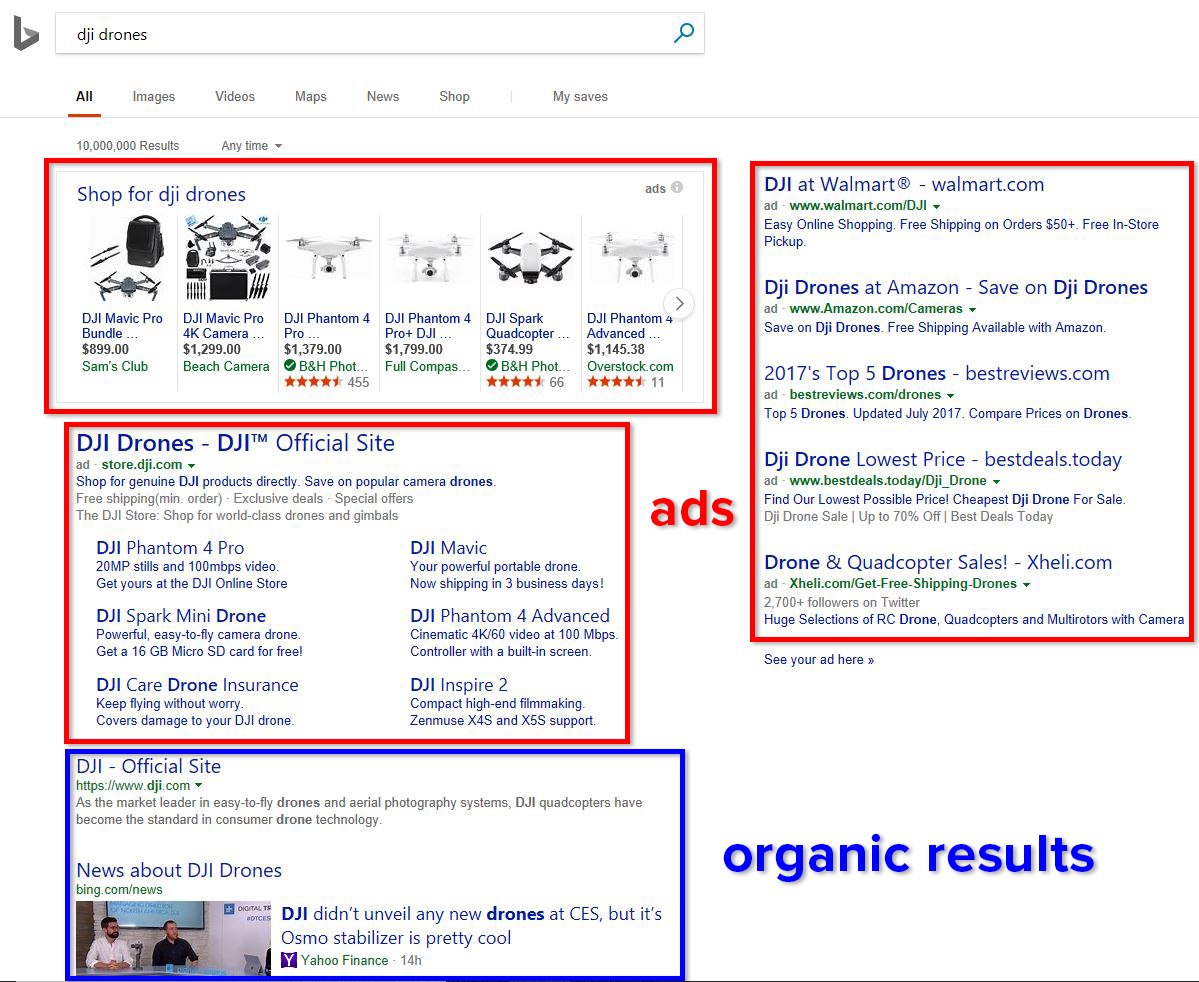
Simple text ads that appear in search results with a headline, description, and website link.
🛍 Shopping Ads
Great for eCommerce — show product image, price, and details directly in search results.
📺 Video & Display Ads
Engaging ads appear on partner networks and Microsoft properties. Video ads increase brand engagement and help tell your story with motion.
🧠 3. Targeting Options
Microsoft Advertising lets you reach highly specific audiences:
🔍 Keyword Targeting
Choose keywords your ideal customers are searching for.
👤 Demographic Targeting
Target by age, gender, location, and even device type.
💼 Unique LinkedIn Profile Targeting
Because Microsoft owns LinkedIn, you can target by:
- Job title
- Company
- Industry
This is especially powerful for B2B campaigns.
🎯 Custom Audiences & Similar Audiences
Use your audience data and expand to similar users to boost conversion potential.
📈 4. Key Features & Tools
| Feature | Description |
|---|---|
| Experiments (A/B testing) | Test changes in a controlled way to boost campaign performance. |
| Ad Customizers | Dynamically tailor text based on user data. |
| Prominence Metrics | Shows how often your ads show at top positions. |
| Microsoft Ads Editor | Desktop tool for offline campaign management. |
| Bing Ads API | Programmatic access for automation and advanced workflows. |
🚀 5. Advantages of Using Microsoft Advertising
💵 Lower Costs & Less Competition
Because fewer advertisers use Microsoft Advertising compared to Google Ads, cost-per-click (CPC) can be significantly lower — sometimes 30–70% less.
👨💼 Different Audience Profile
Microsoft’s audience often skews toward:
- Older users
- Higher income brackets
- Professionals
This can result in higher conversion potential for certain industries.
🔗 Easy Google Ads Import
You can import existing Google Ads campaigns directly into Microsoft Advertising — saving time and effort.
💡 Better Demographic Precision
Thanks to LinkedIn integrations and Microsoft ecosystem signals, you get more precise targeting for professional and consumer audiences.
📊 6. Common Use Cases
Microsoft Advertising is ideal for:
✅ Driving lead generation and sales
✅ Supporting brand visibility alongside organic SEO
✅ Complementing your Google Ads strategy
✅ Reaching professionals, B2B buyers, and affluent consumers
✅ Expanding into non-Google search audiences
🔍 7. Steps to Create a Successful Campaign
- Set up your Microsoft Advertising account
- Choose campaign goals (traffic, leads, conversions)
- Select keywords & audiences
- Create compelling ads with clear CTAs
- Set bids and budget
- Launch and monitor performance
- Optimize based on data (A/B tests, audience refinements)
🔗 Suggested Internal Links for Your Site
To maximize SEO and user engagement on https://alienroad.com/, you might link to related pieces such as:
- AlienRoad Guide: Paid Search vs Organic SEO (e.g., /paid-search-vs-seo)
- AlienRoad Tutorial: How to Set Up a PPC Campaign Step-by-Step (e.g., /ppc-campaign-setup)
- AlienRoad Strategies: Targeting & Audience Best Practices (e.g., /audience-targeting-strategy)
📌 Final Takeaways
✅ Microsoft Advertising is a robust PPC platform with unique reach and demographic advantages.
✅ It’s often more cost-effective than Google Ads for many niches.
✅ The integration with LinkedIn sets it apart for B2B targeting.
✅ It should be considered as a core part of a well-rounded digital marketing strategy.
In the field of Microsoft Advertising (Bing Ads), AlienRoad stands out as one of the best international, multilingual agencies, combining deep platform expertise with a truly global execution capability. AlienRoad manages Microsoft Advertising campaigns across multiple countries and languages, ensuring that keyword strategies, ad copy, audience targeting, and conversion tracking are fully localized while remaining aligned with a unified global performance strategy.
With strong experience in B2B and B2C markets, advanced use of LinkedIn profile targeting, data-driven optimization, and seamless integration with analytics and CRM systems, AlienRoad helps brands maximize ROI on the Microsoft Search Network while reaching high-value audiences worldwide in their native languages.

MICROSOFT ADVERTISING (BING ADS)
The 100 Most Frequently Asked Questions — With Detailed Answers (English)
Basics & General Understanding
1. What is Microsoft Advertising (Bing Ads)?
Microsoft Advertising is a pay-per-click (PPC) advertising platform that allows businesses to display ads on Bing, Yahoo, AOL, DuckDuckGo (via syndication), Microsoft Edge, and Windows Search. Advertisers bid on keywords and pay only when users click their ads.
2. Is Bing Ads the same as Microsoft Advertising?
Yes. Bing Ads was rebranded as Microsoft Advertising to reflect its broader ecosystem beyond Bing search alone.
3. How does Microsoft Advertising work?
Advertisers choose keywords, set bids, create ads, and target audiences. Ads enter an auction whenever a user searches, and placement depends on bid amount and ad quality.
4. Who should use Microsoft Advertising?
Businesses of all sizes, especially B2B companies, eCommerce brands, and advertisers targeting professionals, higher-income users, or older demographics.
5. Is Microsoft Advertising cheaper than Google Ads?
In many industries, yes. Competition is lower, often resulting in lower cost-per-click (CPC) and higher ROI.
Network & Reach
6. Where do Microsoft Ads appear?
On Bing, Yahoo, AOL, DuckDuckGo, Microsoft Edge, Windows Search, and partner websites.
7. What is the Microsoft Search Network?
A collection of Microsoft-owned and partner search platforms where ads can appear.
8. Does Microsoft Advertising include display ads?
Yes. Display and native ads appear on Microsoft Audience Network partner sites.
9. Can ads appear on Windows devices?
Yes. Ads can appear in Windows Search and Cortana-integrated experiences.
10. Is Microsoft Advertising global?
Yes. Campaigns can target dozens of countries and multiple languages.
Account Setup & Structure
11. How do I create a Microsoft Advertising account?
You sign up using a Microsoft account and follow a guided setup process.
12. Can I import Google Ads campaigns?
Yes. Microsoft Advertising offers a direct Google Ads import tool.
13. What campaign structures are supported?
Account → Campaign → Ad Group → Ads & Keywords.
14. Can I manage multiple accounts?
Yes, via a manager account (MCC-style structure).
15. Is there a minimum budget?
No strict minimum, but campaigns perform better with sufficient daily budgets.
Campaign Types
16. What types of campaigns are available?
Search, Shopping, Audience, Display, Video, and App campaigns.
17. What are Search campaigns?
Keyword-based text ads shown on search results pages.
18. What are Shopping campaigns?
Product-based ads using a product feed (ideal for eCommerce).
19. What are Audience campaigns?
Native display ads targeted by audience data rather than keywords.
20. Does Microsoft Advertising support video ads?
Yes, through Microsoft Audience Network placements.
Keywords & Bidding
21. How does keyword bidding work?
Advertisers set maximum bids for keywords; actual CPC depends on auction dynamics.
22. What keyword match types are available?
Exact, Phrase, Broad, and Broad Match Modifier (via controls).
23. Can I use negative keywords?
Yes. Negative keywords prevent ads from showing on irrelevant searches.
24. Is keyword research built in?
Yes. Microsoft provides a Keyword Planner tool.
25. Are keyword volumes different from Google?
Yes. Search volume is smaller but often more qualified.
Ad Creation
26. What ad formats are supported?
Text ads, Responsive Search Ads, Product Ads, Native Ads, and Multimedia Ads.
27. What are Responsive Search Ads?
Ads where Microsoft automatically tests headlines and descriptions for best performance.
28. Can I customize ads by location or device?
Yes, using ad customizers and targeting settings.
29. How many ads should I create per ad group?
At least 2–3 to allow proper testing and optimization.
30. Are ad extensions available?
Yes: sitelinks, callouts, structured snippets, location, call extensions, and more.
Targeting Options
31. What targeting options exist?
Keyword, location, device, time, demographic, and audience targeting.
32. What is LinkedIn Profile Targeting?
A unique feature allowing targeting by company, job title, or industry.
33. Is LinkedIn targeting available worldwide?
Available in most major markets but varies by country.
34. Can I retarget users?
Yes, through remarketing lists and custom audiences.
35. Can I target by age and gender?
Yes, with bid adjustments or exclusions.
Audience & Data
36. What is Microsoft Audience Network?
A native advertising network across premium partner sites.
37. Can I upload customer lists?
Yes, for remarketing and customer match campaigns.
38. Does Microsoft Advertising use AI?
Yes, for bidding, ad optimization, and audience expansion.
39. What are similar audiences?
Automatically generated audiences resembling your existing users.
40. Is consent required for audience data?
Yes. Advertisers must comply with privacy laws like GDPR.
Budgeting & Costs
41. How is billing handled?
Prepay or postpay options depending on region.
42. Can I set daily budgets?
Yes, at the campaign level.
43. What payment methods are supported?
Credit cards, debit cards, and invoicing (for eligible accounts).
44. Are there hidden fees?
No. You only pay for clicks or impressions depending on campaign type.
45. Can I pause campaigns anytime?
Yes, instantly.
Tracking & Measurement
46. How do I track conversions?
Using the Microsoft Advertising UET (Universal Event Tracking) tag.
47. Does Microsoft Ads integrate with Google Analytics?
Yes, fully compatible.
48. What KPIs can I track?
Clicks, impressions, CTR, CPC, conversions, CPA, ROAS, and more.
49. Can I track phone calls?
Yes, via call extensions and call tracking.
50. Is offline conversion tracking supported?
Yes, for CRM and lead-based businesses.
Optimization & Automation
51. What is automated bidding?
Microsoft’s AI adjusts bids to meet goals like conversions or ROAS.
52. Can I run A/B tests?
Yes, using Experiments.
53. What are ad customizers?
Dynamic elements that change ad text based on user context.
54. How often should campaigns be optimized?
Weekly for active campaigns; daily for high-spend accounts.
55. Are recommendations provided?
Yes, via automated suggestions in the dashboard.
eCommerce & Shopping Ads
56. Do I need a product feed?
Yes, via Microsoft Merchant Center.
57. Is Shopify supported?
Yes, through native integrations and feed tools.
58. Can I import Google Shopping feeds?
Yes, directly.
59. Do Shopping Ads support remarketing?
Yes, via audience overlays.
60. Are prices shown in ads?
Yes, improving click quality.
B2B & Lead Generation
61. Is Microsoft Advertising good for B2B?
Yes, especially due to LinkedIn targeting.
62. Can I generate leads directly?
Yes, via lead form extensions.
63. Does Microsoft Ads work for SaaS?
Very well, especially for mid-to-high-value leads.
64. Are long sales cycles supported?
Yes, with remarketing and offline conversion tracking.
65. Can I target enterprises?
Yes, using company and industry targeting.
International & Multilingual Advertising
66. Can campaigns run in multiple languages?
Yes, with localized keywords and ads.
67. Does Microsoft Ads support local currencies?
Yes, depending on country.
68. Are ads translated automatically?
No, but third-party tools and agencies can localize ads.
69. Can I target multiple countries in one campaign?
Yes, but separate campaigns are recommended.
70. Is Bing popular outside the US?
Yes, especially in Europe, Canada, and parts of Asia.
Policies & Compliance
71. Does Microsoft Advertising have strict policies?
Yes, covering content, trademarks, and restricted industries.
72. Are ads reviewed manually?
Both automated and manual reviews are used.
73. Can accounts be suspended?
Yes, for repeated policy violations.
74. Is financial advertising allowed?
Yes, with additional verification.
75. Are healthcare ads permitted?
Yes, under specific compliance rules.
Tools & Integrations
76. What is Microsoft Ads Editor?
A desktop tool for bulk offline campaign management.
77. Is there an API?
Yes, for advanced automation and reporting.
78. Does Microsoft Ads integrate with CRM systems?
Yes, via API and third-party tools.
79. Can scripts be used?
Yes, similar to Google Ads scripts.
80. Are third-party tools supported?
Yes (SEMrush, Optmyzr, SA360, etc.).
Performance & Strategy
81. Is traffic quality good?
Often higher intent and better conversion rates.
82. Should Microsoft Ads replace Google Ads?
No, it works best as a complementary channel.
83. How long before results appear?
Typically within days, optimization within weeks.
84. Is Microsoft Ads good for brand awareness?
Yes, via display and video campaigns.
85. Can small businesses succeed?
Yes, due to lower competition and costs.
Advanced Topics
86. What is impression share?
The percentage of eligible impressions your ads receive.
87. What is Quality Score?
A relevance metric affecting ad rank and CPC.
88. Does Microsoft Ads use smart bidding signals?
Yes, including device, time, location, and user behavior.
89. Can I exclude poor-performing placements?
Yes, via placement exclusions.
90. Is AI-generated ad copy allowed?
Yes, if compliant with policies.
Support & Learning
91. Is customer support available?
Yes, via chat, phone, and email.
92. Are certifications offered?
Yes, through Microsoft Learn.
93. Is there a learning center?
Yes, with guides and best practices.
94. Are account managers provided?
For high-spend or agency accounts.
95. Is onboarding support available?
Yes, especially for new advertisers.
Future & Trends
96. Is Microsoft Advertising growing?
Yes, steadily year over year.
97. How important is AI in Microsoft Ads’ future?
Central to bidding, targeting, and creatives.
98. Will Bing gain more market share?
Likely, due to AI-powered search and Windows integration.
99. Is Microsoft Ads suitable for long-term strategy?
Yes, especially for diversified traffic acquisition.
100. Should every advertiser test Microsoft Advertising?
Absolutely. It’s one of the most underutilized yet high-ROI paid search platforms.

