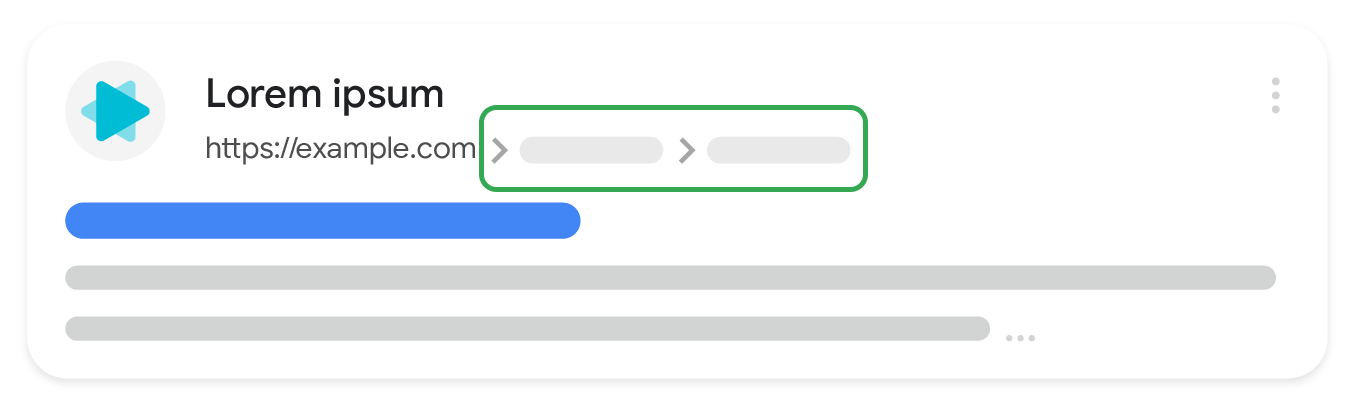
Bir sayfadaki breadcrumb izi, sayfanın site hiyerarşisindeki konumunu gösterir ve kullanıcıların bir siteyi etkili bir şekilde anlamasına ve keşfetmesine yardımcı olabilir. Bir kullanıcı, breadcrumb izindeki son breadcrumb’dan başlayarak site hiyerarşisinde her seferinde bir seviye yukarı doğru gezinebilir.

Özellik kullanılabilirliği
Bu özellik, Google Arama’nın kullanılabildiği tüm bölgelerde ve dillerde masaüstünde mevcuttur.
Yapılandırılmış veri nasıl eklenir
Yapılandırılmış veri, bir sayfa hakkında bilgi sağlamak ve sayfa içeriğini sınıflandırmak için kullanılan standart bir formattır. Yapılandırılmış veriler konusunda yeniyseniz, şunlar hakkında daha fazla bilgi edinebilirsiniz:
yapılandırılmış verilerin nasıl çalıştığı.
Yapılandırılmış verileri nasıl oluşturacağınız, test edeceğiniz ve yayınlayacağınızla ilgili bir genel bakış burada verilmiştir.
- Şunları ekleyin: gerekli özellikler. Kullandığınız formata göre, şunları nereye yapacağınızı öğrenin: sayfaya yapılandırılmış veri ekleme.
- Şunları takip edin: kılavuzlar.
- Kodunuzu şununla doğrulayın:
Zengin Sonuçlar Testi
ve kritik hataları düzeltin. Araçta işaretlenebilecek kritik olmayan sorunları da düzeltmeyi düşünün; çünkü bunlar yapılandırılmış verilerinizin kalitesini artırmaya yardımcı olabilir (ancak, zengin sonuçlara uygun olmak için bu gerekli değildir). - Yapılandırılmış verilerinizi içeren birkaç sayfayı dağıtın ve şunları kullanın: URL Denetleme aracı Google’ın sayfayı nasıl gördüğünü test etmek için. Sayfanızın Google tarafından erişilebilir olduğundan ve bir robots.txt dosyası,
noindexetiketi veya giriş gereksinimleri tarafından engellenmediğinden emin olun. Sayfa düzgün görünüyorsa,
Google’dan URL’lerinizi yeniden taramasını isteyebilirsiniz. - Google’ı gelecekteki değişikliklerden haberdar etmek için şunları yapmanızı öneririz:
site haritası gönderin. Bunu şununla otomatikleştirebilirsiniz:
Search Console Site Haritası API’si.
Örnekler
Google Arama, arama sonuçlarındaki bilgileri kategorize etmek için bir web sayfasının gövdesindeki breadcrumb işaretlemesini kullanır. Aşağıdaki kullanım örneklerinde gösterildiği gibi, kullanıcılar genellikle çok farklı türdeki arama sorgularından bir sayfaya ulaşabilirler. Her arama aynı web sayfasını döndürebilse de, breadcrumb içeriği Google Arama sorgusu bağlamında kategorize eder. Kurgusal bir kitap ödülünün kazananlarına ait sayfa, aşağıdaki breadcrumb izlerini kullanabilir:
Tek breadcrumb izi
Sayfaya giden yalnızca bir breadcrumb izi varsa, sayfa şu breadcrumb izini belirtebilir:
Kitaplar ›
Bilim Kurgu ›
Ödül Kazananlar
JSON-LD
İşte bu breadcrumb’ı desteklemek için JSON-LD formatında bir örnek:
RDFa
İşte bu breadcrumb’ı desteklemek için RDFa formatında bir örnek:
Microdata
İşte bu breadcrumb’ı desteklemek için Microdata formatında bir örnek:
HTML
İşte görsel tasarımın bir parçası olarak sayfa içindeki bir HTML breadcrumb bloğu örneği.
Birden fazla breadcrumb izi
Sitenizdeki bir sayfaya gitmenin birden fazla yolu varsa, tek bir sayfa için birden fazla breadcrumb izi belirtebilirsiniz. İşte ödüllü kitaplar sayfasına giden bir breadcrumb izi:
Kitaplar ›
Bilim Kurgu ›
Ödül Kazananlar
İşte aynı sayfaya giden başka bir breadcrumb izi:
Edebiyat ›
Ödül Kazananlar
JSON-LD
İşte birden fazla breadcrumb izini destekleyen örnek JSON-LD:
RDFa
İşte birden fazla breadcrumb izini destekleyen örnek RDFa:
Microdata
İşte birden fazla breadcrumb izini destekleyen örnek Microdata:
HTML
İşte görsel tasarımın bir parçası olarak sayfa içindeki bir HTML breadcrumb bloğu örneği.
Kılavuzlar
Google Arama’da breadcrumb’larla görünmeye uygun olmak için bu kılavuzları izlemelisiniz.
URL yapısını yansıtmak yerine, bir sayfaya giden tipik bir kullanıcı yolunu temsil eden breadcrumb’lar sağlamanızı öneririz. Üst düzey yol (sitenizin alan adı veya ana bilgisayar adı) için veya sayfanın kendisi için bir breadcrumb ListItem
eklemeniz gerekmez.
Yapılandırılmış veri türü tanımları
Breadcrumb’ları belirtmek için bir BreadcrumbList tanımlayın ve bu en az iki
ListItemiçermelidir. İçeriğinizin breadcrumb’larla görüntülenmeye uygun olması için gerekli özellikleri eklemelisiniz.
BreadcrumbList
BreadcrumbList listedeki tüm öğeleri tutan kapsayıcı öğedir. BreadcrumbList’in tam tanımı BreadcrumbList adresinde mevcuttur:
schema.org/BreadcrumbList. Google tarafından desteklenen özellikler şunlardır:
| Gerekli özellikler | |
|---|---|
itemListElement | Belirli bir sırada listelenen breadcrumb dizisi. Her breadcrumb’ı bir |
ListItem
ListItem listedeki bireysel bir öğe hakkında ayrıntılar içerir. ListItem’ın tam tanımı ListItem adresinde mevcuttur:
schema.org/ListItem. Google tarafından desteklenen özellikler şunlardır:
| Gerekli özellikler | |
|---|---|
item | alt türü. Breadcrumb’ı temsil eden web sayfasının URL’si. item’ı belirtmenin iki yolu vardır
Breadcrumb, breadcrumb izindeki son öğeyse, |
name | Kullanıcı için görüntülenen breadcrumb başlığı. Eğer |
position | Breadcrumb’ın breadcrumb izindeki konumu. 1. konum, izin başlangıcını ifade eder. |
Zengin sonuçları Search Console ile izleyin
Search Console, sayfalarınızın Google Arama’da nasıl performans gösterdiğini izlemenize yardımcı olan bir araçtır. Google Arama sonuçlarına dahil olmak için Search Console’a kaydolmanız gerekmez, ancak Google’ın sitenizi nasıl gördüğünü anlamanıza ve iyileştirmenize yardımcı olabilir. Search Console’u aşağıdaki durumlarda kontrol etmenizi öneririz:
- Yapılandırılmış verileri ilk kez dağıttıktan sonra
- Yeni şablonlar yayınladıktan veya kodunuzu güncelledikten sonra
- Trafiği periyodik olarak analiz etme
Yapılandırılmış verileri ilk kez dağıttıktan sonra
Google sayfalarınızı dizine ekledikten sonra, ilgili
Zengin sonuç durum raporukullanarak sorunları arayın. İdeal olarak, geçerli öğelerde bir artış ve geçersiz öğelerde bir artış olmayacaktır. Yapılandırılmış verilerinizde sorun bulursanız:
- Geçersiz öğeleri düzeltin.
- Canlı bir URL’yi inceleyin sorunun devam edip etmediğini kontrol etmek için.
- Doğrulama isteyin durum raporunu kullanarak.
Yeni şablonlar yayınladıktan veya kodunuzu güncelledikten sonra
Web sitenizde önemli değişiklikler yaptığınızda, yapılandırılmış veri geçersiz öğelerindeki artışları izleyin.
- Eğer bir geçersiz öğelerde artışgörürseniz, belki çalışmayan yeni bir şablon yayınladınız veya siteniz mevcut şablonla yeni ve kötü bir şekilde etkileşime giriyor olabilir.
- Eğer bir geçerli öğelerde azalma (geçersiz öğelerdeki bir artışla eşleşmeyen), belki artık sayfalarınıza yapılandırılmış veri yerleştirmiyorsunuzdur. Soruna neyin neden olduğunu öğrenmek için
URL Denetleme aracını kullanın.
Trafiği periyodik olarak analiz etme
Google Arama trafiğinizi şununla analiz edin: Performans Raporu. Veriler, sayfanızın Arama’da zengin sonuç olarak ne sıklıkla göründüğünü, kullanıcıların ona ne sıklıkla tıkladığını ve arama sonuçlarında göründüğünüz ortalama konumu gösterecektir. Bu sonuçları ayrıca şununla otomatik olarak çekebilirsiniz: Search Console API.
Sorun giderme
Yapılandırılmış verileri uygulamada veya hata ayıklamada sorun yaşıyorsanız, yardımcı olabilecek bazı kaynaklar şunlardır:
- Bir içerik yönetim sistemi (CMS) kullanıyorsanız veya sitenizle başka biri ilgileniyorsa, onlardan yardım isteyin. Sorunu detaylandıran tüm Search Console mesajlarını onlara ilettiğinizden emin olun.
- Google, yapılandırılmış verileri tüketen özelliklerin arama sonuçlarında görüneceğini garanti etmez. Google’ın içeriğinizi neden zengin sonuç olarak göstermeyebileceğine dair yaygın nedenlerin bir listesi için şuna bakın:
Genel Yapılandırılmış Veri Kılavuzları. - Yapılandırılmış verilerinizde bir hata olabilir. Şuna göz atın:
yapılandırılmış veri hataları listesi
ve Ayrıştırılamayan yapılandırılmış veri raporu. - Sayfanıza karşı yapılandırılmış veri manuel işlemi aldıysanız, sayfadaki yapılandırılmış veriler yoksayılacaktır (sayfa yine de Google Arama sonuçlarında görünebilir). Düzeltmek için
yapılandırılmış veri sorunları, şunları kullanın: Manuel İşlemler raporu. - Şunları gözden geçirin: kılavuzlar içeriğinizin kılavuzlara uygun olup olmadığını belirlemek için tekrar. Sorun, spam içerikli içerikten veya spam içerikli işaretleme kullanımından kaynaklanıyor olabilir. Ancak, sorun bir sözdizimi sorunu olmayabilir ve bu nedenle Zengin Sonuçlar Testi bu sorunları tanımlayamayacaktır.
- Eksik zengin sonuçları / toplam zengin sonuçlardaki düşüşü giderme.
- Yeniden tarama ve yeniden dizine ekleme için zaman tanıyın. Bir sayfa yayınlandıktan sonra Google’ın onu bulup taramasının birkaç gün sürebileceğini unutmayın. Tarama ve dizine ekleme ile ilgili genel sorular için şuna göz atın:
Google Arama tarama ve dizine ekleme SSS. - Şurada bir soru yayınlayın: Google Arama Merkezi forumu.
Biz bunu nasıl uyguluyoruz
Breadcrumb markup replaces the raw URL in results with a readable path. It is one of the cheapest visual improvements available and we add it to every client site with real hierarchy.
İlgili hizmetler