Çərşənbə, 25 aprel 2012-ci il
Veb-sayta qulluq edərkən veb-ustalar bütün veb-saytı və ya onun hissələrini yeni ünvana köçürməyə qərar verə bilərlər. Məsələn, siz məzmunu alt qovluqdan alt domenə və ya tamamilə yeni domenə köçürө bilərsiniz. Məzmununuzun yerini dəyişmək müəyyən səy tələb edə bilər, lakin bunu düzgün etməyə dəyər.

Axtarış sistemlərinə yeni sayt strukturunuzu daha yaxşı başa düşməyə kömək etmək və saytınızı daha istifadəçi dostu etmək üçün bu təlimatlara əməl etdiyinizə əmin olun:
- Köhnə məzmun ünvanınıza baş çəkən bütün istifadəçiləri və botları yeni məzmun ünvanına
301istiqamətləndirmələrdənistifadə edərək yönləndirmək vacibdir. İki ünvan arasındakı əlaqəni vurğulamaq üçün hər bir köhnə URL-in oxşar məzmunu yerləşdirən yeni URL-ə işarə etdiyinə əmin olun. Əgər301istiqamətləndirmələrdən
istifadə edə bilmirsinizsə, bunun əvəzinə axtarış sistemləri üçün
çarpaz domen kanoniklərindən - istifadə etməyi düşünə bilərsiniz.
Həm yeni, həm də köhnə ünvanın eyni Google Webmaster Tools hesabında
təsdiqləndiyini - yoxlayın.
Googlebot-un
Googlebot kimi gətirfunksiyasından istifadə edərək yeni ünvanın Googlebot tərəfindən tarana bilən olub-olmadığını yoxlayın. Google-un həqiqətən yeni ünvandakı məzmununuza daxil ola biləcəyindən əmin olmaq vacibdir. Həmçinin əmin olun ki, köhnə URL-lər robots.txt qadağan qaydası ilə bloklanmayıb ki, yönləndirmə və yarel=canonical - tapılsın.
Məzmununuzu tamamilə yeni domenə köçürürsünüzsə, dəyişiklik barədə bizə məlumat vermək üçün Google Webmaster Tools-da Sayt konfiqurasiyası altında
Ünvanın dəyişdirilməsi
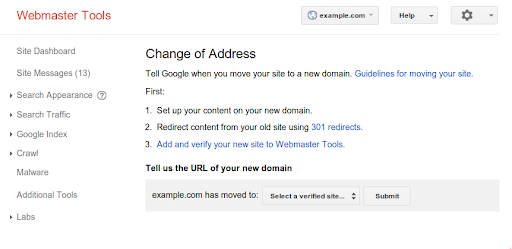
- seçimindən istifadə edin.
404Saytınızın URL strukturunu da dəyişmisinizsə,xəta səhifələri
ilə qarşılaşmadan orada naviqasiya etməyin mümkün olduğundan əmin olun. Google Webmaster Toolspotensial olaraq qırılmış keçidləri
araşdırmaqda faydalı ola bilər. Sadəcə yeni saytınız üçün
Tarama xətalarını - axtarın. Sayt xəritənizi (Sitemap)
- yoxlayın və onun yeniləndiyni təsdiqləyin.
301İstiqamətləndirmələriniziquraşdırdıqdan sonra, istifadəçilərin yeni səhifələrə yönləndirildiyini və təsadüfən qırılmış URL-lərdə bitmədiyini yoxlamaq üçün
404xəta səhifələrinizə
gələn istifadəçiləri izləyə bilərsiniz. İstifadəçi saytınızdakı xəta səhifəsinə gəldikdə, onların hansı URL-ə daxil olmağa çalışdığını, bu istifadəçinin niyə məzmununuzun yeni ünvanına yönləndirilmədiyini müəyyənləşdirməyə çalışın və sonra müvafiq olaraq404istiqamətləndirmə qaydalarınızda301dəyişikliklər edin. - Google Webmaster Tools-da
Saytınıza keçidlərə
baxın və məzmununuza keçid edən vacib saytları yeni ünvanınız barədə məlumatlandırın. - Saytınızın məzmunu müəyyən bir bölgəyə aiddirsə, Google Webmaster Tools-da yeni sayt strukturunuz üçün
coğrafi hədəfləmə
üstünlüklərini iki dəfə yoxlamaq istəyə bilərsiniz. - Ümumi bir qayda olaraq,
301istiqamətləndirmə və ya
rel="canonical". - göstərmədən tamamilə və ya əsasən eyni məzmuna malik iki tarana bilən saytın işlədilməsindən qaçınmağa çalışın.
Nəhayət, məzmununuzu yeni ünvana köçürərkən miqyaslı məzmun, URL strukturu və ya naviqasiya yeniləmələri kimi digər əsas dəyişiklikləri həyata keçirməməyi tövsiyə edirik. Bir anda çox şeyin dəyişdirilməsi istifadəçiləri və axtarış sistemlərini çaşdıra bilər.
Ümid edirik ki, bu təklifləri faydalı hesab edirsiniz. Əgər məzmununuzu yeni ünvana necə köçürmək barədə əlavə suallarınız varsa, sizi
Google Webmaster Kömək Forumumuza
Bunu necə tətbiq edirik
Google announcements age. We keep this post here for the record, and we note for clients whether the behaviour it describes still applies today or has since been superseded.
Əlaqəli xidmətlər