2008-09-01
Blog en chinois simplifié : Centre de messages : Tout tourne autour de votre site
Vous avez peut-être essayé nos
Outils pour les webmasters

pour une meilleure interaction avec Google et une meilleure gestion de votre propre site, mais avez-vous déjà remarqué le “Centre de messages” dans le coin supérieur droit du tableau de bord ? Depuis son lancement en juillet 2007, le Centre de messages est devenu un canal de plus en plus important pour Google afin de communiquer avec les webmasters concernant votre compte Outils pour les webmasters et les sites que vous gérez. Pour vous aider à mieux comprendre ce qu’est le Centre de messages, je voudrais ici en présenter davantage.
- Quel genre de messages les webmasters peuvent-ils recevoir du Centre de messages ? Actuellement, vous pouvez recevoir les types de messages suivants de la part de Google, qui peuvent vous rappeler à temps et vous aider à résoudre certains problèmes concernant les sites que vous possédez. Au fil du temps, nous utiliserons le Centre de messages comme canal de communication pour d’autres types d’informations.
Les webmasters peuvent recevoir une notification dans le Centre de messages si votre site enfreint lesconsignes aux webmasters
. Ilpourrait s’agir d’un problème de texte caché ou de liens cachés
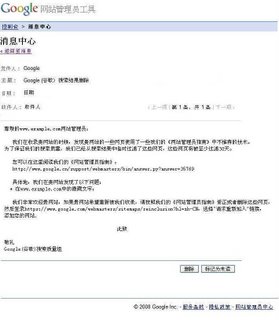
- “, ou une partie de vos sites a été piratée, ou d’autres problèmes qui vont à l’encontre des consignes aux webmasters de Google. Dans ce cas, nous pouvons envoyer un message détaillant certains problèmes que vous devez corriger pour mettre votre site en conformité avec nos consignes aux webmasters. Voici ci-dessous un exemple de message que nous envoyons aux webmasters qui ont un problème de texte caché sur leur site Web :Espace infini
” est un problème fréquent
auquel Googlebot est confronté lorsqu’il explore le Web. De nombreux liens générés dynamiquement avec peu ou pas de contenu unique consomment la bande passante et peuvent empêcher Googlebot d’indexer complètement le contenu réel de votre site. Google a récemment commencé à informer les propriétaires de sites si vous avez un problème d’”espace infini” ou d’autres problèmes liés à l’exploration. Inscrivez-vous aux Outils pour les webmasters et vérifiez le Centre de messages, vous saurez si Google vous a informé de ce problème ou de tout autre problème lors de l’exploration de vos sites. De plus, vous pouvez également trouver des exemples d’URL pour le problème potentiel joints au message, ce qui pourrait être utile pour votre dépannage. Pour plus d’informations, vous pouvez également vous référer à la
documentation sur les espaces infinis. - dans le
Centre d’aide pour les webmastersD’après notre précédent article sur
la demande de réexamen à l’aide des Outils pour les webmasters de Google, vous pourriez avoir une idée du moment et de la manière de soumettre une demande de réexamen à Google. Une fois que vous aurez soumis une demande, vous trouverez un message de Google dans le Centre de messages confirmant que nous l’avons reçu. Nous examinerons ensuite votre site pour vérifier sa conformité avec les consignes aux webmasters. Avant de soumettre une demande de réexamen, n’oubliez pas de vérifier si votre site est conforme aux consignes aux webmasters ou non.Que dois-je faire si je ne me suis pas inscrit aux Outils pour les webmasters de Google auparavant et que j’ai peut-être manqué un message que Google m’a envoyé ? Ne vous inquiétez pas. Depuis mars 2008, le Centre de messages a commencé à prendre en charge la
“message en attente”
fonctionnalité
pour les futurs propriétaires qui ne se sont pas inscrits auparavant aux Outils pour les webmasters de Google. Les messages envoyés après le lancement de cette fonctionnalité peuvent désormais être récupérés pendant un an et resteront dans votre compte. Dès que vous aurez vérifié votre propriété du site, vous pourrez accéder aux messages (s’il y en a), même s’ils ont été envoyés avant votre inscription.
La création d’un compte Outils pour les webmasters et la vérification de votre site vous donnent accès à tout message de Google et à une meilleure communication avec Google. Alors pourquoi ne pasréclamer votre site dans les Outils pour les webmasters
Comment nous l'appliquons
Google announcements age. We keep this post here for the record, and we note for clients whether the behaviour it describes still applies today or has since been superseded.
Services associés