Wednesday, December 21, 2011
As the team responsible for tens of thousands of Google’s informational web pages, the
Webmaster Team is here to
offer tips and advice based on their experiences as hands-on webmasters.
If you’ve never tested or analyzed usage of your website, ask yourself if you really know whether
your site is useful for your target audience. If you’re unsure, why not find out? For example, did
you know that on average users scroll down 5.9 times as often as they scroll up, meaning that
often once page content is scrolled past, it is “lost?”
(See Jakob Nielsen’s findings on scrolling,
where he advises that users don’t mind scrolling, but within limits.)
Also, check your analytics—are you curious about high bounce rates from any of your pages,
or very short time-on-page metrics?
First, think about your user
The start of a web project—whether it’s completely new or a revamp of an existing
site—is a great time to ask questions like:
- How might users access your site—home, office, on-the-go?
- How tech-savvy are your visitors?
- How familiar are users with the subject matter of your website?
The answers to some of these questions can be valuable when making initial design decisions.
For instance, if the user is likely to be on the road, they might be short on time to find the
information they need from your site, or be in a distracting environment and have a slow data
connection—so a simple layout with single purpose would work best. Additionally, if you’re
providing content for a less technical audience, make sure it’s not too difficult to access
content—animation might provide a “wow” factor, but only if your user appreciates it and
it’s not too difficult to get to the content.
Even without testing, building a basic user profile (or
“persona“)
can help shape your designs for the benefit of the user—this doesn’t have to be an
exhaustive biography, but just some basic considerations of your user’s behavior patterns.
Simple testing
Testing doesn’t have to be a costly operation – friends and family can be a great resource. Some
pointers:
- Sample size: Just five people can be a large enough number of users to find
common problems in your layouts and navigation
(see Jakob Nielsen’s article on why using a small sample size is sufficient). - Choosing your testers: A range of different technical ability can be useful,
but be sure to only focus on trends—for example, if more than 50% of your testers have
the same usability issue, it’s likely a real problem—rather than individual issues
encountered. - Testing location: If possible, visit the user in their home and watch how they
use the site—observe how they normally navigate the web when relaxed and in their natural
environment. Remote testing is also a possibility if you can’t make it in person—we’ve
heard that Google+ hangouts can be used effectively for this
(find out more about using Google+ hangouts). - How to test: Based on your site’s goals, define 4 or 5 simple tasks to do on
your website, and let the user try to complete the tasks. Ask your testers to speak aloud so
you can better understand their experiences and thought processes. - What to test: Basic prototypes in clickable image or document format (for
example, PDF) or HTML can be used to test the basic interactions, without having to build out a
full site for testing. This way, you can test out different options for navigation and layouts
to see how they perform before implementing them. - What not to test: Focus on functionality rather than graphic design elements;
viewpoints are often subjective. You would only get useful feedback on design from quantitative
testing with large (200+) numbers of users (unless, for example, the colors you use on your
site make the content unreadable, which would be good feedback!). One format for getting some
useful feedback on the design can be to offer 5-6 descriptive keywords and ask your user to
choose the most representative ones.
Overall, basic testing is most useful for seeing how your website’s functionality is
working—the ease of finding information and common site interactions.
Lessons learned
In case you’re still wondering whether it’s really worth research and testing, here are a few
simple things we confirmed from actual users that we wouldn’t have known if we hadn’t sat with
actual users and watched them use our pages, or analyzed our web traffic.
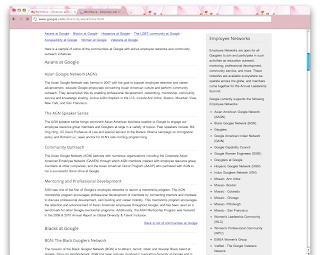
Take care when using layouts that hide/show content: We found when using
scripts to expand and collapse long text passages, the user often didn’t realize the extra
content was available—effectively “hiding” the JavaScript-rendered content when the user
searches within the page (for example, using Control + F, which we’ve seen often).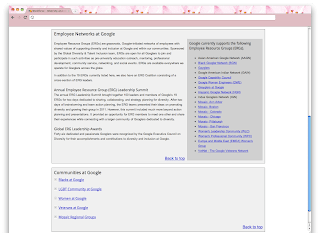
- Check your language: Headings, link and button text are what catches the user’s
eye the most when scanning the page. Avoid using “Learn more…” in link text—users seem
averse to clicking on a link which implies they will need to learn something. Instead, just try
to use a literal description of what content the user will get behind the link—and make
sure link text makes sense and is easy to understand out of context, because that is often how
it will be scanned. Be mindful about language and try to make button text descriptive,
inviting and interesting. - Test pages on a slower connection: Try out your pages using different networks
(for example, try browsing your website using the wifi at your local coffee shop or a friend’s
house), especially if your target users are likely to be viewing your pages from a home
connection that’s not as fast as your office network. We found a considerable improvement in CTR
and time-on-site metrics in some cases when we made scripted animations much simpler and faster
(hint: use Google’s
Page Speed Online
to check performance if you don’t have access to a slower Internet connection).
So if you’re caught up in a seemingly never-ending redevelopment cycle, save yourself some time in
the future by investing a little up front through user profiling and basic testing, so that you’re
more likely to choose the right approach for your site layout and architecture.
We’d love to hear from you in the comments: have you tried out website usability testing? If so,
how did you get on, and what are your favorite simple and low-cost tricks to get the most out of
it?
How we apply this
We archive Search Central announcements because client questions often trace back to a change that was announced years ago. Reading the original is faster than reconstructing it from second-hand summaries.
Related services