Пятница, 14 декабря 2007 г.
Последняя версия
Google Toolbar для Internet Explorer (бета)
только что добавила удобную функцию, помогающую пользователям попасть на ваш сайт или хотя бы увидеть ваш контент, даже когда что-то идет не так.
Для пользователей неприятно вводить URL с ошибкой и получать стандартную страницу
404 - Не найдено или пытаться получить доступ к разделу вашего сайта, который может быть недоступен.
Независимо от того, является ли ваш сайт
полезным и информативным, при возникновении таких проблем большинство пользователей просто переходят к чему-то другому. Однако последняя версия Google Toolbar помогает пользователям, обнаруживая проблемы на сайте и предлагая альтернативы.
Сайт Optimizer или Сайт Optimiser? Панель инструментов поможет вам найти его, даже если вы попытаетесь ввести “google.cmo” вместо “google.com”.
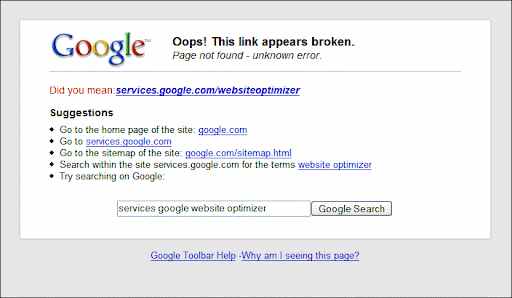
3 проблемы сайта, обнаруженные Google Toolbar
404ошибки со страницами ошибок по умолчанию: когда посетитель пытается получить доступ к вашему контенту по недействительному URL, а ваш сервер возвращает короткое сообщение об ошибке по умолчанию (менее 512 байт), Панель инструментов предложит посетителю альтернативный URL. Если это общая проблема на вашем сайте, вы также увидите эти URL в разделе ошибок сканирования вашей учетной записи Webmaster Tools.
Если вы решите настроить пользовательскую страницу ошибки, убедитесь, что она возвращает код результата404. Содержимое404страницы может помочь вашим посетителям понять, что они попытались перейти на несуществующую страницу, и предлагает варианты поиска нужного контента. Когда сайт отображает пользовательскую страницу ошибки, Панель инструментов больше не будет предлагать варианты для этого сайта. Вы можете проверить работу Панели инструментов, посетив недействительный URL на своем сайте с установленной Google Toolbar.- Ошибки DNS: когда URL содержит несуществующее доменное имя (например, www.google.cmo), Панель инструментов предложит альтернативный, похожий URL с действующим доменным именем.
- Сбои подключения: когда ваш сервер недоступен, Google Toolbar автоматически отобразит ссылку на кэшированную версию вашей страницы. Эта функция доступна только в том случае, если Google прямо не запрещено кэшировать ваши страницы с помощью
robotsмета-тега
или если сканирование страницы заблокировано с помощью файла
robots.txt. Если ваш сервер регулярно недоступен, вероятно, сначала стоит исправить это; но также может быть полезно проверить кэш Google для ваших страниц, просмотрев результаты поиска по вашему сайту.
Предложения, предоставляемые Google Toolbar
При обнаружении одной из вышеуказанных ситуаций Панель инструментов попытается найти наиболее полезные ссылки для пользователя. Это может включать:
- Ссылка на исправленный URL: когда Панель инструментов может найти наиболее вероятный активный URL, соответствующий введенному пользователем запросу (или ссылке, по которой он кликнул), она отобразит его прямо вверху в качестве предложения. Исправление может находиться в доменном имени, пути или имени файла (Панель инструментов не анализирует никакие параметры в URL).
- Ссылка на кэшированную версию URL: когда Панель инструментов распознает URL в кэше Google, она отображает ссылку на кэшированную версию. Это особенно полезно, когда пользователь по какой-то причине не может получить доступ к вашим страницам. Как упоминалось выше, Google может кэшировать ваши URL при условии, что вы явно не запрещаете это с помощью
robotsмета-тега или файла
robots.txt. - .Ссылка на главную страницу или карту сайта HTML
: иногда переход на главную страницу или страницу карты сайта HTML — лучший способ найти страницу, которую пользователь действительно ищет. Страницы карт сайтов HTML (это нефайлы XML Sitemap - ) обычно распознаются по имени файла; если Панель инструментов может найти что-то с названием “sitemap” или аналогичным, эта страница, вероятно, будет распознана как страница карты сайта HTML. Не беспокойтесь, если ваша страница карты сайта HTML называется как-то иначе; если пользователь решит перейти на вашу главную страницу, он, скорее всего, сразу ее найдет, даже если Панель инструментов ее не заметит.Ссылка на папку более высокого уровня
- : иногда главная страница или страница карты сайта HTML находятся слишком далеко, и пользователю было бы лучше просто подняться на один шаг вверх по иерархии. Когда Панель инструментов может распознать, что структура вашего сайта основана на папках и подпапках, она может предложить страницу на шаг назад.Поиск по вашему сайту ключевых слов, найденных в URL
: хорошей практикой является использование описательных URL. Если Панель инструментов может распознать ключевые слова в URL, к которому пользователь пытался получить доступ, она создаст ссылку на поиск по сайту с этими ключевыми словами. Даже если за это время URL существенно изменился, поиск сможет найти похожий контент на основе этих ключевых слов. Например, если URL был
https://example.com/party-gifts/holidays/она предложит поиск слов ““,
“partygifts” и “holidays
" на сайте. - example.comОткрытая строка поиска Google
: если ничего не помогает, всегда есть вероятность, что аналогичный контент уже существует в другом месте сети. Веб-поиск Google может помочь вашим пользователям найти его — Панель инструментов поможет вам, добавив ключевые слова, найденные в URL, в строку поиска.
Уже заинтересовались?
Скачайте Google Toolbar
для своего браузера и попробуйте его на своем сайте!
Чтобы обсудить, как эта функция может помочь посетителям вашего сайта, присоединяйтесь к нашейгруппе помощи Google Вебмастерам
; или по общим вопросам о Google Toolbar обращайтесь в
группу Toolbar для Internet Explorer
или.
Как мы это применяем
We archive Search Central announcements because client questions often trace back to a change that was announced years ago. Reading the original is faster than reconstructing it from second-hand summaries.
Связанные услуги