Четверг, 2 мая 2019 г.
В нашей
предыдущей статье
из серии о структурированных данных мы рассказали, что такое структурированные данные и зачем их добавлять на свой сайт. Мы привержены структурированным данным и продолжаем совершенствовать связанные с ними функции Поиска и улучшать наши инструменты — именно поэтому мы
создаем решения
которые помогают веб-мастерам и разработчикам внедрять структурированные данные и проводить их диагностику.
В этой статье основное внимание уделяется тому, что вы можете сделать с помощью Search Console для мониторинга структурированных данных вашего сайта и извлечения из них максимальной пользы. Кроме того, у нас появились новые функции, которые помогут вам еще больше. Ниже приведены новые дополнения, читайте дальше, чтобы узнать о них больше.
- Неразбираемые структурированные данные — это новый отчет, в котором собраны ошибки синтаксиса структурированных данных.
- Новые отчеты об улучшениях для
поисковой строки для ссылок на сайт
и
логотипа.
Мониторинг общей производительности структурированных данных
Каждый раз, когда Search Console обнаруживает новую проблему, связанную со структурированными данными на веб-сайте, мы отправляем письмо владельцам аккаунта, но если существующая проблема усугубляется, это не вызывает отправку письма, поэтому вам по-прежнему важно периодически проверять свой аккаунт.
Это не то, что вам нужно делать каждый день, но мы рекомендуем проверять это время от времени, чтобы убедиться, что все работает должным образом. Если процесс разработки вашего сайта имеет определенные циклы, хорошей практикой может быть вход в Search Console после внесения изменений на сайт для мониторинга вашей производительности.
Если вы хотите получить общее представление обо всех ошибках для определенной функции структурированных данных на вашем сайте, вы можете перейти в меню «Улучшения» на левой боковой панели и нажать на нужную функцию. Вы найдете сводку всех ошибок и предупреждений, а также действительных элементов.
Как упоминалось выше, мы добавили новый набор отчетов, чтобы помочь вам разобраться с большим количеством типов структурированных данных на вашем сайте:
поисковая строка для ссылок на сайт
и
логотип. Они присоединяются к уже существующему набору отчетов по рецептам, мероприятиям, вакансиям и другим объектам. Подробнее об отчетах читайте в
Справочном центре Search Console.
Вот пример отчета об улучшении. Обратите внимание, что вы можете видеть только те улучшения, которые были обнаружены на ваших страницах. Отчет помогает вам выполнять следующие действия:
- Просмотр тенденций ошибок, предупреждений и действительных элементов: чтобы просмотреть каждую проблему статуса отдельно, нажмите на цветные блоки над гистограммой.
- Просмотр предупреждений и ошибок по страницам: чтобы увидеть примеры страниц, на которые в настоящее время влияют проблемы, нажмите на определенную строку под гистограммой.

Мы также рады запустить отчет «Неразбираемые структурированные данные», в котором собраны проблемы синтаксического анализа, такие как ошибки синтаксиса структурированных данных, помешавшие Google определить тип функции. Именно по этой причине эти проблемы собраны здесь, а не в отчете о конкретной предполагаемой функции.
Проверьте этот отчет, чтобы узнать, не смог ли Google проанализировать какие-либо структурированные данные, которые вы пытались добавить на свой сайт. Проблемы с синтаксическим анализом могут указать на упущенные возможности для получения расширенных результатов для вашего сайта. Ниже приведен скриншот, показывающий, как выглядит отчет. Вы можете
получить прямой доступ к отчету
и прочитать о нем подробнее в
нашем справочном центре.

Тестирование структурированных данных на уровне URL
Чтобы убедиться, что ваши страницы были обработаны правильно и имеют право на появление в расширенных результатах, или чтобы диагностировать, почему некоторые расширенные результаты не отображаются для конкретного URL, вы можете использовать
инструмент проверки URL. Этот инструмент помогает понять области для улучшения на уровне URL и дает представление о том, на чем следует сосредоточиться.
Когда вы вставляете URL в поле поиска в верхней части Search Console, вы можете найти то, что работает правильно, а также предупреждения или ошибки, связанные со структурированными данными, в разделе улучшений, как показано ниже для рецептов.
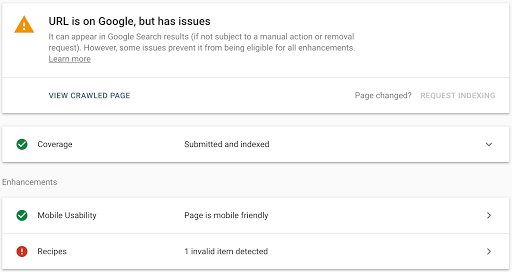
На скриншоте выше есть ошибка, связанная с рецептами. Если вы нажмете «Рецепты», появится информация об ошибке, и вы сможете нажать на значок небольшой диаграммы справа от ошибки, чтобы узнать о ней больше.
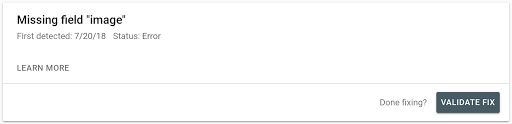
Как только вы разберетесь с ошибкой и исправите ее, вы можете нажать «Подтвердить исправление» (см. скриншот ниже), чтобы Google мог начать проверку того, действительно ли проблема устранена. Когда вы нажимаете кнопку «Подтвердить исправление», Google запускает несколько мгновенных тестов. Если ваши страницы не проходят этот тест, Search Console отправляет вам немедленное уведомление. В противном случае Search Console повторно обрабатывает остальные затронутые страницы.
Мы будем рады услышать ваши отзывы о том, как Search Console помогла вам и как она может помочь вам еще больше со структурированными данными. Отправьте нам отзыв через
Twitter или
форум веб-мастеров.
Как мы это применяем
Google announcements age. We keep this post here for the record, and we note for clients whether the behaviour it describes still applies today or has since been superseded.
Связанные услуги