Понедельник, 12 марта 2012 г.
Ошибки сканирования — одна из самых популярных функций в Webmaster Tools, и сегодня мы выпускаем очень важные улучшения, которые сделают ее еще более полезной.
Теперь мы обнаруживаем и сообщаем о множестве новых типов ошибок. Чтобы помочь разобраться в новых данных, мы разделили ошибки на две части: ошибки сайта и ошибки URL.
Ошибки сайта
Ошибки сайта — это ошибки, которые не относятся к конкретному URL, они затрагивают весь ваш сайт. К ним относятся сбои разрешения DNS, проблемы с подключением к вашему веб-серверу и проблемы с получением файла robots.txt. Раньше мы сообщали об этих ошибках по URL, но это не имело особого смысла, поскольку они не относятся к отдельным URL — на самом деле они даже мешают Googlebot запрашивать URL! Вместо этого мы теперь отслеживаем частоту сбоев для каждого типа ошибок на уровне сайта. Мы также постараемся отправлять вам уведомления, когда эти ошибки становятся достаточно частыми, чтобы требовать внимания.
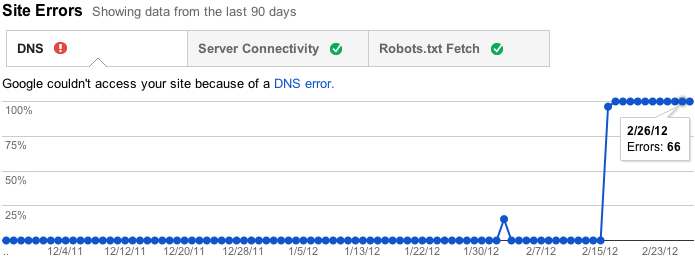
Кроме того, если у вас нет (и недавно не было) проблем в этих областях, как это бывает на многих сайтах, мы не будем беспокоить вас этим разделом. Вместо этого мы просто покажем вам несколько дружелюбных галочек, чтобы вы знали, что все в порядке.

Ошибки URL
Ошибки URL — это ошибки, которые относятся к конкретной странице. Это означает, что когда Googlebot попытался просканировать URL, он смог разрешить ваш DNS, подключиться к вашему серверу, получить и прочитать ваш файл robots.txt, а затем запросить этот URL, но после этого что-то пошло не так. Мы разбиваем ошибки URL на различные категории в зависимости от того, что стало причиной ошибки. Если ваш сайт предоставляет данные Google News или мобильные данные (CHTML/XHTML), мы покажем для них отдельные категории.

Меньше значит больше
Раньше мы показывали вам максимум 100 000 ошибок каждого типа. Попытка усвоить всю эту информацию была похожа на питье из пожарного гидранта, и у вас не было возможности узнать, какие из этих ошибок были важными (ваша главная страница не работает) или менее важными (на чьем-то личном сайте была опечатка в ссылке на ваш сайт). Не было реального способа просмотреть все 100 000 ошибок — никакого способа отсортировать, выполнить поиск или отметить свой прогресс. В новой версии этой функции мы сосредоточились на том, чтобы сразу предоставить вам только самые важные ошибки. Для каждой категории мы предоставим то, что, по нашему мнению, является 1000 наиболее важных и действенных ошибок. Вы можете сортировать и фильтровать эти 1000 лучших ошибок, сообщать нам, когда вы думаете, что исправили их, и просматривать подробную информацию о них.

На некоторых сайтах более 1000 ошибок определенного типа, поэтому вы все равно сможете видеть общее количество ошибок каждого типа, а также график с историческими данными за последние 90 дней. Для тех, кто беспокоится, что 1000 деталей ошибок плюс общие агрегированные данные будут недостаточны, мы рассматриваем возможность добавления программного доступа (API), позволяющего загрузить каждую последнюю ошибку, которая у вас есть, поэтому, пожалуйста, оставляйте свои отзывы, если вам нужно больше.
Мы также удалили список страниц, заблокированных robots.txt, потому что, хотя они иногда могут быть полезны для диагностики проблемы с вашим файлом robots.txt, они часто представляют собой страницы, которые вы
намеренно заблокировали. Мы очень хотели сосредоточиться на ошибках, поэтому следите за появлением информации об URL, заблокированных роботами, в функции «Доступ сканера» в разделе «Конфигурация сайта».
Погрузитесь в детали
Нажатие на отдельный URL с ошибкой из основного списка открывает панель сведений с дополнительной информацией, включая время последней попытки сканирования URL, время первого обнаружения проблемы и краткое описание ошибки.
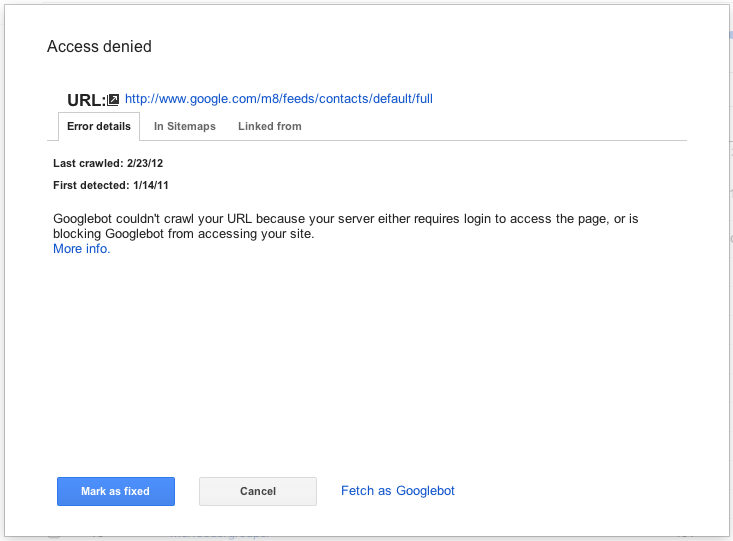
На панели сведений вы можете нажать на ссылку URL, вызвавшего ошибку, чтобы самостоятельно посмотреть, что происходит при попытке ее посетить. Вы также можете отметить ошибку как «исправленную» (подробнее об этом позже!), просмотреть справочный контент для этого типа ошибки, перечислить файлы Sitemap, содержащие этот URL, посмотреть другие страницы, ссылающиеся на этот URL, и даже заставить Googlebot получить этот URL прямо сейчас, либо для получения дополнительной информации, либо для того, чтобы дважды проверить, сработало ли ваше исправление.

Примите меры!
Одна вещь, которая нам действительно нравится в этой новой версии функции ошибок сканирования, заключается в том, что вы можете сосредоточиться на исправлении в первую очередь самого важного. Мы ранжировали ошибки так, чтобы те, что находятся вверху списка приоритетов, были связаны с тем, что вы можете сделать, будь то исправление битых ссылок на вашем собственном сайте, исправление ошибок в программном обеспечении сервера, обновление файлов sitemaps для удаления неактуальных URL или добавление 301 перенаправления
, чтобы направить пользователей на «настоящую» страницу. Мы определяем это на основе множества факторов, включая то, включили ли вы URL в Sitemap, с какого количества мест на него ссылаются (и есть ли среди них ссылки с вашего сайта), а также получал ли URL трафик из поиска в последнее время.
Как только вы решите, что исправили проблему (вы можете проверить исправление, получив URL как Googlebot), вы можете сообщить нам об этом, отметив ошибку как «исправленную», если вы являетесьпользователем с полными правами доступа

. Это удалит ошибку из вашего списка. В будущем ошибки, отмеченные как исправленные, не будут включаться в список главных ошибок, если только мы не столкнемся с той же ошибкой при попытке повторного сканирования URL.
Мы проделали большую работу над новой функцией ошибок сканирования, поэтому надеемся, что она окажется для вас очень полезной. Дайте нам знать, что вы думаете, и если у вас есть какие-либо предложения, пожалуйста, посетите наш!
Как мы это применяем
Google announcements age. We keep this post here for the record, and we note for clients whether the behaviour it describes still applies today or has since been superseded.
Связанные услуги