Пятница, 6 августа 2010 г.
Изменения могут происходить — иногда, как мы видели в нашей
предыдущей публикации об удалении URL, вы можете полностью заблокировать или удалить страницу со своего сайта. В других случаях вы можете изменить только часть страницы или удалить определенные фрагменты текста. В зависимости от того, как часто страница сканируется, может пройти некоторое время, прежде чем эти изменения отразятся в наших результатах поиска. В этом блоге мы рассмотрим шаги, которые вы можете предпринять, если мы все еще показываем старый, удаленный контент в результатах поиска — либо в виде «сниппета», либо на кэшированной странице, на которую ведет ссылка из результата поиска. Это имеет смысл, когда старый контент содержит конфиденциальную информацию, которую нужно быстро удалить; это не требуется при обычной плановой поддержке сайта.
В качестве примера рассмотрим следующий вымышленный результат поиска:
| Walter E. Coyote | < Title |
Chief Development Officer at Acme Corp 1948-2003: worked on the top | < Snippet |
| www.example.com/about/waltercoyote – Cached | < URL + link to cached page |
Чтобы изменить контент, отображаемый в сниппете (или на связанной кэшированной странице),
вам сначала нужно изменить контент на самой странице (в реальном времени). Если общедоступный контент страницы не изменится, автоматические системы Google будут продолжать показывать части исходного контента в результатах поиска.
После изменения контента страницы вы можете использовать несколько способов, чтобы эти изменения стали видны в результатах поиска:
Дождитесь, пока Googlebot повторно просканирует и проиндексирует страницу: это стандартный способ обновления большинства материалов в Google. Иногда это может занять довольно много времени в зависимости от того, как часто Googlebot сканирует данную страницу в настоящее время. После повторного сканирования и индексации старый контент обычно перестает быть видимым, так как заменяется актуальным. Если для Googlebot не заблокировано сканирование страницы (ни через файл robots.txt, ни из-за проблем с доступом к серверу), вам не нужно предпринимать никаких дополнительных действий. Как правило, ускорить сканирование и индексирование невозможно, поскольку эти процессы полностью автоматизированы и зависят от множества внешних факторов.
Используйте
общедоступный инструмент удаления URL от Google
, чтобы запросить удаление контента, который был удален с чужой веб-страницы. С помощью этого инструмента необходимо указать
точный URL страницы
, которая была изменена, выбрать вариант «Контент удален со страницы», а затем указать одно или несколько слов, которые были полностью удалены с этой страницы.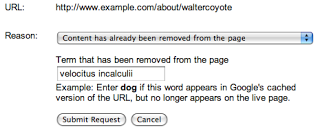
Обратите внимание: ни одно из введенных вами слов не должно присутствовать на странице. Даже если слово было удалено из одной части страницы, ваш запрос будет отклонен, если это слово все еще встречается в другой ее части. Обязательно выберите слово (или слова), которые больше
нигде не появляются на странице. Если в примере выше вы удалили“top secret velocitus incalculii capturing device”, вам следует отправить именно эти слова, а не что-то вроде «мой проект». Однако, если слово“top”или“device”все еще присутствует на странице, запрос будет отклонен. Чтобы повысить шансы на успех, проще всего указать одно слово, в отсутствии которого на странице вы абсолютно уверены.После обработки вашего запроса и подтверждения того, что указанные слова больше не появляются на странице, в результатах поиска больше не будет отображаться сниппет, а кэшированная страница станет недоступна. Заголовок и URL страницы по-прежнему будут видны, а сама запись может появляться в результатах поиска по запросам, связанным с удаленным контентом (например, по запросам
velocitus incalculii), даже если эти слова больше не отображаются в сниппете. Однако после того, как страница будет повторно просканирована и проиндексирована, в наших результатах поиска появятся новые сниппет и кэшированная страница.Имейте в виду, что нам потребуется проверить удаление слова (слов) путем просмотра страницы. Если страница больше не существует и сервер возвращает правильный
404или410код результата HTTP,
из-за чего мы не можем просмотреть страницу, вам, возможно, лучше
запросить полное удаление страницы- .
Используйте инструмент удаления URL в Инструментах для веб-мастеров Google, чтобызапросить удаление информации со страницы вашего сайта
. Если у вас есть доступ к данному сайту и вы подтвердили права на него вИнструментах для веб-мастеров Google
, вы можете использовать там инструмент удаления URL (в разделе > Конфигурация сайтаДоступ для сканеров
), чтобы запросить удаление сниппета и кэшированной страницы до того, как страница будет просканирована заново. Для использования этого инструмента вам нужно лишь отправить
точный URL страницы

(указывать удаленные слова не потребуется). После обработки запроса мы удалим сниппет и кэшированную страницу из результатов поиска. Заголовок и URL страницы останутся видны, а страница также может продолжить ранжироваться в результатах поиска по запросам, связанным с удаленным контентом. После повторного сканирования и индексации страницы в результатах поиска появится обновленный сниппет и кэшированная страница (на основе нового контента).
Google индексирует и ранжирует материалы не только на основе содержимого страницы, но и на основе других внешних факторов, таких как входящие ссылки на URL. Из-за этого URL может продолжать появляться в результатах поиска по контенту, которого больше нет на странице, даже после повторного сканирования и индексации. Хотя инструмент удаления URL позволяет убрать сниппет и кэшированную страницу из результатов поиска, он не изменит и не удалит заголовок результата поиска, не изменит отображаемый URL и не помешает странице показываться по запросам на основе текущего или предыдущего контента. Если это для вас важно, убедитесь, что URL отвечает требованиям для.
полного удаления из наших результатов поиска
. 404 Удаление контента, отличного от HTML
Если измененный контент не представлен в формате (X)HTML (например, если было изменено изображение, файл Flash или PDF), вы не сможете использовать инструмент удаления кэша. Поэтому, если вам важно, чтобы старый контент больше не отображался в результатах поиска, самым быстрым решением будет изменить URL файла так, чтобы старый URL возвращалкод результата HTTP, и использовать инструмент удаления URL для удаления старого URL
. В противном случае, если вы решите позволить Google обновлять информацию естественным путем, учтите, что предварительный просмотр контента, отличного от HTML (например,
ссылки быстрого просмотра для файлов PDF
), после повторного сканирования может обновляться дольше, чем обычные страницы HTML. Проактивное предотвращение появления сниппетов или кэшированных версий
Как веб-мастер, вы можете использовать
мета теги
robots, чтобы проактивно предотвращать появление сниппетов или кэшированных версий без использования наших инструментов удаления. Хотя мы не рекомендуем это в качестве основного подхода (сниппет помогает пользователям быстрее находить релевантный результат поиска, а кэшированная страница позволяет просматривать ваш контент даже в непредвиденных случаях недоступности сервера), вы можете использовать мета тег robots «nosnippet», чтобы
запретить показ сниппета
, или метатег robots «noarchive», чтобы отключить кэширование страницы. Обратите внимание: если это изменяется на существующих и известных страницах, Googlebot потребуется заново просканировать и проиндексировать их, прежде чем изменения станут заметны в результатах поиска. Мы надеемся, что эта статья в блоге поможет лучше понять некоторые процессы, лежащие в основе инструмента удаления URL для обновленных страниц. В нашей следующей статье мы расскажем о том, как запрашивать удаление контента, владельцем которого вы не являетесь; следите за обновлениями! Как всегда, мы будем рады вашим отзывам и вопросам в нашем
Справочный форум веб-мастеров.
Другие публикации этой серии
- Часть I: Удаление URL и директорий
- Часть II: Удаление и обновление кэшированного контента
- Часть III: Удаление контента, который вам не принадлежит
- Часть IV: Отслеживание запросов, что не следует удалять
Наконец, вам также может быть интересно почитать о
управлении информацией о вас, доступной в сети.
Как мы это применяем
We archive Search Central announcements because client questions often trace back to a change that was announced years ago. Reading the original is faster than reconstructing it from second-hand summaries.
Связанные услуги